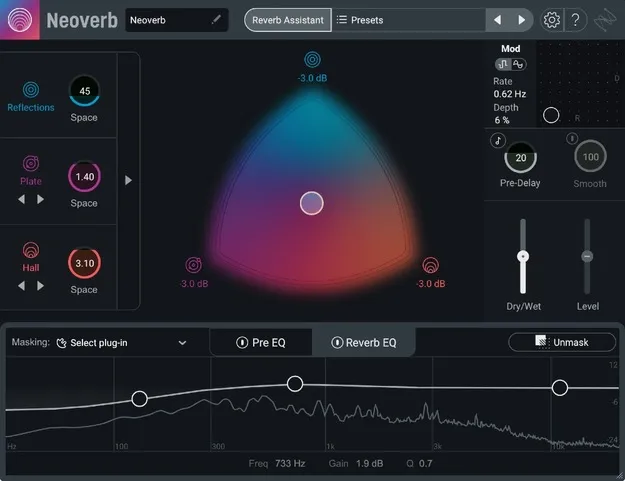
Neoverb reverb plugin by iZotope interface with Blend Pad and Reverb Assistant

Neoverb: AI-Assisted Reverb Plugin by iZotope Free Download

Rated 4.7/5 on Plugin Boutique (1,645 ratings)

Neoverb is a reverb plugin from iZotope for Windows and macOS that blends up to three reverb types and uses AI-powered EQ to help reverbs sit cleanly in a mix.

VST3VST2AUWindowsmacOS64-bit
AVAILABLE ATPlugin Boutique
Free trial available from the developer
01Overview

Neoverb is built on Exponential Audio reverb engines, which iZotope says are modeled on classic studio hardware. Its Blend Pad lets you combine up to three reverb types, and its Reverb Assistant adjusts settings in real time as you move a few controls. Built-in EQ sections listen to the incoming audio to suggest cuts and unmask the dry signal, so the reverb is less likely to muddy the mix. Neoverb is available in VST3, VST2 and AU formats and includes a trial.

Best for

  • Vocal reverb
  • Guitar ambience
  • Drum room sounds
  • Mix cleanup
  • Automated reverb transitions
Developer
iZotope
Category
Reverbs
Store
Plugin Boutique
02Key features

What you get

  • Blend Pad mixing Reflections, Plate and Hall reverb types
  • Separate Size control for each reverb type
  • Automatable blend for changing reverb mix over time
  • Reverb Assistant with four-step guided workflow
  • Four Tone options for dark, airy and bright reverbs
  • Three-band Pre EQ with Auto Cut suggestions
  • Reverb EQ with Masking Meter and Unmask function
  • Advanced Panel with per-engine parameters
03In depth

Blend Pad and Reverb Assistant Workflow

The Blend Pad mixes Reflections, Plate and Hall reverb types in one plugin. Each type has its own Size control, so you can build a short room for drums or a long, dense tail for guitars. The Blend Pad can be automated in your DAW to change the reverb mix over the course of a song.

The Reverb Assistant works through a four-step flow. You choose a Size and Style, and the plugin selects and blends reverb combinations and advanced settings for you. Four Tone options (dark, airy, bright and similar) adjust the result further.
Pre EQ and Reverb EQ for Mix Control

Neoverb includes a three-band Pre EQ before the reverb to clean the input signal and reduce build-up in the wet signal. Auto Cut suggests areas to cut, and you can add shelving and band filters manually.

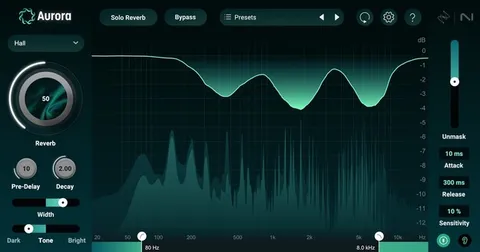
The Reverb EQ includes a Masking Meter and an Unmask function that analyzes the dry signal. iZotope says this helps keep the reverb clean without long corrective plugin chains. The Advanced Panel offers per-engine parameters such as Attack, Crossover and Damping for more detailed control.

04Specs

Will it run?

Formats, systems and requirements as listed by Plugin Boutique. Missing details are left out, not guessed.

DeveloperiZotope
TypePlugin
CategoryReverb
FormatsVST3, VST2, AU
Operating systemsWindows, macOS
Architecture64-bit
Free trialYes
05Upgrades

Upgrade and crossgrade options

06FAQ

Questions, answered

What formats does Neoverb support?

Neoverb is available in VST3, VST2 and AU formats. All plugin formats are 64-bit only.

Which operating systems does Neoverb run on?

Neoverb runs on Windows 10 and Windows 11, and on macOS Catalina (10.15.7), Big Sur (11.7.x), Monterey (12.6.x) and Ventura (13.4.x). Mac support covers Intel and Apple silicon Macs, the latter in Rosetta 2 and native modes.

What do I need to use Neoverb?

Neoverb runs as a plugin inside a compatible DAW. The listed hosts include Logic Pro, Live 9.7 to 11, Cubase 9.5 to 10.5, Pro Tools 12 to 2022, FL Studio 20, Studio One 5, REAPER 6, Reason, Bitwig Studio 4 and Digital Performer 11.

Does Neoverb have a trial?

Yes, Neoverb offers a trial version.

08Developer

More from iZotope

All iZotope products →