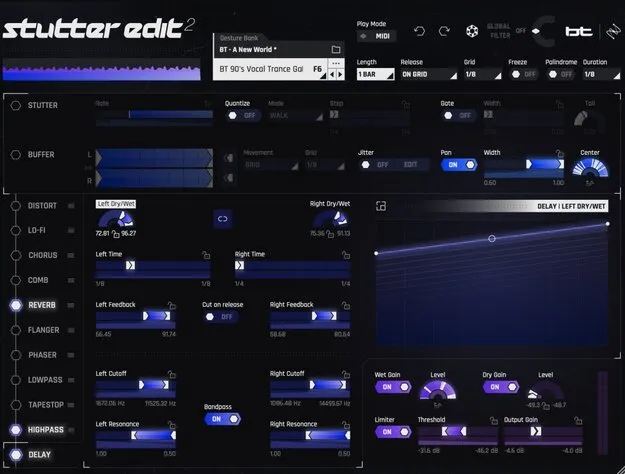
Stutter Edit 2 by iZotope effects plugin interface

Stutter Edit 2: Stutter and Gesture Effect Plugin by iZotope Free Download

Rated 4.5/5 on Plugin Boutique (6,370 ratings)

Stutter Edit 2 is a multi-effect plugin from iZotope, built with BT, for creating rhythmic stutters, gestures and glitched breakdowns. It runs as a VST3, AU or AAX plugin on Windows and macOS.

VST3AUAAXWindowsmacOS64-bit
AVAILABLE ATPlugin Boutique
Free trial available from the developer
01Overview

Stutter Edit 2 is designed around the stutter effect, where audio is chopped and repeated to the beat. Its AUTO mode lets you try sounds in a mix with one button and without manual routing, and its Curve Editor can move any control in time with your session. The plugin includes a set of effect modules, including Comb, Chorus, Reverb and a two-band Distort, plus banks of gestures designed by BT. It is a practical choice for producers who want fast rhythmic movement on samples, vocals, percussion or full mixes.

Best for

  • Trap hi-hat rolls
  • Vocal glitch edits
  • Dubstep breakdowns
  • Tempo-synced filter sweeps
  • Percussion pitch effects
  • Lo-fi mix movement
Developer
iZotope
Store
Plugin Boutique
02Key features

What you get

  • Instant rhythmic stutter patterns on any sound
  • AUTO mode for one-button use in a mix
  • MIDI controller setup with in-app help that detects your DAW
  • Curve Editor for tempo-synced control of any setting
  • 12 premade curves plus custom curve drawing
  • New Comb and Chorus modules
  • Full-featured Reverb and two-band Distort modules
  • Gesture banks designed by BT with auto-mapping to MIDI keys
03In depth

Stutter, Buffer and Curve Editor Controls

The core of Stutter Edit 2 is its stutter engine. The Stutter and Buffer controls let you chop a sample to the beat or shred it into pitched, synth-like textures. Gestures can be triggered from the plugin or mapped to a MIDI keyboard, and saved banks auto-map to your keys.

The Curve Editor lets you draw motion into any setting. You can choose one of 12 premade curves or draw your own, set the range with the blue sliders, and drill into individual settings to refine the shape. This gives filter sweeps, pumping reverbs and lo-fi blends a tempo-synced movement without relying on your DAW's automation.
Setup, Workflow and Who It Suits

Setup is built to be quick. AUTO mode works without routing, and for MIDI control the in-app help detects your DAW and gives step-by-step instructions. A dedicated output section and simpler Stutter controls make the interface easier to follow.

Stutter Edit 2 suits producers working on electronic music, such as dubstep breakdowns, trap hi-hat rolls and vocal glitches. It is also useful for adding rhythmic movement to a finished mix. The plugin is a 64-bit effect that runs in the hosts listed in its system requirements.

04Specs

Will it run?

Formats, systems and requirements as listed by Plugin Boutique. Missing details are left out, not guessed.

DeveloperiZotope
TypePlugin
CategoryMulti Effect
FormatsVST3, AU, AAX
Operating systemsWindows, macOS
Architecture64-bit
Free trialYes
05FAQ

Questions, answered

What formats and operating systems does Stutter Edit 2 support?

Stutter Edit 2 is available in VST3, AU and AAX formats. It runs on Windows 10 and 11 and on macOS Catalina through Ventura, and all plugin formats are 64-bit only.

What do I need to use Stutter Edit 2?

Stutter Edit 2 runs inside a host DAW. The listed supported hosts are Logic Pro, Live 10.1 to 11, Cubase 12, Pro Tools 2022, FL Studio 20, Studio One 5 to 6, REAPER 6, Bitwig Studio 4 and Digital Performer 11.

Can I control Stutter Edit 2 from a MIDI keyboard?

Yes. Saved banks auto-map to your MIDI keys, and the in-app help guides you through connecting a MIDI controller and detects which DAW you are using.

Is there a trial version?

Yes, Stutter Edit 2 offers a trial.

07Developer

More from iZotope

All iZotope products →