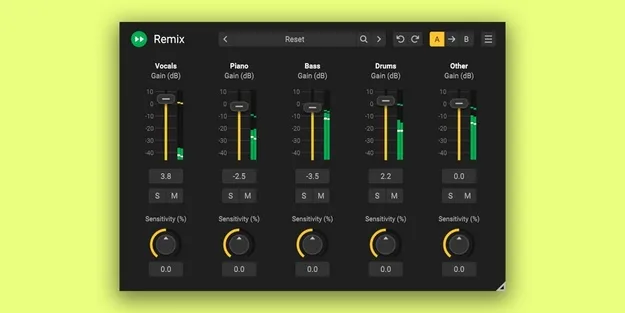
Remix by Acon Digital stem separation plugin interface

Remix: AI Stem Separation Plugin by Acon Digital

Rated 4.5/5 on Plugin Boutique (220 ratings)

Remix is an audio utility plugin from Acon Digital that separates a complete mix into five stems: Vocals, Piano, Bass, Drums and Other. The stems can be adjusted, remixed or routed to separate outputs.

VST3VST2AUAAXWindowsmacOS
AVAILABLE ATPlugin Boutique
Opens the store in a new tab
01Overview

Remix is an audio utility plugin that uses artificial intelligence to split a finished mix into five instrument groups, called stems. The developer, Acon Digital, describes it as the first plugin able to do this in real time with acceptable latency. Each stem can be raised, lowered or removed, which makes it possible to boost vocals, pull back drums or create a karaoke version. Separate outputs for each stem let you route them to their own tracks and apply insert effects to them individually.

Best for

  • Karaoke track creation
  • Vocal level adjustment
  • Drum isolation for remixing
  • Stem-based effects processing
  • Mix rebalancing
Developer
Acon Digital
Category
Utilities
Store
Plugin Boutique
02Key features

What you get

  • Separates a mix into Vocals, Piano, Bass, Drums and Other stems
  • Sensitivity control for detection of each stem
  • Output level meters for each stem
  • Separate audio outputs for Mix and each stem
  • All parameters fully automatable
  • Preset manager with factory presets
  • Save, load and categorize user presets
  • Resizable interface with adjustable UI scaling
03In depth

Real-time stem separation and sensitivity control

Remix separates a mix into Vocals, Piano, Bass, Drums and Other stems. For each stem, a sensitivity control sets how the detection behaves, so you can find a balance between artifacts and spill from other sources. Acon Digital notes that every parameter is fully automatable, so changes can be drawn into your host's timeline.

Alongside the main mix output, Remix provides an output for each stem, with level meters shown per stem so you can monitor what each one is carrying.
Routing stems to separate outputs in your host

The plugin offers Mix, Vocals, Piano, Bass, Drums and Other outputs. If your host supports it, you can send these to separate tracks, which lets you use insert effects on each stem as if you had five individual tracks.

Remix includes a preset manager with a large set of factory presets, along with options to save, load and categorize your own. The interface can be resized and its scaling adjusted.

04Specs

Will it run?

Formats, systems and requirements as listed by Plugin Boutique. Missing details are left out, not guessed.

DeveloperAcon Digital
TypePlugin
CategoryUtility
FormatsVST3, VST2, AU, AAX
Operating systemsWindows, macOS
05FAQ

Questions, answered

What does Remix do?

Remix splits a complete mix into five stems (Vocals, Piano, Bass, Drums and Other) and lets you change the level of each one, including creating a karaoke version.

Which formats and operating systems does Remix support?

Remix is available in VST3, VST2, AU and AAX formats. It runs on Windows and macOS. On macOS it runs natively on ARM64 and Intel processors.

What do I need to use Remix?

You need a host application compatible with VST, VST3 or AAX (Pro Tools 12 or higher) on Windows, or AU, VST, VST3 or AAX (Pro Tools 12.8.3 or higher) on macOS. Windows 11 or 10 and macOS 10.13 or later are required, with at least 1 GB of RAM and 1 GB of free disk space.

07Developer

More from Acon Digital

All Acon Digital products →