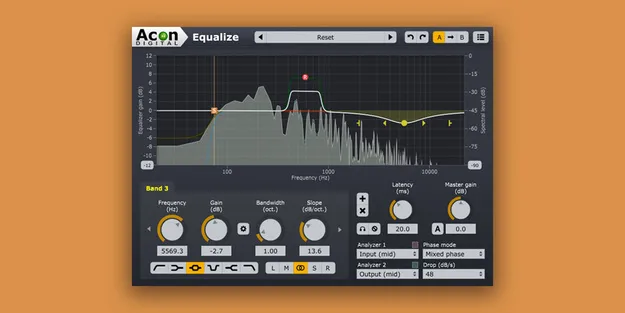
Equalize by Acon Digital parametric EQ plugin interface

Equalize: Parametric EQ Plugin by Acon Digital Free Download

Rated 4.6/5 on Plugin Boutique (140 ratings)

Equalize is a parametric equalizer plugin from Acon Digital. It offers up to twelve bands, eight filter types and three phase modes, including a mixed phase mode with adjustable latency.

VST3VST2AUAAXWindowsmacOS64-bit
AVAILABLE ATPlugin Boutique
Free trial available from the developer
01Overview

Equalize is an EQ plugin built around precise control of each band. Every band can be set independently for frequency, gain, bandwidth, resonance and filter slope, with slopes ranging from gentle 3 dB to steep 120 dB per octave. Its interface lets you adjust bands directly on the frequency response graph, and a real-time analyzer helps you monitor the processing as you work.

Best for

  • Mixing corrective EQ
  • Mid-side EQ
  • Mastering tonal balance
  • Linear phase EQ
  • Sound design filtering
Developer
Acon Digital
Category
EQ
Store
Plugin Boutique
02Key features

What you get

  • Up to twelve independent parametric EQ bands
  • Eight band filter types including tilt and bandpass
  • Filter slopes adjustable from 3 to 120 dB per octave
  • Minimum, linear and mixed phase modes
  • Mixed phase mode with latency from 5 to 120 ms
  • Per-band channel mode: mid, side, left, right or full
  • Two spectrum analyzers for input or output monitoring
  • Optional piano keyboard display for setting band frequencies
03In depth

Filter Types, Phase Modes and Latency

Equalize provides eight band filter types: low cut, low shelf, peak, tilt, bandpass, notch, high shelf and high cut. Up to twelve bands can be used at once.

Three phase modes are available. Minimum phase runs with zero latency. Linear phase preserves phase relationships. The mixed phase mode, which Acon Digital describes as novel, lets you set latency between 5 and 120 milliseconds while keeping phase relationships as far as possible. Latency values below 20 milliseconds are intended to mask pre-ringing through temporal masking of human hearing.
Workflow and Channel Control

Band parameters can be adjusted by dragging handles in the frequency response display, including bandwidth and filter slope. The frequency range of the curve can be changed by dragging the edges of the frequency axis, which helps when zooming in on a specific range.

Each band can process full, mid, side, left or right channel content independently. An optional piano keyboard display above the frequency axis lets you set a band frequency by clicking the matching key. Two spectrum analyzers can show the input or output signal from any channel, and the preset manager includes a large number of factory presets.

04Specs

Will it run?

Formats, systems and requirements as listed by Plugin Boutique. Missing details are left out, not guessed.

DeveloperAcon Digital
TypePlugin
CategoryEQ
FormatsVST3, VST2, AU, AAX
Operating systemsWindows, macOS
Architecture64-bit
Free trialYes
05FAQ

Questions, answered

What formats does Equalize support?

Equalize is available as VST3, VST2, AU and AAX plugins. AU is supported on macOS only.

Which operating systems run Equalize?

Equalize runs on Windows and macOS. The macOS version supports both Intel and Apple Silicon, and it is 64-bit only.

What do I need to use Equalize?

You need a host application compatible with VST, VST3 or AAX, or AU on macOS. Pro Tools 10.3.5 or higher is listed for AAX on Windows and Pro Tools 11 or higher on macOS. A 1 GB free disk space minimum is listed, and 4 GB of RAM is recommended.

Does Equalize have a trial version?

Yes, a trial is available.

07Developer

More from Acon Digital

All Acon Digital products →