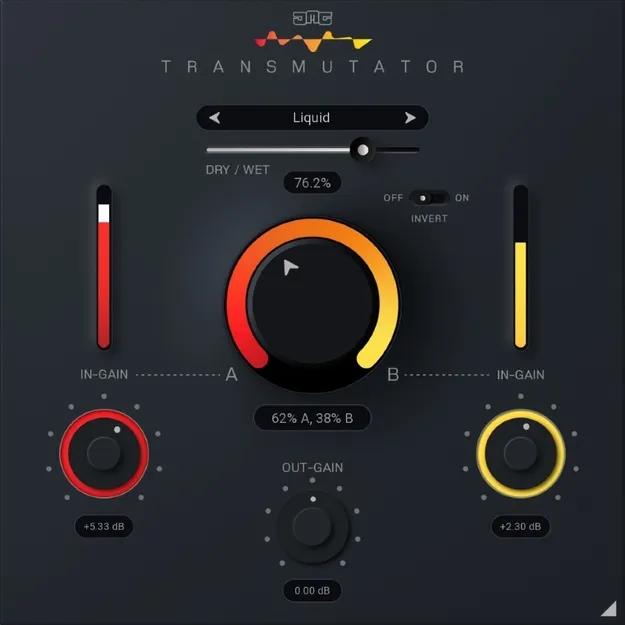
Transmutator crossfade plugin interface by United Plugins

Transmutator: Sidechain Crossfade Utility Plugin by United Plugins Free Download

Rated 4.6/5 on Plugin Boutique (868 ratings)

Transmutator is a utility plugin from United Plugins that crossfades between two audio inputs using 16 blend modes. It takes a second signal through its sidechain input and is available in VST3, VST2, AU and AAX formats.

VST3VST2AUAAXWindowsmacOS64-bit
AVAILABLE ATPlugin Boutique
Free trial available from the developer
01Overview

Transmutator goes beyond a standard volume crossfade. You place it on a track, route a second track into its sidechain input, and use the Mix control to move from input A to input B. The plugin offers 16 blend modes, each with an Invert option that changes its behavior. Dry/Wet control lets you range from a simple volume fade to heavy sonic processing. It runs on Windows and macOS, and a trial version is available.

Best for

  • Verse-to-chorus transitions
  • Build-up to drop transitions
  • DJ track transitions
  • Spectral morphing and sound design
  • Video transition effects
  • Noise and tone merging
Category
Utilities
Store
Plugin Boutique
02Key features

What you get

  • 16 blend modes for crossfading between two inputs
  • Sidechain input for feeding a second track
  • Mix control for automating transitions in your DAW
  • Dry/Wet control from simple fade to heavy processing
  • Invert parameter that changes each mode's behavior
  • Internal 64-bit processing at any sample rate, including 192 kHz
  • Smart bypass with latency compensation and no clicks
  • License-file activation with no iLok or dongle required
03In depth

Blend Modes and Sound Character

Transmutator's modes cover several processing approaches, including Mid/Side, multi-band, dynamics, filtering, spectral freezing and blurring, and pitch or frequency shifting. The developer describes the plugin as a sound designer's tool for merging noise and tone and morphing spectra between two signals.

The Dry/Wet control sets how far the effect goes. At the low end you get a traditional crossfade, and at higher settings the result is more processed. Because the Invert parameter changes how each mode behaves, a single mode can produce several different results.
Workflow for Transitions and Mixing

Automating the Mix control in your DAW lets you move between song sections, such as a verse and a chorus or a build-up and a drop. The developer also positions the plugin for DJ-style transitions between full tracks and for syncing effects to video edits.

The plugin needs a sidechain signal to work. Hosts that do not support sidechain routing, such as GarageBand, are not a good fit for it.

04Specs

Will it run?

Formats, systems and requirements as listed by Plugin Boutique. Missing details are left out, not guessed.

DeveloperUnited Plugins
TypePlugin
CategoryUtility
FormatsVST3, VST2, AU, AAX
Operating systemsWindows, macOS
Architecture64-bit
Free trialYes
05FAQ

Questions, answered

What formats does Transmutator support?

Transmutator is available in VST3, VST2, AU and AAX formats. It is a 64-bit plugin.

Which operating systems can run Transmutator?

Transmutator runs on Windows and macOS. On Windows, the listed support covers Windows 8 to 11 in 32-bit or 64-bit. On macOS, the listed support covers macOS 10.10 and later, including M1 Silicon Macs and macOS 11 Big Sur, in 64-bit only.

What do I need to use Transmutator?

Transmutator needs a VST2, VST3, AAX or AU compatible host and an Intel or AMD processor with SSE2 support. Because it works through a sidechain input, the host must support sidechain routing. GarageBand is not a good fit.

Does Transmutator require an iLok or internet connection?

No. The developer states that no iLok, dongle or internet access is required for activation, which uses license files instead.

07Developer

More from United Plugins

All United Plugins products →