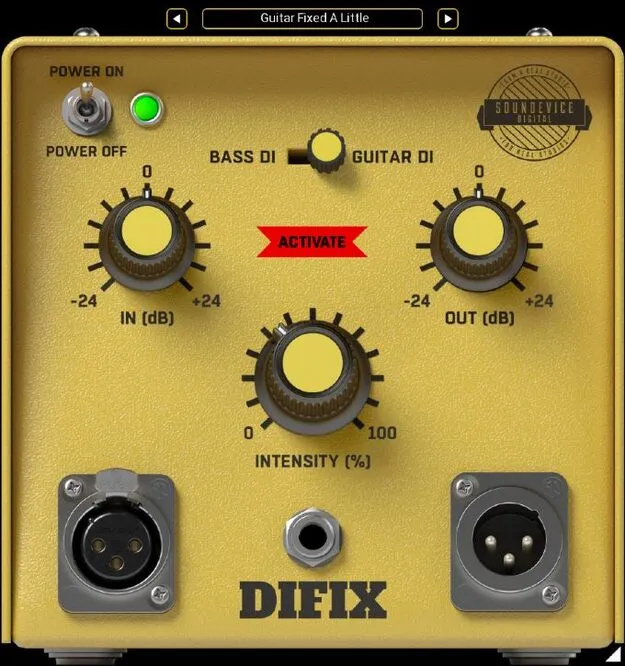
DIFIX guitar and bass input correction plugin interface by United Plugins

DIFIX: Guitar and Bass DI Input Fix Plugin by United Plugins Free Download

Rated 4.7/5 on Plugin Boutique (483 ratings)

DIFIX is a studio utility plugin by United Plugins that corrects the sound of guitars and basses recorded directly into a sound card, adding multi-band leveling and analog-style saturation similar to a DI-box.

VST3VST2AUAAXWindowsmacOS64-bit
AVAILABLE ATPlugin Boutique
Free trial available from the developer
01Overview

Many sound cards advertise a Hi-Z instrument input, but the input impedance is often too low for pickups to respond properly, which can leave a direct recording sounding dull. DIFIX is built for this problem. It is meant to be inserted as the first plugin on a guitar or bass track, before any amp simulations or effects. You choose whether the source is guitar or bass and set how strongly the plugin should improve the input signal.

Best for

  • Home studio guitar recording
  • Direct bass recording
  • Cleaning up cheap sound card inputs
  • Remixing old guitar recordings
  • Pre-amp input correction
Category
Utilities
Store
Plugin Boutique
02Key features

What you get

  • Multi-band dynamic processor for leveling instrument input
  • Analog-style saturation modeled on a real DI-box
  • Guitar and bass selection modes
  • Designed to be placed first in the guitar track chain
  • 64-bit internal processing at any sampling rate, including 192 kHz
  • Smart bypass that avoids clicks when automating
  • Latency compensation for bypass states
  • Sleep mode when no processing is needed, reducing CPU use
  • Resizable photorealistic interface
  • License-file activation without iLok or dongle
03In depth

How DIFIX Corrects a Direct Guitar or Bass Signal

According to United Plugins, a sound card instrument input is not the same as a proper DI-box. Plugging a guitar or bass straight in can reduce brilliance and make the recording sound lifeless. DIFIX uses a multi-band dynamic processor to even out the level and adds a small amount of analog saturation, aiming to reproduce the character of a real DI-box.

The developer notes that the plugin is most useful in home studios with inexpensive interfaces, but that even higher-priced hardware DI units can benefit from a small correction. The amount of correction is the main decision to make.
Workflow, Controls and Licensing

Placement matters. DIFIX should sit at the top of the guitar track's plugin chain so that every later effect and amp simulation receives a corrected signal. The interface is kept simple: select guitar or bass, then set the amount of correction.

The graphical interface is photorealistic and can be resized by dragging the arrow in the bottom right corner, which makes it easier to use on a large screen or saves space on a smaller one. Activation uses license files rather than an iLok, dongle or internet access. The software can be used on all of your computers as long as you are the user. A 15-day unlimited trial is available.

04Specs

Will it run?

Formats, systems and requirements as listed by Plugin Boutique. Missing details are left out, not guessed.

DeveloperUnited Plugins
TypePlugin
CategoryUtility
FormatsVST3, VST2, AU, AAX
Operating systemsWindows, macOS
Architecture64-bit
Free trialYes
05FAQ

Questions, answered

What does DIFIX do?

DIFIX is designed to correct the sound of a guitar or bass recorded directly into a sound card. It uses a multi-band dynamic processor to level the signal and adds a small amount of analog-style saturation, similar to a DI-box.

Where should I place DIFIX in my signal chain?

The developer recommends inserting DIFIX as the first plugin on the guitar or bass track, before other guitar effects and amp simulations.

Which formats and operating systems does DIFIX support?

DIFIX is available in VST3, VST2, AU and AAX formats for 64-bit systems on Windows and macOS. Windows 8 through 11 and macOS 10.10 or later are supported.

Does DIFIX require an iLok or internet activation?

No. DIFIX does not need an iLok, a dongle or internet access. It activates with license files and can be used on all of your computers as long as you are the user.

Is there a trial version?

Yes. United Plugins offers a 15-day unlimited trial version.

07Developer

More from United Plugins

All United Plugins products →