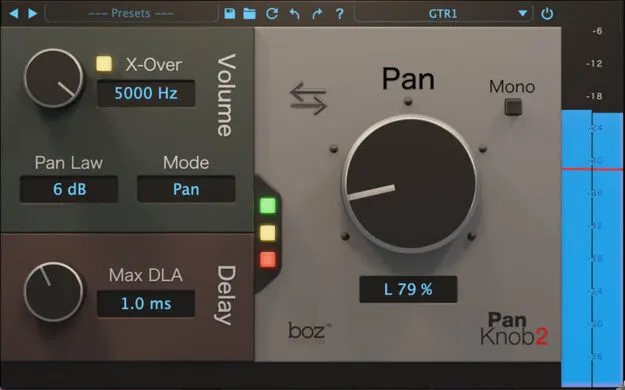
Pan Knob stereo panning utility plugin by Boz Digital Labs interface

Pan Knob: Stereo Panning Utility Plugin by Boz Digital Labs Free Download

Rated 4.7/5 on Plugin Boutique (982 ratings)

Pan Knob is a panning utility plugin from Boz Digital Labs that replaces traditional volume-based panning with an algorithm that keeps low frequencies centered while higher frequencies are positioned in the stereo field.

VST3VST2AUAAXWindowsmacOS64-bit
AVAILABLE ATPlugin Boutique
Free trial available from the developer
01Overview

Pan Knob is a studio utility plugin designed to improve how panning translates across listening setups. Standard panners move a signal by adjusting left and right levels, which can sound unbalanced on headphones when sources are placed wide. Pan Knob adds its own panning behavior on top of that, so you can place sources in the stereo field with more control over the result. It is available in VST3, VST2, AU and AAX formats for Windows and macOS.

Best for

  • Mix panning
  • Headphone mix checks
  • Stereo placement experiments
  • Quick instrument repositioning
  • Mix translation tuning
Category
Utilities
Store
Plugin Boutique
02Key features

What you get

  • Panning algorithm that keeps low frequencies centered
  • Selectable micro delay for stereo positioning
  • Choose between balance and pan modes
  • Selectable pan laws
  • Pan anywhere in your signal chain
  • Available in VST3, VST2, AU and AAX formats
  • Runs on Windows and macOS in 64-bit
03In depth

How Pan Knob Changes Stereo Panning

Boz Digital Labs describes Pan Knob as a panning algorithm that keeps low frequencies centered while higher frequencies are panned. The developer says this helps the left and right balance hold up when sources are placed away from center.

The plugin offers a selectable micro delay, which the developer says simulates the difference in arrival time between your ears. You can switch between balance and pan modes and choose a pan law, so you can adjust the behavior to suit the material and the listening environment.
Workflow and Use in Your Signal Chain

Pan Knob can be placed anywhere in your signal chain, so you are not limited to the channel fader panner. You can swap pan positions of instruments quickly, which the developer says speeds up mixing and makes it easier to try different stereo placements.

The plugin is a good fit for mix engineers and producers who want to experiment with where instruments sit in the stereo field without the balance trade-offs they associate with standard panners.

04Specs

Will it run?

Formats, systems and requirements as listed by Plugin Boutique. Missing details are left out, not guessed.

DeveloperBoz Digital Labs
TypePlugin
CategoryUtility
FormatsVST3, VST2, AU, AAX
Operating systemsWindows, macOS
Architecture64-bit
Free trialYes
05FAQ

Questions, answered

What formats does Pan Knob support?

Pan Knob is available in VST3, VST2, AU and AAX formats. It is a 64-bit plugin.

Which operating systems can run Pan Knob?

Pan Knob runs on Windows and macOS. On macOS it supports Intel and M1 Apple Silicon Macs running macOS 10.13 High Sierra or later. On Windows it requires Windows 7 or later.

Is there a trial version of Pan Knob?

Yes, Pan Knob offers a trial.

What is a pan law?

A pan law sets how the signal level changes as it moves across the stereo field. Pan Knob lets you select the pan law you want to use.

07Developer

More from Boz Digital Labs

All Boz Digital Labs products →