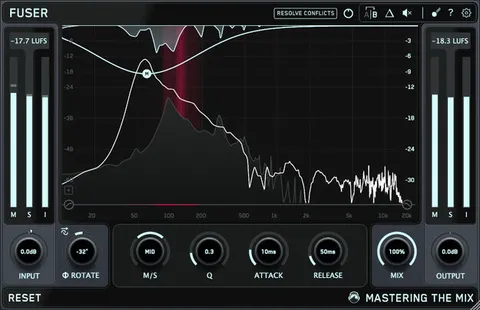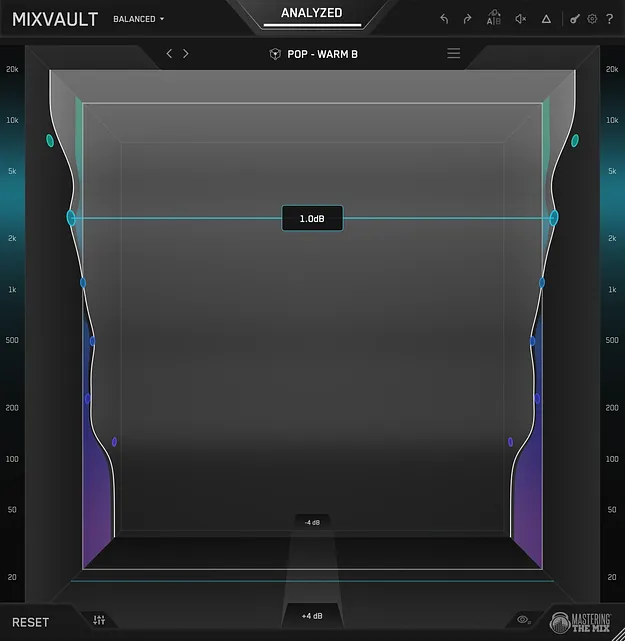
MIXVAULT immersive 3D EQ plugin interface by Mastering The Mix

MIXVAULT: Immersive 3D EQ Plugin by Mastering The Mix

MIXVAULT is an EQ plugin by Mastering The Mix that analyzes your audio and lets you shape its tonal balance in an immersive 3D interface. Every adjustment is loudness-matched in real time, so you hear the true tonal change.

VST3AUAAXWindowsmacOS64-bit
AVAILABLE ATPlugin Boutique
Opens the store in a new tab
01Overview

MIXVAULT is built around shaping tone by feel. Its 3D interface lets you pull a frequency toward you to boost it and push it away to cut it, while the room adjusts to give you perspective. Hit Analyze and the plugin builds a Smart Preset from your audio, based on the source you select, such as the mix, vocals, bass, drums or music, and the genre. The developer says the bands are fixed and phase-stable, so boosts and cuts aim to keep transients sharp and the low end tight.

Best for

  • Mix bus EQ
  • Bass tone shaping
  • Vocal tonal balance
  • Drum and kick EQ
  • Reference-based mixing
  • Fast EQ starting points
Category
Utilities
Store
Plugin Boutique
02Key features

What you get

  • Immersive 3D interface that boosts frequencies pulled toward you and cuts those pushed away
  • Smart Presets built from your audio by source and genre after Analyze
  • Level Match loudness-compares every EQ move in real time
  • Fixed, phase-stable bands for clean boosts and cuts
  • Live delta visual showing how the EQ shapes the signal during playback
  • Bass mode with five bands across 20 to 320 Hz
  • Four resolution modes: Broad, Balanced, Detailed and Bass
  • Reference track import for shaping toward a trusted tonal balance
  • Zoomable Hertz strips with typed dB entry for precise control
03In depth

Sound Shaping and Level-Matched Monitoring

MIXVAULT uses a level-matched workflow. Every move is loudness-matched in real time, so you judge the tonal change itself rather than the difference in volume. Mastering The Mix describes its fixed, phase-stable bands as keeping boosts and cuts clean.

The live delta visual shows how the EQ shapes the signal as it plays, which makes it easier to see where your adjustments are working. Zoomable Hertz strips let you scroll into any part of the spectrum, and you can type an exact dB value when you need fine control.
Bass Mode, Resolutions and Reference Tracks

Bass mode focuses on low-end filtering, with five bands covering 20 to 320 Hz. The developer says it aims to add weight to bass without going soft, and that the filters minimize phase and transient distortion so the kick still hits.

Four resolution modes (Broad, Balanced, Detailed and Bass) let you change the band layout at any time without losing your work. Reference track import lets you load a track you trust and shape your mix toward its tonal balance.

04Specs

Will it run?

Formats, systems and requirements as listed by Plugin Boutique. Missing details are left out, not guessed.

DeveloperMastering The Mix
TypePlugin
CategoryUtility
FormatsVST3, AU, AAX
Operating systemsWindows, macOS
Architecture64-bit
05FAQ

Questions, answered

What formats does MIXVAULT support?

MIXVAULT is available in VST3, AU and AAX formats, as a 64-bit plugin for Windows and macOS.

What do I need to run MIXVAULT?

On macOS you need Mac OS X 10.15 or higher with a 64-bit AU, VST3 or AAX host, and Apple Silicon is supported natively. On Windows you need Windows 10 or higher with a 64-bit VST3 or 64-bit AAX host.

How do Smart Presets work?

Click Analyze, choose your source (mix, vocals, bass, drums or music) and genre, and MIXVAULT builds a starting preset from your actual audio. You can step through the preset arrows to explore alternatives labeled dark, balanced or bright, and bypass to compare against your original.

Can I use MIXVAULT for bass?

Yes. Bass mode focuses five bands on 20 to 320 Hz, which the developer says adds weight to bass without going soft.

07Developer

More from Mastering The Mix

All Mastering The Mix products →