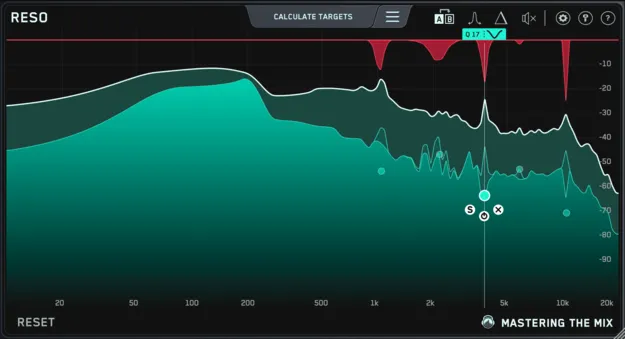
RESO dynamic resonance suppressor plugin interface by Mastering The Mix

RESO: Dynamic Resonance Suppressor by Mastering The Mix Free Download

Rated 4.6/5 on Plugin Boutique (1,134 ratings)

RESO is a dynamic resonance suppressor effect plugin by Mastering The Mix that identifies frequencies with excess energy and applies targeted reduction to tame harshness in a mix.

VST3AUAAXWindowsmacOS64-bit
AVAILABLE ATPlugin Boutique
Free trial available from the developer
01Overview

RESO is an effects plugin from Mastering The Mix built to locate and reduce resonances in audio. When resonant peaks build up, a mix can sound harsh and mask other elements. Broad cuts across the whole mix can dull its character, so RESO works frequency by frequency, measuring energy relative to the rest of the mix and suggesting how much reduction is needed. It is available as a VST3, AU and AAX plugin for Windows and macOS.

Best for

  • Vocal resonance cleanup
  • Harsh synth frequencies
  • Drum bus cleanup
  • Mastering chain taming
  • Full mix resonance control
Store
Plugin Boutique
02Key features

What you get

  • Dynamic resonance suppression that acts only when peaks flare up
  • Calculate Targets locates the most resonant frequencies automatically
  • Frequency Sweep helps you hear which resonances sound unpleasant
  • Visual display highlights disproportionately high peaks
  • Click-to-place nodes with scroll-adjustable Q
  • Automatic Q optimization for musical results
  • Mastering-grade filters for cleaner sounding mixes
  • Works on individual channels, busses and mastering chains
03In depth

Finding and Taming Harsh Resonances

The developer describes RESO as a way to pinpoint which frequencies carry a build-up of energy compared with the whole mix. The visual display shows disproportionately high peaks, and the Frequency Sweep helps you hear which resonances sound unpleasant.

The Calculate Targets feature locates the most resonant frequencies and proposes targets for each. Reduction is dynamic, so the cuts act when a resonance flares up rather than constantly thinning the sound.
Workflow on Individual Channels and Busses

RESO can be applied to any channel in a mix, including vocals, synths, percussion, busses and a mastering chain. Adding a node is done by clicking anywhere on the interface. Position the node at the peak level where you want suppression to begin, then scroll to adjust its Q.

The filters are designed for mastering-grade transparency, with automatic Q optimization intended to keep results musical.

04Specs

Will it run?

Formats, systems and requirements as listed by Plugin Boutique. Missing details are left out, not guessed.

DeveloperMastering The Mix
TypePlugin
CategoryDynamics Processor
FormatsVST3, AU, AAX
Operating systemsWindows, macOS
Architecture64-bit
Free trialYes
05FAQ

Questions, answered

What is RESO used for?

RESO is used to find and reduce resonances, the buildups of energy at specific frequencies that can make a mix sound harsh. It can be applied to vocals, synths, percussion, busses or a mastering chain.

Which formats and operating systems does RESO support?

RESO is available in VST3, AU and AAX formats. It runs on Windows 10 or higher and macOS 10.15 or higher, in 64-bit only, with Apple Silicon native support on Mac.

What do I need to use RESO?

You need a 64-bit AU, VST3 or AAX host. AAX is compatible with Pro Tools 11 and later only. If you access RESO through a Rent to Own plan or Beatport Studio membership, it runs through the Beatport Access portal and requires an internet connection every 30 days to validate the license.

Is there a trial version of RESO?

Yes, RESO offers a trial.

07Developer

More from Mastering The Mix

All Mastering The Mix products →