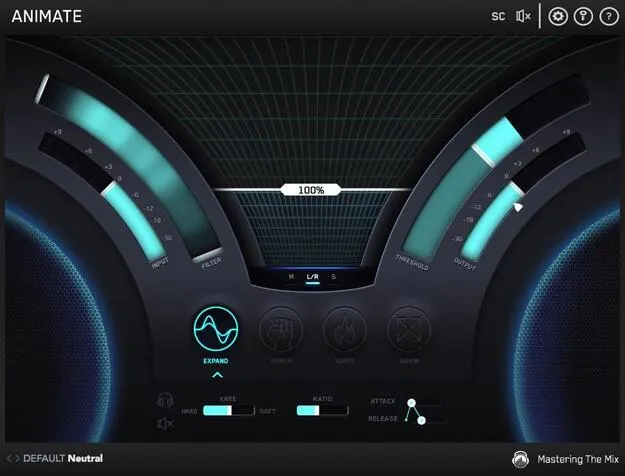
ANIMATE multi-effect plugin interface by Mastering The Mix

ANIMATE: Multi-Effect Plugin by Mastering The Mix Free Download

Rated 4.4/5 on Plugin Boutique (4,549 ratings)

ANIMATE is a multi-effect plugin from Mastering The Mix that adds movement to mixes using four modes: Expand, Punch, Ignite and Grow. Each mode has its own frequency assignment and mid/side functionality.

VST3AUAAXWindowsmacOS64-bit
AVAILABLE ATPlugin Boutique
Free trial available from the developer
01Overview

ANIMATE is built for producers who want to shape the energy and width of a mix with more control than a single effect offers. It combines four processing modes in one plugin, each focused on a different aspect of movement: dynamic range, transients, harmonic saturation and stereo width. Every mode lets you assign it to specific frequencies, and mid/side processing adds further control over where the effect is applied. The developer also offers each module as a separate product, so you can start with the full plugin or with individual modes.

Best for

  • Mix bus energy
  • Drum transient punch
  • Master chain width
  • Adding presence to synths
  • Stereo pad widening
  • Electronic music processing
Store
Plugin Boutique
02Key features

What you get

  • Four movement modes: Expand, Punch, Ignite and Grow
  • Individual frequency assignment for each mode
  • Mid/side processing for targeted stereo control
  • Transparent upward expansion above a set threshold
  • Transient enhancement for punchier drums and percussion
  • Dynamic harmonic distortion for added loudness and presence
  • Dynamic stereo widening using a psychoacoustic precedence effect
  • Available as a full plugin or as separate modules
03In depth

Four Movement Modes for Shaping Dynamics, Punch and Width

Expand adds upward expansion, increasing the level of signals above the threshold to widen dynamic range in a transparent way. Punch enhances transients so drums and percussion cut through the mix, and it can be used subtly on the mid channel of a master or more heavily on a single track.

Ignite adds harmonic distortion that responds to the input signal, which can increase perceived loudness, power and presence without the pumping typical of a compressor. Grow widens selected frequencies using a psychoacoustic precedence effect, and it can be dynamic so that only signal above the threshold is widened.

Because each mode has its own frequency assignment, you can apply Punch to the high end of a kick bus while Grow works on the upper mids of a stereo pad, all within one plugin.
Who ANIMATE Suits and How to Use It

ANIMATE suits producers who process mix buses, master chains and individual tracks. Its mid/side functionality lets you treat the center and sides of a stereo signal differently, which is useful for keeping low end focused while adding width or sheen above it.

For a typical workflow, start by choosing the mode that addresses the problem you hear, such as dull transients or narrow highs. Set the frequency range, then use the threshold and dynamic settings to limit the effect to the moments that need it. Because the modes are separate, you can layer them if a single mode does not do enough.

04Specs

Will it run?

Formats, systems and requirements as listed by Plugin Boutique. Missing details are left out, not guessed.

DeveloperMastering The Mix
TypePlugin
CategoryMulti Effect
FormatsVST3, AU, AAX
Operating systemsWindows, macOS
Architecture64-bit
Free trialYes
05FAQ

Questions, answered

What is ANIMATE?

ANIMATE is a multi-effect plugin by Mastering The Mix with four modes, Expand, Punch, Ignite and Grow, for adding movement to a mix. Each mode has its own frequency assignment and mid/side functionality.

Which formats and operating systems does ANIMATE support?

ANIMATE is available in VST3, AU and AAX formats, for Windows and macOS. It is a 64-bit plugin, and the system requirements list macOS 10.15 or higher and Windows 10 or higher, with Apple Silicon supported natively on Mac.

What do I need to use ANIMATE?

ANIMATE needs a 64-bit host that supports AU, VST3 or AAX on macOS, or VST3 or AAX on Windows. AAX is compatible with Pro Tools 11 and later only. If you use a Rent to Own plan or Beatport Studio membership, the plugin runs through the Beatport Access portal and needs an internet connection every 30 days to validate the license.

Is there a trial version of ANIMATE?

Yes, ANIMATE offers a trial version.

07Developer

More from Mastering The Mix

All Mastering The Mix products →