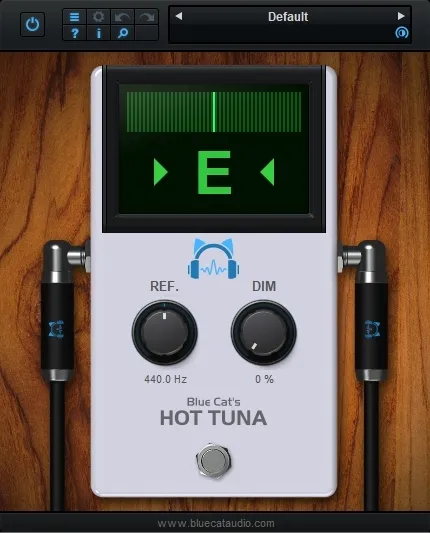
Blue Cat's Hot Tuna chromatic tuner plugin interface

Blue Cat's Hot Tuna: Chromatic Tuner Plugin for Live and Studio Use Free Download

Rated 4.6/5 on Plugin Boutique (227 ratings)

Blue Cat's Hot Tuna is a chromatic tuner plugin from Blue Cat Audio. It can dim or mute the signal while tuning and lets you set the reference frequency anywhere from 430 to 450 Hz.

VST2AUAAXWindowsmacOS64-bit
AVAILABLE ATPlugin Boutique
Free trial available from the developer
01Overview

Blue Cat's Hot Tuna is a tuning utility for musicians and producers who need to check pitch inside their session. It runs as a plugin in VST2, AU and AAX formats, so it can be placed in a track chain or used in a live rig. The developer describes it as simple to use, with a dimming control that lets you quiet the signal while you tune, which is useful on stage. Hot Tuna is available as a trial version.

Best for

  • Live gig tuning
  • Non-standard tuning
  • Studio pitch checks
  • Tuning between takes
Category
Utilities
Store
Plugin Boutique
02Key features

What you get

  • Chromatic tuner plugin with high precision
  • Dim or mute the signal while the tuner is active
  • Reference frequency adjustable from 430 to 450 Hz
  • Most processing runs in the background
  • Full MIDI control, automation and MIDI Learn
  • Smooth bypass for noiseless activation and deactivation
  • Undo/redo and integrated presets manager
  • Customizable interface with transparency and zoom
03In depth

Tuning Features and Signal Dimming

Hot Tuna is a high precision chromatic tuner. When it is active, you can dim or mute the signal passing through it, so the audience does not hear the tuning process during a gig. The amount of dimming is adjustable.

The reference frequency can be set from 430 to 450 Hz. This covers the standard A440 tuning as well as non-standard tunings that some ensembles and older instruments use.

The developer states that most of the processing runs in the background, so the tuner does not add load to the host's real-time audio engine.
Compatibility and Setup

Hot Tuna is built for Windows and macOS. On Windows it supports Windows Vista, 7, 8 and 10 in 32 or 64-bit editions, and requires an SSE2-enabled processor. On macOS it requires macOS 10.9 or newer and runs on Intel or M1 Apple Silicon processors, in 64-bit only.

The plugin needs a VST, AU or AAX compatible host application. Blue Cat Audio's standard features include MIDI Learn, undo and redo, a presets manager, copy and paste of plugin state between instances, and support for any sample rate.

04Specs

Will it run?

Formats, systems and requirements as listed by Plugin Boutique. Missing details are left out, not guessed.

DeveloperBlue Cat Audio
TypePlugin
CategoryUtility
FormatsVST2, AU, AAX
Operating systemsWindows, macOS
Architecture64-bit
Free trialYes
05FAQ

Questions, answered

What formats does Hot Tuna support?

Hot Tuna is available in VST2, AU and AAX formats. It runs on Windows and macOS.

What do I need to run Blue Cat's Hot Tuna?

You need a VST, AU or AAX compatible host application. On Windows, a processor with SSE2 support is required. On macOS, you need version 10.9 or newer on an Intel or M1 Apple Silicon processor, in 64-bit mode.

Can I tune to a reference pitch other than A440?

Yes. The reference frequency can be set anywhere from 430 to 450 Hz, which covers standard and non-standard tunings.

Does the tuner affect my audio performance?

The developer says most of the processing is performed in the background, so the tuner does not impact the real-time audio engine of the host.

07Developer

More from Blue Cat Audio

All Blue Cat Audio products →