Radio by Plugin Boutique internet radio sampling plugin interface

Radio: Internet Radio Sampling Plugin by Plugin Boutique Free Download

Rated 4.5/5 on Plugin Boutique (5,670 ratings)

Radio is a utility plugin by Plugin Boutique that streams internet radio stations inside your DAW or as a standalone app, letting you record, save and drag radio clips into your projects as samples.

VST2AUAAXStandaloneWindowsmacOS64-bit
AVAILABLE ATPlugin Boutique
Free trial available from the developer
01Overview

Radio is built for finding unexpected sound material. Its station list covers a wide mix of genres and topics, and the plugin keeps a rolling buffer of the last 30 seconds of streamed audio so you can catch something interesting after you hear it. Clips you select can be saved for later and dragged straight into your DAW. Radio can run inside your session or as a standalone application when you just want to listen.

Best for

  • Found-sound sampling
  • Lo-fi radio textures
  • Spoken word samples
  • Sci-fi and ambient sound design
  • Creative inspiration
  • Vintage phone and radio effects
Category
Utilities
Store
Plugin Boutique
02Key features

What you get

  • Stream internet radio stations inside your DAW or standalone
  • Rolling 30-second buffer of recently streamed audio
  • Select and save clips permanently for later use
  • Drag and drop sampled clips from the plugin into your DAW
  • 24 FX emulations: vintage radios, car stereos, phones, small speakers
  • Curated station list maintained as web addresses change
  • Add your own station using a URL
  • Random button and daily featured station
03In depth

Sampling Internet Radio in Your DAW

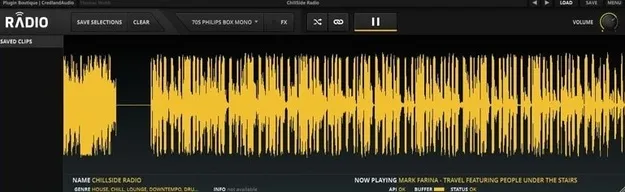
Radio records the last 30 seconds of any streamed material. When something catches your ear, select it in the display, save it and drag it into your DAW. You can also buffer audio inside Radio for sampling, or record everything directly in your host.

The station presets span comedy, sci-fi, police scanners, ambient, spoken word, paranormal and more. Station categories include Blues, World, Comedy and Chillout, and a random button lets you jump to a new station. A featured station is updated daily.

You can also add your own station using a URL, so you are not limited to the built-in list.

Lo-Fi FX for Radio Textures

The onboard FX section includes 24 emulations meant to make the feed sound like it is coming through real consumer equipment. The developer describes them as vintage radios, car and portable stereos, small speakers and phones.

These processors are useful when you want found audio to sit in a specific sonic space, such as a worn-out radio or a phone speaker. Because the effects are part of the plugin, you can shape the sound before you sample it.

04Specs

Will it run?

Formats, systems and requirements as listed by Plugin Boutique. Missing details are left out, not guessed.

DeveloperPlugin Boutique
TypePlugin
CategoryUtility
FormatsVST2, AU, AAX, Standalone
Operating systemsWindows, macOS
Architecture64-bit
Free trialYes
05FAQ

Questions, answered

What formats does Radio support?

Radio is available in VST2, AU, AAX and Standalone formats. It is a 64-bit plugin for Windows and macOS.

What operating systems does Radio run on?

Radio supports macOS (Mac OS X 10.7 and later, 32-bit and 64-bit compatible) and Windows 7 and later (32-bit and 64-bit compatible).

How does Radio sampling work?

Radio records the last 30 seconds of any streamed material. Select a clip from the display, save it and drag it into your DAW.

Can I use recordings made from Radio in my music?

The copyright of all sources remains with the creator, publisher or other rights holder. Using sound material recorded from Radio requires permission from the rights holder, and you should check any legal restrictions on recording streamed audio in your country.

Does Radio have a trial?

Yes, Radio offers a trial version.

07Developer

More from Plugin Boutique

All Plugin Boutique products →