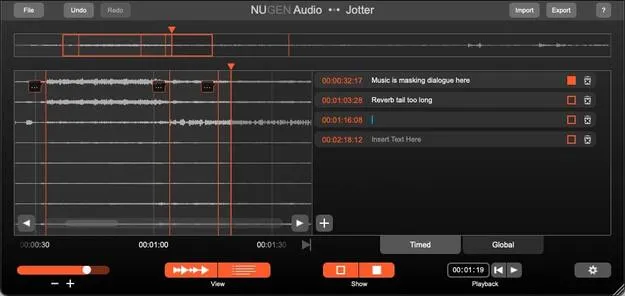
Jotter by NUGEN Audio utility plugin interface for timecode notes

Jotter: Timecode Notes Utility Plugin by NUGEN Audio Free Download

Jotter is a utility plugin from NUGEN Audio for making notes and comments in a project. Annotations are locked to timecode and can be shared with collaborators through the plugin or an exported CSV file.

VST3AUAAXWindowsmacOS64-bit
AVAILABLE ATPlugin Boutique
Free trial available from the developer
01Overview

Jotter is aimed at production teams who need to communicate about a session. You insert the plugin anywhere in a project and add annotations that stay locked to the timecode, so each note sits at the moment it refers to. Notes can be passed between collaborators inside the plugin or exported as a .csv file. NUGEN Audio also notes that Jotter can run as a standalone application for situations where a DAW is unavailable or not needed.

Best for

  • Session review notes
  • Remote collaboration feedback
  • Timecode-based production notes
  • Sharing notes via CSV
  • Standalone note taking
Developer
NUGEN Audio
Category
Utilities
Store
Plugin Boutique
02Key features

What you get

  • Insert anywhere in your project as a utility plugin
  • Annotations locked to timecode
  • Share notes between collaborators inside the plugin
  • Export annotations as a .csv file
  • Can be used as a standalone application
  • Available as VST3, AU and AAX
  • 64-bit support on Windows and macOS
03In depth

Timecode-Locked Notes for Collaboration

Jotter is built around shared review. Insert it anywhere in your project and add annotations that are locked to the timecode, so a comment always stays attached to the point in the session it describes.

Notes can be shared between collaborators in two ways: directly through the plugin, or by exporting the annotations as a .csv file. The CSV route makes it easy to pass feedback to people who work in other tools or who want to review notes in a spreadsheet.
Standalone Use Beyond the DAW

NUGEN Audio says Jotter can also be used as a standalone application. This is useful when a DAW is unavailable or simply not required, for example when someone needs to add or review notes without opening a full session.

Because Jotter is a utility rather than a processing tool, its role is communication and documentation within a production workflow.

04Specs

Will it run?

Formats, systems and requirements as listed by Plugin Boutique. Missing details are left out, not guessed.

DeveloperNUGEN Audio
TypePlugin
CategoryUtility
FormatsVST3, AU, AAX
Operating systemsWindows, macOS
Architecture64-bit
Free trialYes
05FAQ

Questions, answered

What does Jotter do?

Jotter is a utility plugin for making notes and comments. You add annotations locked to the timecode, which can then be shared with collaborators.

How do I share Jotter notes with collaborators?

Notes can be shared through the plugin itself or by exporting them as a .csv file.

Can I use Jotter without a DAW?

Yes. NUGEN Audio says Jotter can be used as a standalone application when a DAW is unavailable or not required.

What formats and operating systems does Jotter support?

Jotter is available in VST3, AU and AAX formats for 64-bit Windows and macOS. It requires 512 MB of RAM.

Is there a trial version of Jotter?

Yes, Jotter offers a trial.

07Developer

More from NUGEN Audio

All NUGEN Audio products →