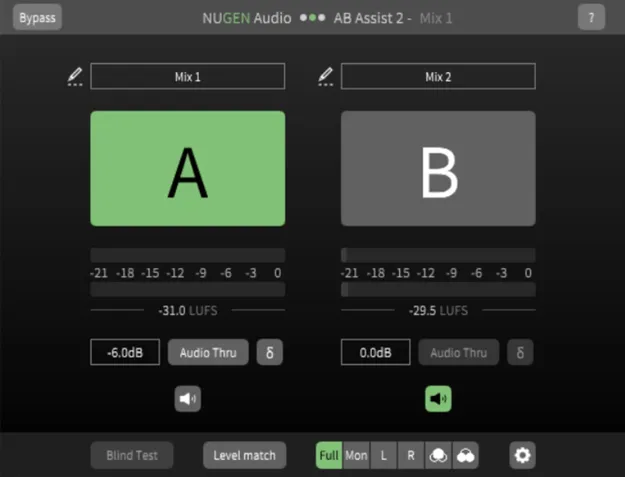
AB Assist 2 audio comparison plugin interface by NUGEN Audio

AB Assist 2: Audio Comparison Tool by NUGEN Audio Free Download

AB Assist 2 is a utility plugin from NUGEN Audio for quickly comparing multiple audio sources, such as takes, mix revisions, master versions or plug-in options. It is available in VST3, AU and AAX formats.

VST3AUAAXWindowsmacOS64-bit
AVAILABLE ATPlugin Boutique
Free trial available from the developer
01Overview

AB Assist 2 is built around one task: switching between audio versions fairly and quickly. You can load different takes, mix revisions or versions of a master and move between them to hear the differences. A blind test mode labels the channels at random, which helps reduce subjective bias when you judge which version is better. Version 2 adds support for comparing four sources at once, along with tools for level matching and mono checking, so comparisons stay accurate.

Best for

  • Mix revision comparison
  • Mastering version checks
  • Blind listening tests
  • Plug-in option comparison
  • Mono compatibility checks
  • Surround mix comparison
Developer
NUGEN Audio
Category
Utilities
Store
Plugin Boutique
02Key features

What you get

  • Receive and compare four audio sources
  • Blind test mode with randomly labeled channels
  • Auto-level-match based on short-term loudness (LUFS)
  • Mono-check for comparing mono fold-downs
  • Compare surround mixes in any channel count
  • Smooth fades between sources
  • Plug-in instances communicate directly without an external send
03In depth

Comparing Sources Without Bias

The core job of AB Assist 2 is to make A/B comparison faster and more reliable. You can receive and compare four audio sources, which is useful when a mix has gone through several revisions or when you are weighing several plug-in options against each other.

Test mode labels the channels randomly. That removes the guesswork about which version you are hearing, so you can judge the sound rather than the name on the track. NUGEN Audio says the tool is meant to remove subjectivity and biases from quick comparisons.

Smooth fades between sources help the switch feel natural rather than jarring, which makes subtle differences easier to hear.
Level Matching, Mono Checks and Surround

Level differences are one of the most common reasons a version sounds better when it is simply louder. AB Assist 2 includes auto-level-match, which matches the short-term loudness (LUFS) of the sources so you can compare them on equal terms.

The mono-check feature lets you compare a mono fold-down, a useful step when you need to confirm that a mix holds up in mono. Surround mixes can be compared in any channel count.

For multiple plug-in instances, the instances communicate directly rather than through an external send, which keeps the setup simpler when you are comparing plug-in options.

04Specs

Will it run?

Formats, systems and requirements as listed by Plugin Boutique. Missing details are left out, not guessed.

DeveloperNUGEN Audio
TypePlugin
CategoryUtility
FormatsVST3, AU, AAX
Operating systemsWindows, macOS
Architecture64-bit
Free trialYes
05Upgrades

Upgrade and crossgrade options

06FAQ

Questions, answered

What is AB Assist 2 used for?

AB Assist 2 is used to compare multiple audio sources quickly, such as different takes, mix revisions, master versions or plug-in options. Its blind test mode labels the channels randomly to reduce bias.

Which formats and operating systems does AB Assist 2 support?

AB Assist 2 is available in VST3, AU and AAX formats. It runs on Windows and macOS and is 64-bit only. The system requirements list 512 MB RAM on both platforms.

Does AB Assist 2 support surround mixes?

Yes. You can compare surround mixes in any channel count.

Is there a trial version?

Yes, a trial version is available.

08Developer

More from NUGEN Audio

All NUGEN Audio products →