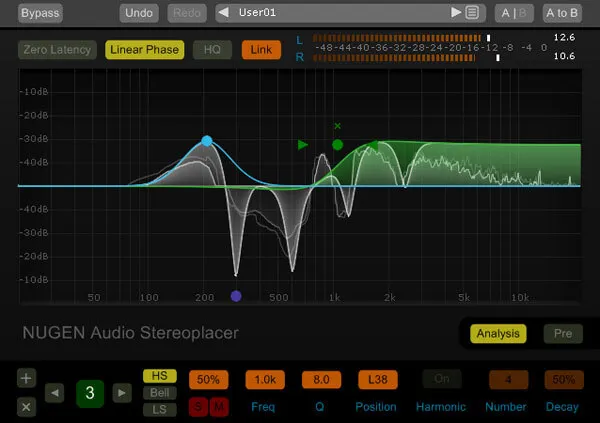
Stereoplacer by NUGEN Audio EQ-style stereo panning plugin interface

Stereoplacer: Frequency-Specific Panning Tool by NUGEN Audio Free Download

Stereoplacer is an EQ-style frequency-specific panning plugin from NUGEN Audio that pans chosen frequency bands left or right without affecting the rest of the stereo image.

VST3AUAAXWindowsmacOS64-bit
AVAILABLE ATPlugin Boutique
Free trial available from the developer
01Overview

Stereoplacer works like an equalizer, but instead of boosting or cutting a frequency band, it moves that band across the stereo field. The rest of the mix stays where it is. That makes it a practical tool for producers who need to place specific parts of a sound in the stereo image with precision, whether they are working with a mono source or taming a sample loop that sounds lopsided.

Best for

  • Mono-to-stereo restoration
  • Archive recording repair
  • Piano recording panning
  • Sample loop cleanup
  • Drum loop panning
  • Mic placement correction
Developer
NUGEN Audio
Category
EQ
Store
Plugin Boutique
02Key features

What you get

  • Frequency-specific panning that leaves the rest of the stereo image untouched
  • Up to 10 bands with bell curves and high and low shelves
  • Switchable harmonic control linking overtones to their fundamentals
  • EQ-style interface for pan placement by frequency range
  • Available as VST3, AU and AAX plugin formats
  • Runs on both Windows and macOS in 64-bit
03In depth

Shaping Stereo Placement Like an EQ

Stereoplacer uses bell curves and high and low shelves to sculpt the audio, with up to 10 bands. Each band controls how far a frequency range is panned, so you can send lower notes to one side and higher notes to the other.

A switchable harmonic control links harmonics and overtones to their fundamentals. NUGEN Audio says this helps produce more natural sounding panning, because the overtones of a sound move with its core frequencies instead of drifting apart.
Restoring Stereo From Mono Recordings

The plugin is most commonly used to restore a stereo image from a mono recording. This covers archive material that was only ever captured in mono, as well as new recordings limited by the number of inputs available in a session.

Panning lower notes left and higher notes right can give a mono piano recording a more realistic spread. Stereoplacer can also nudge the fundamental frequencies of drum loops back toward the center when a loop's panning feels distracting.

04Specs

Will it run?

Formats, systems and requirements as listed by Plugin Boutique. Missing details are left out, not guessed.

DeveloperNUGEN Audio
TypePlugin
CategoryEQ
FormatsVST3, AU, AAX
Operating systemsWindows, macOS
Architecture64-bit
Free trialYes
05Upgrades

Upgrade and crossgrade options

06FAQ

Questions, answered

What is Stereoplacer used for?

Stereoplacer is most often used to restore a stereo image from a mono recording, such as archive material or recordings made with limited inputs. It can also pan individual sounds within sample loops.

Which plugin formats does Stereoplacer support?

Stereoplacer is available in VST3, AU and AAX formats, all in 64-bit. It runs on Windows and macOS.

What are the minimum system requirements?

The listed minimums are Mac OS X 10.9 with 512 MB RAM, or Windows 7 with 512 MB RAM.

Is there a trial version?

Yes, Stereoplacer offers a trial version.

08Developer

More from NUGEN Audio

All NUGEN Audio products →