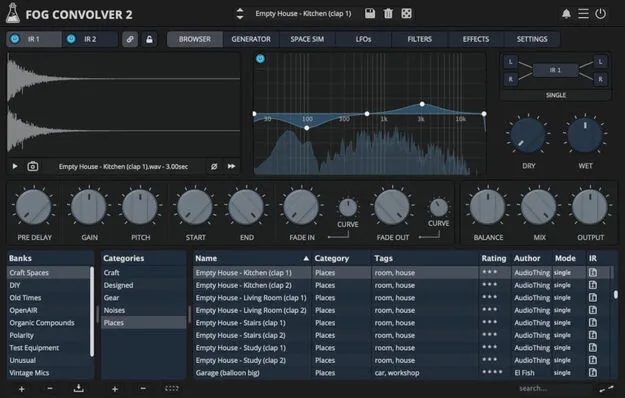
Fog Convolver 2 by AudioThing convolution reverb plugin interface

Fog Convolver 2: Convolution Reverb Plugin by AudioThing Free Download

Rated 4.8/5 on Plugin Boutique (301 ratings)

Fog Convolver 2 is a true stereo convolution reverb and processor plugin from AudioThing. It applies the sonic character of impulse responses to any sound in real time, with modulation, effects and a built-in impulse generator.

VST3VST2AUAAXCLAPWindowsmacOSLinux64-bit
AVAILABLE ATPlugin Boutique
Free trial available from the developer
01Overview

Fog Convolver 2 is a convolution plugin that uses impulse responses to shape audio. It can add reverberation, create special effects, or apply the character of recorded acoustic spaces and electronic gear. AudioThing describes the version as rewritten from scratch, with modulation, effects and an impulse response generator added. Users can load two separate impulse responses or a single true stereo impulse, with separate or linked controls for each.

Best for

  • Reverb for mixing
  • Experimental stereo reverbs
  • Sound design effects
  • Creating artificial spaces
  • Drones and textures
Developer
AudioThing
Category
Reverbs
Store
Plugin Boutique
02Key features

What you get

  • True stereo convolution with 6 modes, including true stereo
  • Dual IR engine with parameter link
  • Lightweight real-time convolution engine
  • 4 LFOs with multiple destinations
  • 2 multi-mode filters with pre, IR and post modes
  • Chorus, phaser, compressor and waveshaper effects
  • Built-in impulse response generator and space simulator
  • Preset browser, randomizer and snapshot system
03In depth

Impulse Routing, Modulation and Filtering

Fog Convolver 2 offers five routing modes for its impulses: single, serial, parallel, parallel mix and true stereo. Each impulse has two LFOs with 10 waveforms and 18 destinations, plus a dedicated multi-mode filter that can run pre, IR or post. A 5-band graphic EQ is also included.

The plugin also includes chorus, phaser, compressor and waveshaper effects. A dual IR engine with parameter link lets you control both impulses together or independently.
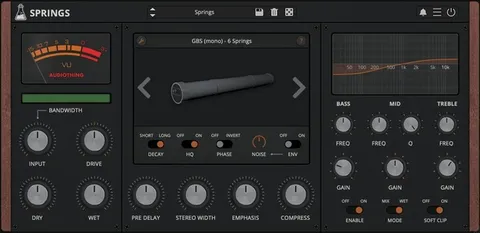
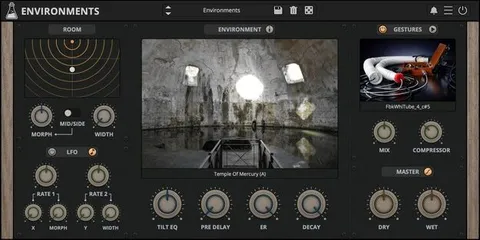
Loading Impulses and Using the Factory Library

You can load any WAV or AIFF file by drag and drop or through the built-in browser. Dragging two files assigns them to IR1 and IR2. True stereo impulses are usually recorded simultaneously to capture a stereo image, while two unrelated impulses can be used for experimental stereo reverbs.

The factory library contains eight banks with more than 660 impulse responses, drawn from real and artificial spaces, vintage and digital equipment, organic sources and public domain recordings. If you have no impulses of your own, the built-in impulse generator can create artificial spaces.

04Specs

Will it run?

Formats, systems and requirements as listed by Plugin Boutique. Missing details are left out, not guessed.

DeveloperAudioThing
TypePlugin
CategoryReverb
FormatsVST3, VST2, AU, AAX, CLAP
Operating systemsWindows, macOS, Linux
Architecture64-bit
Free trialYes
05Upgrades

Upgrade and crossgrade options

06FAQ

Questions, answered

What formats does Fog Convolver 2 support?

Fog Convolver 2 is available in VST3, VST2, AU, AAX and CLAP formats, all in 64-bit. It runs on Windows, macOS and Linux.

Which operating systems are supported?

Windows 7 through 11, macOS 10.13 through macOS 14 (including Apple Silicon as a Universal 2 binary) and Ubuntu 20.04 LTS are listed. Minimum requirements are a 2GHz CPU, 4 GB RAM and 1.5 GB of disk space.

What audio files can I load as impulse responses?

You can load WAV or AIFF files by drag and drop or with the built-in browser.

How does activation work?

Activation can be online, by logging in through the plugin, or offline, using a downloaded license file. One license covers up to three computers, and no iLok or internet connection is required.

08Developer

More from AudioThing

All AudioThing products →