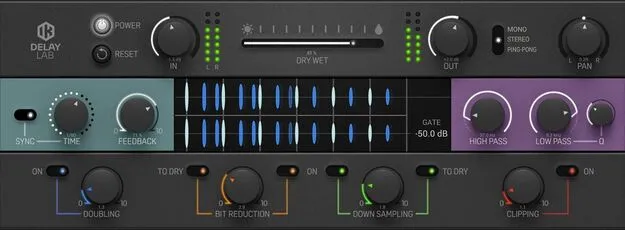
Delay Lab by IK Multimedia delay effect plugin interface

Delay Lab: Digital Delay Plugin by IK Multimedia

Delay Lab is a digital delay effect plugin from IK Multimedia. It offers BPM-synced delay times, MONO, STEREO and PING-PONG modes, and creative filtering, doubling, bit reduction and downsampling for textures.

VST3VST2AUAAXWindowsmacOS64-bit
AVAILABLE ATPlugin Boutique
Opens the store in a new tab
01Overview

Delay Lab is a digital delay effect from IK Multimedia that covers both everyday delay duties and experimental processing. The developer describes it as a versatile tool that can move from a simple utility delay to more unusual texture work. Its delay section handles stereo placement, timing and gating, while a separate creative section adds filtering, lo-fi processing and digital clipping for feedback-heavy sounds. It is available as a plugin for Windows and macOS.

Best for

  • Rhythmic delay patterns
  • Stereo ping-pong delays
  • Lo-fi texture processing
  • Feedback-heavy sound design
  • Tempo-synced echoes
Developer
IK Multimedia
Category
Delays
Store
Plugin Boutique
02Key features

What you get

  • BPM sync with musical bar divisions or manual millisecond timing
  • Pan control to place the delay across the stereo field
  • Gate control for rhythmic delay patterns
  • MONO, STEREO and PING-PONG stereo modes
  • High-pass and low-pass filters for tone shaping
  • Doubling, bit reduction and downsampling effects
  • Optional lo-fi processing on the dry signal
  • Digital clipping control for feedback-heavy sounds
03In depth

Delay Timing, Panning and Gating

Delay Lab lets you place the delay signal anywhere across the stereo field, from left to right. Timing can be synced to the project BPM using musical bar divisions, or set manually in milliseconds.

The gate control sets a threshold for the wet signal, which helps create rhythmic delay patterns rather than a continuous repeat. Three stereo modes are available: MONO, STEREO and PING-PONG, so you can choose how the repeats move between channels.
Creative Effects for Texture and Lo-Fi Sound

The creative section includes high-pass and low-pass filters for shaping the tone of the delayed signal. Doubling, bit reduction and downsampling can be adjusted from subtle to extreme settings, and bit reduction and downsampling can also be applied to the dry signal for lo-fi results.

The clipping control sets the level at which the signal is digitally clipped, which is useful for high-feedback textures without the signal overloading.

04Specs

Will it run?

Formats, systems and requirements as listed by Plugin Boutique. Missing details are left out, not guessed.

DeveloperIK Multimedia
TypePlugin
CategoryDelay
FormatsVST3, VST2, AU, AAX
Operating systemsWindows, macOS
Architecture64-bit
05FAQ

Questions, answered

What formats does Delay Lab support?

Delay Lab is available in VST3, VST2, AU and AAX formats, all 64-bit.

Which operating systems can run Delay Lab?

Delay Lab runs on Windows and macOS. On Windows it requires an ASIO compatible sound card, and on macOS it requires macOS 10.15 or newer, with macOS 11 or newer needed for Apple Silicon.

Does Delay Lab need an internet connection?

The system requirements note that an internet connection is required because the Custom Shop operations are web based.

What do I need to run Delay Lab?

You need a computer with at least 8 GB of RAM, 9 GB of free hard drive space and an OpenGL 2 compatible graphics adapter. The minimum processor is an Intel Core i5 or equivalent, or an Apple M1 on macOS.

07Developer

More from IK Multimedia

All IK Multimedia products →