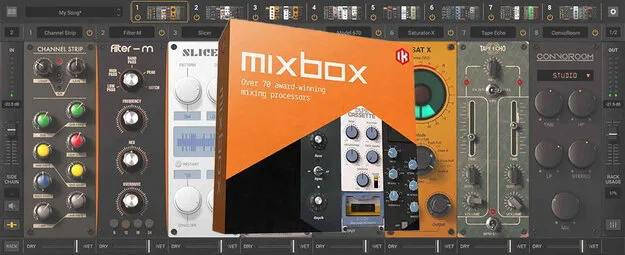
MixBox multi-effect rack plugin interface by IK Multimedia

MixBox: Multi-Effect Rack Plugin by IK Multimedia

Rated 4.7/5 on Plugin Boutique (1,750 ratings)

MixBox is a multi-effect plugin from IK Multimedia that packs more than 70 processors into a 500-series style rack. It runs as a plugin in VST3, VST2, AU and AAX hosts, or standalone on Windows and macOS.

VST3VST2AUAAXStandaloneWindowsmacOS64-bit
AVAILABLE ATPlugin Boutique
Opens the store in a new tab
01Overview

MixBox gathers processors derived from IK Multimedia's T-RackS, AmpliTube and SampleTank plugins into one rack. Each rack has 8 slots, so you can build a channel strip or multi-effect chain, save it, and recall it later. The plugin ships with over 600 presets covering individual processors and whole chains. Each module has its own gain and dry/wet controls, and a sidechain input lets one signal trigger effects such as compression.

Best for

  • Vocal processing chains
  • Bass and kick sidechain
  • Bus compression and EQ
  • Guitar amp tones
  • Sound design effects
  • Live multi-channel mixing
Developer
IK Multimedia
Store
Plugin Boutique
02Key features

What you get

  • 70+ effects derived from T-RackS, AmpliTube and SampleTank
  • 8 processor slots per rack for custom channel strips
  • Save and recall custom processor chains
  • Over 600 individual and whole-chain presets included
  • Dry/wet slider and gain control on every module
  • Sidechain input for ducking and pumping effects
  • Standalone mode with up to 8 racks of 8 processors
  • Four reverb algorithms: hall, room, plate and inverse
03In depth

Effects Range and Modeled Gear

MixBox covers EQ, dynamics, channel strips, filters, modulation, saturation, reverbs, delays, distortion and amp models. The developer describes its models of classic hardware, including the LA2A, 1176, 1073 EQs and 4000-series channel strips, as ultra-precise. The reverb section includes hall, room, plate and inverse algorithms, and the developer says these were rebuilt for this release.

Amp and distortion modules cover tube lead tones, a cabinet model, overdrive and bitcrushing. Tape and phonograph saturation models are also included.

Workflow and Multi-Rack Standalone Mode

Processors are added to a rack by drag and drop, and every parameter stays on one screen, so you do not need to open separate windows to adjust several effects. Chains can be saved and recalled, which helps when you reuse the same vocal or bus setup across sessions.

In standalone mode, MixBox runs up to 8 racks of 8 processors each. Audio can come from a digital mixer or audio interface, and a single main panel manages rack presets, side-chain routing and input/output gain for every rack.

04Specs

Will it run?

Formats, systems and requirements as listed by Plugin Boutique. Missing details are left out, not guessed.

DeveloperIK Multimedia
TypePlugin
CategoryMulti Effect
FormatsVST3, VST2, AU, AAX, Standalone
Operating systemsWindows, macOS
Architecture64-bit
05FAQ

Questions, answered

What formats does MixBox support?

MixBox is listed in VST3, VST2, AU, AAX and Standalone formats. VST3, VST2 and AAX are supported on both Windows and macOS, and Audio Units are supported on macOS.

What do I need to run MixBox?

On Mac, the minimum is an Intel Core 2 Duo processor, 4 GB of RAM (8 GB suggested) and macOS 10.13 or newer. On Windows, the minimum is an Intel Core 2 Duo or AMD Athlon 64 X2 processor, 4 GB of RAM (8 GB suggested) and Windows 7 or newer. Both platforms need 64-bit support and an OpenGL 2 compatible graphics adapter.

Can MixBox be used in a DAW?

Yes. MixBox can run as a plugin in supported DAWs using VST3, VST2, AU or AAX, depending on your platform. It can also run on its own in standalone mode.

How many effects are in each MixBox rack?

Each rack holds 8 processors. In standalone mode, you can run up to 8 racks at the same time.

07Developer

More from IK Multimedia

All IK Multimedia products →