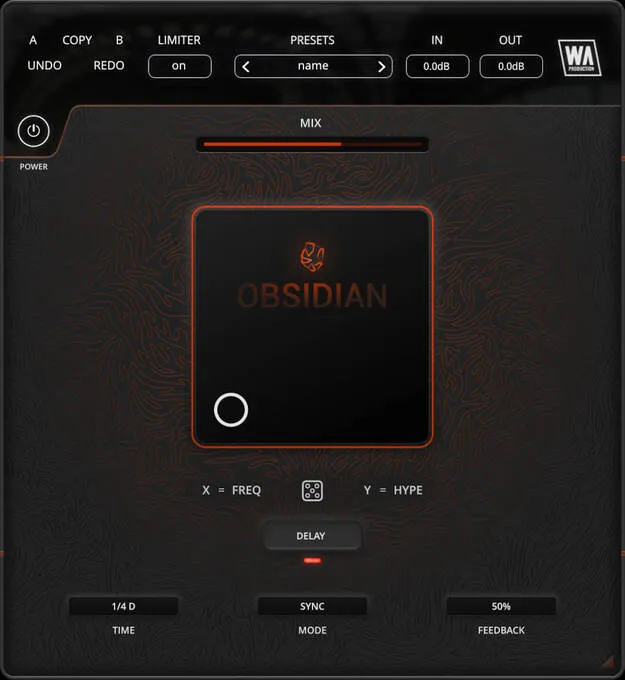
Obsidian multi-effect plugin interface by W. A. Production with XY modulation pad

Obsidian: Multi-Effect Modulation Plugin by W. A. Production Free Download

Rated 4.3/5 on Plugin Boutique (201 ratings)

Obsidian is a multi-effect plugin from W. A. Production that transforms audio using an XY modulation matrix, a formant-shifting FX stage and a creative spectral delay.

AAXWindowsmacOS64-bit
AVAILABLE ATPlugin Boutique
Free trial available from the developer
01Overview

Obsidian is built to add colour and movement to sources such as synths, bass lines and vocals. Rather than working as a conventional processor, the developer describes it as a creative instrument. Its central XY pad lets you move between processing styles, and a Mix slider blends the processed signal with the original. The included factory presets cover subtle coloration through to heavily mutated textures.

Best for

  • Synth coloration
  • Bass line processing
  • Vocal thickening
  • Rhythmic delay effects
  • Ambient textures
  • Dub-style modulation
Store
Plugin Boutique
02Key features

What you get

  • XY pad with central node for moving between processing styles
  • FREQ and HYPE controls for audio-rate modulation
  • Colour and harmonic processing via an FX matrix
  • Creative spectral delay with TIME, MODE and FEEDBACK
  • Delay time from 10 ms to 2 s, including synced note values
  • Randomization button for generating new starting points
  • Mix slider for blending processed and original audio
  • Pop and click-free bypass, AB copy and paste, factory presets
03In depth

Modulation Matrix and Spectral Delay

The XY pad sits at the centre of Obsidian. Its FREQ control sets the frequency and shape of audio-rate modulation, while HYPE sets modulation depth and other special parameters. According to the developer, the signal is modulated at a high rate, formant shifted and then passed through a spectral delay line, which adds harmonics and colour.

The delay module has TIME, MODE and FEEDBACK controls. TIME ranges from 10 ms to 2 seconds and can be set to straight, triplet or dotted note values. MODE can run freely or sync to your host tempo, and FEEDBACK runs from 0 to 100 percent. The delay feeds back into the main matrix, so the output keeps shifting over time.
Workflow Controls and Sources

When you need a starting point, the central dice icon randomizes the XY pad and selects a new set of effects. The Mix slider lets you control how much processed audio is blended with the dry signal, from subtle changes to strong dub-style modulation.

The developer says the factory presets work on guitars, bass, drums, synths, vocals and most other audio. The plugin also offers a resizable interface, pop-free bypass and AB copy and paste for comparing settings.

04Specs

Will it run?

Formats, systems and requirements as listed by Plugin Boutique. Missing details are left out, not guessed.

DeveloperW. A. Production
TypePlugin
CategoryMulti Effect
FormatsAAX
Operating systemsWindows, macOS
Architecture64-bit
Free trialYes
05FAQ

Questions, answered

What formats does Obsidian support?

Obsidian is available in AAX format for Pro Tools. It runs on Windows and macOS in 64-bit.

What do I need to run Obsidian?

The developer lists Windows 8 or higher (64-bit) and macOS 10.10 or higher (64-bit), with Pro Tools 11 or higher for AAX. Mac Apple Silicon users should check the current compatibility status before purchasing. When accessed through a Rent to Own plan or Beatport Studio membership, it runs through the Beatport Access portal and needs an internet connection every 30 days to validate the license.

Is there a trial version of Obsidian?

Yes, a trial is available so you can test the plugin before deciding whether it fits your workflow.

07Developer

More from W. A. Production

All W. A. Production products →