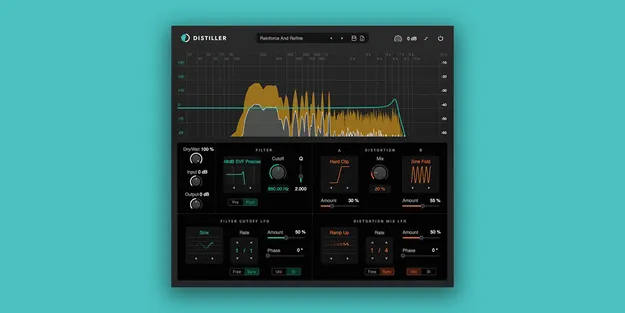
Distiller distortion and filter multi effect plugin interface by Diginoiz

Distiller: Distortion and Filter Multi Effect by Diginoiz

Rated 4.5/5 on Plugin Boutique (760 ratings)

Distiller is a multi effect plugin by Diginoiz that pairs distortion and filtering in one processor. It offers 15 distortion types, 29 filter types and two LFOs for modulating cutoff and distortion mix.

VST3VST2AUWindowsmacOS64-bit
AVAILABLE ATPlugin Boutique
Opens the store in a new tab
01Overview

Distiller combines two core sound design tools: distortion and filtering. Its distortion section offers 15 types, from soft saturation and hard clipping to folding and bit reduction, and a Mix knob blends between two of them. A 29-type filter section sits alongside, and the filter can be placed before or after the distortion. Two independent LFOs control filter cutoff and distortion mix, which makes the plugin suited to movement, wobble and aggressive tone shaping.

Best for

  • Bass sound design
  • Lo-fi textures
  • Synth saturation
  • Wobble and flutter effects
  • Rhythmic filter sweeps
  • Parallel distortion processing
Developer
Diginoiz
Store
Plugin Boutique
02Key features

What you get

  • 29 filter types, including one pole, cascade, SVF classic and SVF precise
  • 15 distortion types, including Atan Saturation, Soft Clip and Sine Fold
  • Mix knob that blends between two distortion types
  • Filter can be placed pre or post distortion
  • Two independent LFOs with seven shapes each
  • Audio-rate modulation up to 200 Hz
  • Spectrum view and waveshaping and filter curve displays
  • Includes 30 factory presets and 60 loops
03In depth

Distortion, Filtering and Modulation in One Plugin

Distiller pairs a wide distortion selection with a large filter library. The distortion types include Atan Saturation, Soft Clip, Hard Clip, Asym Quad, Sine Fold, Triangle Fold, Voice, Rectify and Bit Reduction. The filter section covers one pole, cascade, state variable classic and state variable precise designs, with slopes up to 48 dB per octave on the precise types.

The modulation is where the plugin gets specific. Two separate LFOs handle filter cutoff and distortion mix. Each has seven shapes, including random line and sample and hold. In free mode the rate is set to 0.01 Hz precision, and in sync mode the multiplier and multiplicand each run from 1 to 64, so both standard and odd rhythm divisions are available. Audio-rate modulation goes up to 200 Hz for more extreme results.
Sound Character and Workflow

Developer Diginoiz says the plugin is built around tone shaping from removing unwanted frequencies to adding harmonics. The Q control adds up to 37.5 dB of gain, and an LFO-modulated all-pass filter paired with distortion can produce crisp, sharp sounds or lo-fi wobble and flutter.

For control, a spectrum view shows the input signal and processing, and waveshaping and filter curves are displayed. Parameters can be set by mouse, scroll wheel, keyboard arrows or typed values, and a double-click resets any control to its default. A Dry/Wet knob allows parallel processing, and an output soft clip has an adjustable threshold. The interface is resizable.

04Specs

Will it run?

Formats, systems and requirements as listed by Plugin Boutique. Missing details are left out, not guessed.

DeveloperDiginoiz
TypePlugin
CategoryMulti Effect
FormatsVST3, VST2, AU
Operating systemsWindows, macOS
Architecture64-bit
05Upgrades

Upgrade and crossgrade options

06FAQ

Questions, answered

What formats does Distiller support?

Distiller is available in VST3, VST2 and AU formats. On Windows the VST3 format is supported, and VST2 is not available there. On macOS the VST3 and AU formats are supported, and VST2 is not available.

Which operating systems does Distiller run on?

Distiller runs on Windows 10 and later (64-bit) and macOS 10.15 and later (64-bit). It supports Apple Silicon natively.

Does Distiller include presets?

Yes. It comes with 30 factory presets and 60 free loops, each named to show its possible application.

Does Distiller need an internet connection?

When accessed through a Rent to Own plan or the Beatport Studio membership, it is installed and run through the Beatport Access portal, which requires an internet connection every 30 days to validate the license.

08Developer

More from Diginoiz

All Diginoiz products →