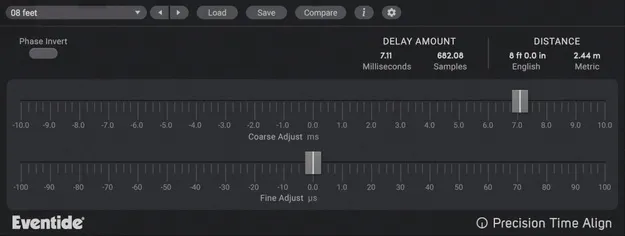
Precision Time Align by Eventide delay plugin interface

Precision Time Align: Sub-Sample Delay Plugin by Eventide

Rated 4.6/5 on Plugin Boutique (177 ratings)

Precision Time Align is a sub-sample delay plugin from Eventide that shifts a track forward or backward in time. It is used to align multi-mic recordings and remove phase problems in a mix.

VST3VST2AUAAXWindowsmacOS64-bit
AVAILABLE ATPlugin Boutique
Opens the store in a new tab
01Overview

Precision Time Align is built for recording engineers and producers who work with multiple microphones on one source. Recording drums, electric guitar cabinets or vocals with more than one mic can cause timing offsets that show up as comb filtering or low-frequency loss when the tracks are summed. The plugin lets you nudge one track against another with very fine resolution, so the signals line up before you mix them.

Best for

  • Multi-mic drum alignment
  • Guitar cabinet phase fixing
  • Vocal double-track alignment
  • Kick drum phase correction
  • Tracking-only session editing
Developer
Eventide
Category
Delays
Store
Plugin Boutique
02Key features

What you get

  • Synchronizes signals to microsecond accuracy, up to 1/64th of a sample
  • Phase Invert button for mirror-image acoustical phasing
  • Coarse and Fine controls for precise time shifts
  • Negative delays move a track earlier relative to others
  • Four calibration methods for signal matching
  • Included Precision Time Delay for DAWs without delay compensation
  • Faster alignment workflow than manual editing in the DAW
03In depth

Sub-Sample Alignment for Multi-Mic Recordings

Precision Time Align can synchronize signals to microsecond accuracy, up to 1/64th of a sample. Eventide describes this as a faster and more accurate approach than manually aligning audio by hand in your DAW, especially on the sample level.

The plugin is aimed at jobs such as combining multiple tracks of a single instrument, compensating for phase differences between mics on a kick drum, and aligning audio segments in a tracking-only session. A Phase Invert button addresses mirror-image acoustical phasing, which is a common cause of hollow-sounding mixes.

Coarse and Fine controls handle the time shift, and negative delays move a track earlier in time relative to the others in the recording.
Calibration Methods and Workflow Options

Four different methods are included for calibrating the signal so the two sources can be matched. This gives you more than one way to reach a precise alignment depending on the material.

A separate Precision Time Delay is also included for use in DAWs that lack delay compensation. Eventide tests the desktop plugins in Ableton Live, Cubase, FL Studio, Logic Pro, Pro Tools and Studio One, and says it should work with any compatible host.

04Specs

Will it run?

Formats, systems and requirements as listed by Plugin Boutique. Missing details are left out, not guessed.

DeveloperEventide
TypePlugin
CategoryDelay
FormatsVST3, VST2, AU, AAX
Operating systemsWindows, macOS
Architecture64-bit
05FAQ

Questions, answered

What formats does Precision Time Align support?

Precision Time Align is available in VST3, VST2, AU and AAX formats. It runs on Windows and macOS.

What do I need to run Precision Time Align?

On Windows, it requires Windows 10 or later, with Windows 11 supported. On macOS, it requires macOS 10.14 or later, with Intel and Apple Silicon supported. Both platforms are 64-bit only. No iLok dongle is required, but a free iLok account is needed for authorization.

What is the difference between Precision Time Align and Precision Time Delay?

Precision Time Align is the main sub-sample alignment tool. Precision Time Delay is included with it and is intended for use in DAWs that lack delay compensation.

Which DAWs does Eventide test Precision Time Align in?

Eventide tests its desktop plugins in Ableton Live, Cubase, FL Studio, Logic Pro, Pro Tools and Studio One. Eventide says the plugin should work with any compatible host.

07Developer

More from Eventide

All Eventide products →