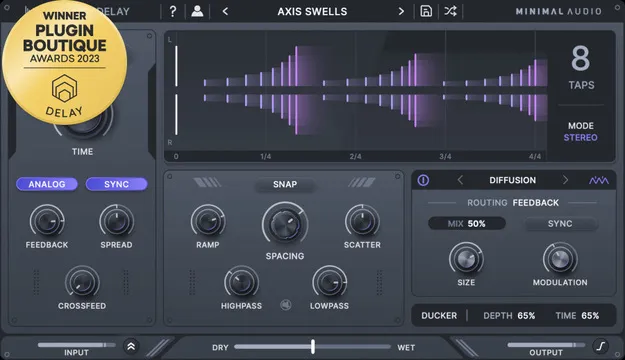
Cluster Delay by Minimal Audio delay plugin interface showing multi-tap display

Cluster Delay: Multi-Tap Delay Plugin by Minimal Audio

Rated 4.8/5 on Plugin Boutique (1,278 ratings)

Cluster Delay is a multi-tap delay plugin from Minimal Audio that sequences up to eight delay taps and routes six built-in effects into the delay line. It is available in VST3, VST2, AU and AAX formats for Windows and macOS.

VST3VST2AUAAXWindowsmacOS64-bit
AVAILABLE ATPlugin Boutique
Opens the store in a new tab
01Overview

Cluster Delay is a delay effect built around a tap sequencer rather than a single delay time. You can ramp, space and scatter up to eight processed taps in time, and macro controls help you shape the pattern quickly. A multi-tap display shows how the delay will evolve over time, so you can see the rhythm you are building. The plugin also includes 100 presets and a set of routable effects for wobble, diffusion, chorus, flanger, phaser and frequency shifting.

Best for

  • Rhythmic delay patterns
  • Dub-style delay effects
  • Evolving stereo spaces
  • Ambient textures
  • Vocal and instrument delays
  • Creative sound design
Developer
Minimal Audio
Category
Delays
Store
Plugin Boutique
02Key features

What you get

  • Multi-tap delay sequencer with up to 8 taps and macro controls
  • Multi-tap display that visualizes delay evolution over time
  • 100 included presets using the plugin's full feature set
  • Six integrated effects: wobble, diffusion, chorus, flanger, phaser, frequency shifting
  • Routable effects with send mode for dub-style automation
  • Mid-side mode, cross-feedback and diffusion for stereo effects
  • Analog modeling mode for modeled feedback
  • Automatic ducking of the delay against the dry input signal
  • Built-in tooltips for in-app learning
03In depth

Sound Design and Delay Character

Cluster Delay combines multi-tap rhythms with effects that change the character of each repeat. Each of the six effects, including wobble, diffusion, chorus, flanger, phaser and frequency shifting, can be placed where it sounds best in the delay line. Routing options let you choose the position of each effect, or use send mode for dub-style automation.

Stereo tools add width and movement. Mid-side mode, cross-feedback and diffusion can be used to build evolving spaces. An analog modeling mode adds modeled feedback inspired by vintage gear, giving the repeats a warmer, more vintage quality.

Automatic ducking lowers the delay in response to your dry input, which helps keep the mix clean while the repeats stay present.
Workflow, Presets and Learning Curve

The tap sequencer and macro controls are the main way to build patterns, and the multi-tap display makes it easier to check the result visually. The 100 included presets cover a range of sounds and make use of the plugin's full feature set, so they are a practical starting point before you adjust the taps and effects yourself.

Built-in tooltips explain controls inside the plugin, which can help when you are learning the routing and the sequencer for the first time.

04Specs

Will it run?

Formats, systems and requirements as listed by Plugin Boutique. Missing details are left out, not guessed.

DeveloperMinimal Audio
TypePlugin
CategoryDelay
FormatsVST3, VST2, AU, AAX
Operating systemsWindows, macOS
Architecture64-bit
05FAQ

Questions, answered

What formats and operating systems does Cluster Delay support?

Cluster Delay is available in VST3, VST2, AU and AAX formats. It runs on Windows 10 or higher and macOS 10.9 or higher, in 64-bit versions.

Does Cluster Delay need an internet connection?

Yes. An internet connection is required for activation.

How many delay taps can Cluster Delay use?

Cluster Delay's tap sequencer can create patterns with up to 8 taps, which you can ramp, space and scatter in time using macro controls.

Does Cluster Delay include presets?

Yes, it includes 100 presets that make use of the plugin's features, ranging from retro tape delays to modern soundscapes.

07Developer

More from Minimal Audio

All Minimal Audio products →