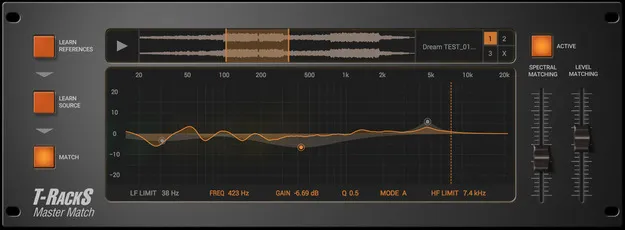
Master Match by IK Multimedia mastering plugin interface

Master Match: Automatic Reference-Matching Mastering Plugin by IK Multimedia Free Download

Master Match is an effects plugin from IK Multimedia that automatically matches the spectral balance and perceived loudness of your mix to up to three reference tracks.

VST3VST2AUAAXWindowsmacOS64-bit
AVAILABLE ATPlugin Boutique
Free trial available from the developer
01Overview

Master Match is a mastering plugin from IK Multimedia, part of the T-RackS processing family. You load up to three reference tracks, let it analyze your source mix, and it proposes an EQ curve and level adjustment to bring your sound closer to those references. The result is an editable EQ curve you can keep, adjust or refine before adding your own processing.

Best for

  • Reference-based mastering
  • Matching mixes to favorite tracks
  • Mix balance checking
  • Loudness matching
  • Mastering chain finishing
Developer
IK Multimedia
Category
Mastering
Store
Plugin Boutique
02Key features

What you get

  • Automatic matching to up to three reference tracks
  • Spectral balance and perceived loudness analysis
  • Editable EQ curve with level adjustment
  • Parametric EQ module
  • Compressor / limiter module
  • Usable standalone or at the end of a processing chain
  • 64-bit native support
  • 32-bit 192 kHz support
  • T-RackS Custom Shop integration
  • 14-day free trial available
03In depth

How reference matching works in Master Match

The workflow has two analysis steps. First, you learn your reference tracks, and you can use sections of each track rather than the full songs, such as a verse from one track and a chorus from another. Second, you learn your own mix by pressing play in your DAW or the standalone window while analysis runs. Analyzing more of your source material makes the analysis more accurate.

When you click Match, the plugin applies an EQ curve and a level adjustment based on the difference between the two. IK Multimedia describes the curve as ultra-high quality and editable, so you keep control over the final result.
Using Master Match as a standalone processor or in a chain

Master Match can run on its own or at the end of an existing processing chain. It also includes parametric EQ and a compressor/limiter, so it can be used as an individual processor or as part of the T-RackS processing chain. You can then add the T-RackS tools you prefer for color and character on top of the matched result.

04Specs

Will it run?

Formats, systems and requirements as listed by Plugin Boutique. Missing details are left out, not guessed.

DeveloperIK Multimedia
TypePlugin
CategoryMastering
FormatsVST3, VST2, AU, AAX
Operating systemsWindows, macOS
Architecture64-bit
Free trialYes
05FAQ

Questions, answered

What formats and operating systems does Master Match support?

Master Match is available in VST3, VST2, AU and AAX formats for macOS and Windows. It is a 64-bit plugin.

What do I need to run Master Match?

On Mac, you need an Apple M1 or Intel Core i5 processor, 8 GB of RAM, macOS 10.15 or newer and 9 GB of hard drive space. On Windows, you need a Core i5 processor or equivalent, 8 GB of RAM, Windows 10 (64-bit) or newer, 9 GB of hard drive space and an ASIO-compatible sound card.

Is there a trial version of Master Match?

Yes, Master Match includes a full 14-day free trial period.

Can I use Master Match with my existing mastering chain?

Yes. Master Match can run as a standalone processor or at the end of an existing processing chain, and it can also be used as part of the T-RackS processing chain.

07Developer

More from IK Multimedia

All IK Multimedia products →