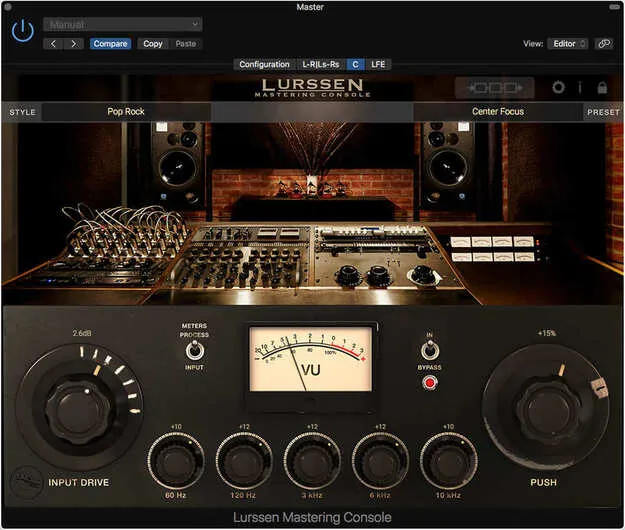
Lurssen Mastering Console by IK Multimedia mastering plugin interface

Lurssen Mastering Console: Mastering Plugin by IK Multimedia

Rated 4.7/5 on Plugin Boutique (32 ratings)

Lurssen Mastering Console is a mastering plugin and standalone application for Mac and PC, created by IK Multimedia with Lurssen Mastering engineers Gavin Lurssen and Reuben Cohen.

VST3VST2AUAAXWindowsmacOS64-bit
AVAILABLE ATPlugin Boutique
Opens the store in a new tab
01Overview

Lurssen Mastering Console models the mastering chain used at Lurssen Mastering in Los Angeles, including tube and solid-state EQs, limiters, de-essers and compressors. Its processors are modeled with their interactions intact, so the signal chain behaves as a single system. The plugin runs as a DAW plug-in on Mac and Windows, and it can also run as a standalone application.

Best for

  • Final mastering
  • Stem mastering
  • Mastering demos
  • Pop mastering
  • Hip-hop mastering
  • Rock mastering
Developer
IK Multimedia
Category
Mastering
Store
Plugin Boutique
02Key features

What you get

  • Developed with Lurssen Mastering engineers Gavin Lurssen and Reuben Cohen
  • 40 pre-made Styles for pop, hip-hop, rock and more
  • Studio, Wave and Chain views for controls, waveform and processors
  • Five-band EQ with fixed frequencies and a PUSH enhancement knob
  • Linkable Input Drive for stereo balance adjustments
  • Full automation of audio content adjustments
  • Input and Process assignable VU metering
  • Stereo/Mono monitoring and master bypass
  • 88.2/96kHz DSP processing
  • Digital Delivery Mastering for Mastered for iTunes specifications
03In depth

Studio Chain and Style Templates

The plugin includes 40 pre-made Styles created by Gavin Lurssen and the team. Each Style reproduces the settings and gear used to master genres such as pop, hip-hop and rock.

The main view has three controls: a linked Input Drive, a fixed five-band EQ and a PUSH knob. PUSH subtly adjusts the EQ uniformly to lift selected passages of a song. A Chain view shows the individual processors in each Style, so you can adjust settings such as gain reduction on specific gear and save the changes as presets.
Workflow, Monitoring and Export

Three displays cover the workflow: the Studio view with controls, a Wave waveform view for looping and editing automation, and the Chain view for individual processors. Input and Process VU metering, a master bypass and a Stereo/Mono monitoring switch help you compare your master against the original file. All control movements can be recorded through automation.

Processing runs at 88.2/96kHz. The plugin can be inserted on mono, stereo and multichannel tracks and buses. Digital Delivery Mastering checks that masters conform to Apple's "Mastered for iTunes" specifications and other digital distribution systems.

04Specs

Will it run?

Formats, systems and requirements as listed by Plugin Boutique. Missing details are left out, not guessed.

DeveloperIK Multimedia
TypePlugin
CategoryMastering
FormatsVST3, VST2, AU, AAX
Operating systemsWindows, macOS
Architecture64-bit
05FAQ

Questions, answered

What formats does Lurssen Mastering Console support?

Lurssen Mastering Console is available in VST3, VST2, AU and AAX formats. The Mac version supports Audio Units, VST 2, VST 3 and AAX, and the Windows version supports VST 2, VST 3 and AAX.

Which operating systems can run Lurssen Mastering Console?

The plugin runs on Windows 10 (64-bit) or newer and on macOS 10.15 or newer. The Windows version requires an ASIO-compatible sound card.

What do I need to use Lurssen Mastering Console?

You need a compatible DAW that supports one of the listed plugin formats. On Mac, the minimum is an Intel Core 2 Duo with 4 GB of RAM, with 8 GB suggested. On Windows, the minimum is an Intel Core 2 Duo or AMD Athlon 64 X2 with 4 GB of RAM, with 8 GB suggested.

07Developer

More from IK Multimedia

All IK Multimedia products →