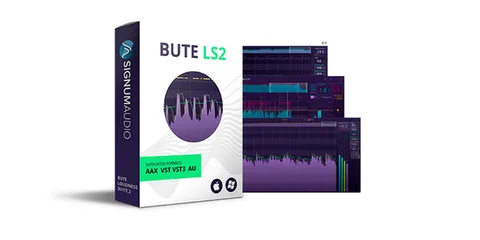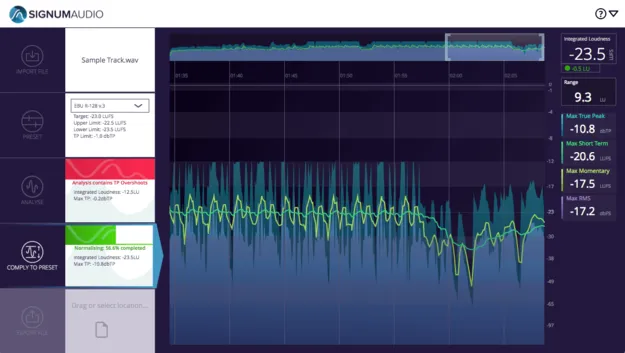
BUTE Loudness Normaliser by Signum Audio standalone app interface

BUTE Loudness Normaliser: Standalone Loudness Compliance Tool by Signum Audio Free Download

Rated 4.7/5 on Plugin Boutique (284 ratings)

BUTE Loudness Normaliser is a standalone application from Signum Audio that analyses and normalises WAV and other audio files to loudness targets. It is built for final checks in mastering and post-production.

StandaloneWindowsmacOS
AVAILABLE ATPlugin Boutique
Free trial available from the developer
01Overview

BUTE Loudness Normaliser is a standalone application for Windows and macOS. It helps engineers check and adjust a finished file before submission or delivery. You drag in a file, choose a preset or set custom parameters, run an analysis, and then normalise the audio. The developer says the integrated true peak limiter keeps overshoots out while the file reaches its target level. It runs as a separate program and does not work inside a digital audio workstation.

Best for

  • Mastering final checks
  • Broadcast delivery
  • Streaming platform compliance
  • Post-production deadlines
  • DJ set level matching
Developer
Signum Audio
Category
Mastering
Store
Plugin Boutique
02Key features

What you get

  • Standalone app for Windows and macOS
  • Built-in true peak limiter with gain reduction display
  • Presets for multiple broadcast and streaming standards
  • Custom presets that can be created and saved
  • Colour-coded alerts on a history timeline
  • Measures integrated, short-term, momentary loudness and true peak
  • Drag-and-drop import and export
  • Imports and exports WAV, FLAC, MP3 and AIFF files
  • Processes one file at a time
03In depth

Loudness Checks and Normalisation for Final Masters

The workflow is short. Drag in a WAV file, select a preset or set your own values, then press Analyse. The analysis flags the areas that need attention. Press Comply to normalise the file. The metering graph shows how much true peak limiting was applied.

Signum Audio says its metering algorithm is tuned for accurate readings. The developer also says the relative dynamics of the audio are changed as little as possible during normalisation.
Presets, Standards and Alerts

BUTE includes built-in presets for a range of broadcast, streaming and industry loudness standards. Signum Audio lists compliance with ITU-R BS.1770, EBU R128, ATSC A/85, OP-59, ARIB TR-B32, and several streaming platforms, including Spotify, YouTube, Apple, Netflix, TIDAL and Pandora. You can also create and save your own presets.

A colour-coded alert system marks sections of the file that fall outside your target. Problem areas show in red on the history timeline. Custom alert thresholds appear in yellow. Measurements for integrated loudness, loudness range, short-term and momentary loudness, RMS and true peak can be toggled on or off.

04Specs

Will it run?

Formats, systems and requirements as listed by Plugin Boutique. Missing details are left out, not guessed.

DeveloperSignum Audio
TypePlugin
CategoryMastering
FormatsStandalone
Operating systemsWindows, macOS
Free trialYes
05FAQ

Questions, answered

What do I need to use BUTE Loudness Normaliser?

BUTE runs as a standalone application, so it does not load inside a DAW. It requires macOS 10.9 or higher, or Windows 7 or higher.

Which file formats does it support?

It supports WAV, including 42-bit 48 kHz files for broadcasting, along with FLAC, MP3 and AIFF files. It processes one file at a time.

Is there a surround version?

Yes. The Stereo version is covered here. Signum Audio also offers a surround version that supports up to Atmos 7.1.2.

Can I try it before deciding?

A trial is available for this product.

07Developer

More from Signum Audio

All Signum Audio products →