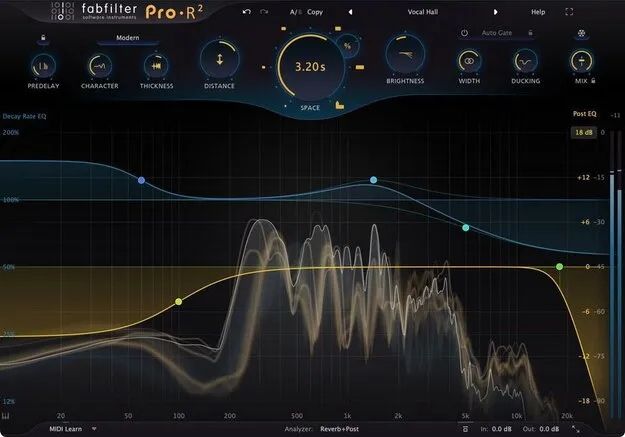
FabFilter Pro-R 2 reverb plugin interface

FabFilter Pro-R 2: Reverb Plugin with Immersive Audio Support Free Download

Rated 4.8/5 on Plugin Boutique (38 ratings)

FabFilter Pro-R 2 is a reverb plugin from FabFilter that offers three core algorithms for simulating physical spaces, digital hardware and plates, with immersive audio support up to 9.1.6 Dolby Atmos.

VST3VST2AUAAXWindowsmacOS64-bit
AVAILABLE ATPlugin Boutique
Free trial available from the developer
01Overview

FabFilter Pro-R 2 is the second generation of FabFilter's reverb plugin. It builds on the original Pro-R with new algorithms, impulse response import and multichannel routing. A unified Space control moves smoothly between room sizes and styles, from small boxes to large halls. A Decay Rate EQ and a six-band Post EQ let you shape the reverb tail frequency by frequency. The plugin runs in VST3, VST2, AU and AAX formats on Windows and macOS.

Best for

  • Drum and vocal reverb
  • Long bright ambient textures
  • Dolby Atmos reverb mixing
  • Impulse response emulation
  • Film score spatial design
Developer
FabFilter
Category
Reverbs
Store
Plugin Boutique
02Key features

What you get

  • Three core algorithms for physical rooms, digital hardware and plates
  • Unified Space knob for smooth transitions between reverb sizes
  • Decay Rate EQ for frequency-specific shaping of the reverb tail
  • Six-band Post EQ for output equalization, with Mid/Side option
  • Immersive audio support up to 9.1.6 Dolby Atmos
  • New Vintage and Plate reverb algorithms
  • IR import for WAV and AIFF impulse responses
  • Ducking, Thickness, Auto Gate and Freeze controls
03In depth

Reverb Algorithms and Sound Character

Pro-R 2 includes three core algorithms. They cover realistic physical spaces, retro digital hardware and electromechanical plates. The two new styles, Vintage and Plate, extend the plugin beyond realistic rooms into more synthetic textures. The Vintage algorithm replicates the sound of early digital reverbs. The Plate algorithm replicates vintage plate reverbs.

The Decay Rate EQ uses parametric bands rather than a fixed crossover. That gives precise control over how each frequency range decays over time. The decay rate range has been widened to 25–400 percent.
Workflow Controls and Tools

The Space knob is the main control for room size and style. Ducking separates the dry and wet signals so the reverb sits back when the dry signal is present. The Thickness control adds program-dependent density and saturation. Auto Gate is tempo-syncable and includes an intelligent mode.

The Freeze button holds the captured reverb buffer at the point it is activated. IR import accepts WAV and AIFF files and recreates them as algorithmic setups, including Decay Rate and Post EQ shaping. The preset browser supports tags, favorites, search and filters, and it can load original Pro-R presets if that plugin is installed.

04Specs

Will it run?

Formats, systems and requirements as listed by Plugin Boutique. Missing details are left out, not guessed.

DeveloperFabFilter
TypePlugin
CategoryReverb
FormatsVST3, VST2, AU, AAX
Operating systemsWindows, macOS
Architecture64-bit
Free trialYes
05Upgrades

Upgrade and crossgrade options

06FAQ

Questions, answered

What formats does FabFilter Pro-R 2 support?

Pro-R 2 is available in VST3, VST2, AU and AAX formats. It runs on Windows and macOS.

What do I need to run FabFilter Pro-R 2?

On Mac it requires macOS 10.13 or higher on Intel or M1 Apple Silicon, in 64-bit only. On Windows it requires Windows 11, 10, 8, 7 or Vista, in 32 or 64-bit, using the VST2, VST3 or AAX Native formats.

Does Pro-R 2 support surround and Dolby Atmos?

Yes. Pro-R 2 supports immersive channel layouts up to 9.1.6 Dolby Atmos. It configures itself for multichannel formats when added to a surround channel.

Can Pro-R 2 import impulse responses?

Yes. It imports WAV and AIFF impulse responses and recreates them as algorithmic reverb setups that approximate their sound.

08Developer

More from FabFilter

All FabFilter products →