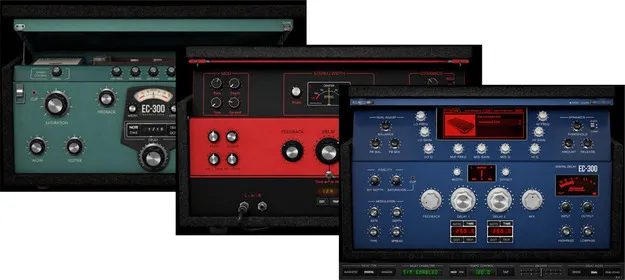
EC-300 Echo Collection Native v7 Upgrade from v6 McDSP delay plugin interface

EC-300 Echo Collection Native v7 Upgrade from v6: McDSP Delay Plugin

Rated 4.6/5 on Plugin Boutique (16 ratings)

EC-300 Echo Collection Native v7 Upgrade from v6 is an upgrade plugin from McDSP that updates an existing v6 EC-300 install to v7. It offers three delay types: Magnetic, Digital and Analog.

VST3VST2AUAAXWindowsmacOS64-bit
AVAILABLE ATPlugin Boutique
Opens the store in a new tab
01Overview

The EC-300 Echo Collection Native v7 Upgrade from v6 is meant for existing owners who want to move from the v6 version of McDSP's EC-300 to v7. The EC-300 bundles a range of echo and chorus effects into one plugin, built around three delay types with a set of character modes for each. Version 7 adds Apple Silicon optimization, updated high-definition interfaces, new presets and double precision processing. It runs as VST3, AU and AAX on Windows and macOS.

Best for

  • Tape-style echo
  • Ping-pong delays
  • Vocal delay throws
  • Synced rhythmic repeats
  • Mix ambience and space
Developer
McDSP
Category
Delays
Store
Plugin Boutique
02Key features

What you get

  • Optimized for Apple Silicon and latest Intel processors
  • Three delay types: Magnetic, Digital and Analog
  • Wide variety of character modes per delay tape
  • Adjustable saturation, wow, flutter and ducking
  • Single, dual and ping-pong delay operation
  • Tap tempo and session sync
  • Over 75 SIMs (Synthetic Impulse Models) included
  • Zero latency algorithms with double precision processing
  • Mono, stereo and mono-to-stereo versions
03In depth

Delay Types, Character Modes and Controls

The EC-300 is organized around three delay types: Magnetic, Digital and Analog. Each type includes its own set of character modes, so one plugin can cover a wide range of tape-style and digital echo sounds.

Beyond the delay type, the plugin provides adjustable saturation, wow and flutter, delay output ducking, in-loop filtering and EQ, and level control at both the input and output stages. These controls let you shape how the repeats degrade and sit in the mix.

The EC-300 can run in single, dual or ping-pong modes. Delay time can be synced to session playback or set by tap tempo.
Who the Upgrade Is For

This product is an upgrade path for owners of the EC-300 Native v7 who are coming from v6. The standard purchase path is also offered separately for new users.

The Native version is the one to choose for standard DAW use. McDSP also offers an HD version for AAX DSP users.

Version 7 is compatible with Pro Tools, Logic Pro, Cubase, Nuendo, Ableton Live, LUNA, Reaper, Sonar, Studio One and other DAWs that support AAX, AU or VST3. VST support ends with v7, so v6 VST versions will no longer be updated and will be uninstalled.

04Specs

Will it run?

Formats, systems and requirements as listed by Plugin Boutique. Missing details are left out, not guessed.

DeveloperMcDSP
TypePlugin
CategoryDelay
FormatsVST3, VST2, AU, AAX
Operating systemsWindows, macOS
Architecture64-bit
05FAQ

Questions, answered

Which formats does the EC-300 v7 upgrade support?

The plugin is available in VST3, VST2, AU and AAX formats. Version 7 does not support VST, so v6 VST versions will no longer be updated.

Which operating systems are supported?

The plugin runs on Windows and macOS. The system requirements list Windows 7, 8 and 10 (64-bit only), and macOS 10.13 or higher (64-bit only), with macOS 12 Monterey compatible. McDSP plugins run natively on Intel and M1 Apple Silicon processors.

What do I need to activate the plugin?

McDSP plugins require an iLok2 or iLok3 USB Smart Key, or a free iLok License Manager account with iLok Cloud for authorization. Each v7 plugin contains two activations per authorization.

Who is this upgrade for?

It is an upgrade path for existing owners of EC-300 Native v7. The standard purchase path is also available for new users.

07Developer

More from McDSP

All McDSP products →