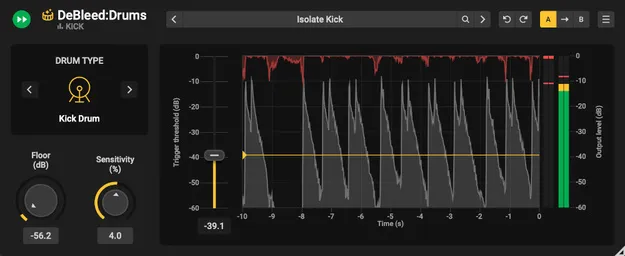
DeBleed:Drums Upgrade from DeBleed:Snare drum spill removal plugin interface by Acon Digital

DeBleed:Drums Upgrade from DeBleed:Snare: AI Drum Spill Removal Plugin by Acon Digital

DeBleed:Drums Upgrade from DeBleed:Snare is an upgrade plugin from Acon Digital that removes unwanted mic spill from drum recordings in real time, using AI-based separation. It is for owners of DeBleed:Snare.

VST3VST2AUAAXWindowsmacOS
AVAILABLE ATPlugin Boutique
Opens the store in a new tab
01Overview

DeBleed:Drums Upgrade from DeBleed:Snare is for mix engineers who already own DeBleed:Snare and want to extend its spill removal to the full drum kit. Mic bleed can make drum tracks sound muddy and undefined, and conventional noise gates often choke hits or cut ghost notes. Acon Digital describes this plugin as a way to isolate drum hits while keeping the natural resonance of the kit. It runs as an insert effect on individual drum tracks during mixing.

Best for

  • Drum mic bleed removal
  • Cleaning individual drum tracks
  • Tightening multi-mic drum mixes
  • Reducing spill in snare mics
  • Mixing recorded drum kits
Developer
Acon Digital
Category
Drum Tools
Store
Plugin Boutique
02Key features

What you get

  • AI-driven separation trained on hours of real drum recordings
  • Real-time stem separation as an insert effect
  • Sensitivity control for fast setting adjustment
  • Trigger Threshold to remove more spill
  • Preset manager for saving and recalling settings
  • Perpetual license with no subscription required
03In depth

Sound and Processing Approach

Acon Digital says the plugin uses neural network technology to separate drum kit elements such as kicks and snares, while DSP algorithms protect transients. The developer describes its trigger threshold logic as a way to remove bleed while keeping the hits you want.

The Sensitivity control sets how aggressively spill is removed, and the Trigger Threshold control lets you remove more bleed and process only selected hits. Because it works in real time as an insert, you hear the result as you mix rather than waiting for offline processing.
Workflow, Presets and Licensing

A preset manager lets you save settings and get started faster on new tracks. The plugin is sold as a perpetual license, so no subscription is needed to keep using it.

This upgrade is intended for owners of DeBleed:Snare. The full DeBleed:Drums version is sold separately.

04Specs

Will it run?

Formats, systems and requirements as listed by Plugin Boutique. Missing details are left out, not guessed.

DeveloperAcon Digital
TypePlugin
CategoryDrum Tools
FormatsVST3, VST2, AU, AAX
Operating systemsWindows, macOS
05FAQ

Questions, answered

What formats and operating systems does DeBleed:Drums Upgrade support?

It is available in VST3, VST2, AU and AAX formats. It runs on Windows and macOS, and the macOS requirements note native support for ARM64 and Intel.

Who is this upgrade for?

It is an upgrade for owners of DeBleed:Snare. The full version of DeBleed:Drums is a separate product.

What do I need to use DeBleed:Drums Upgrade?

You need a compatible host application. The listed requirements mention VST, VST3 or AAX hosts on Windows, with Pro Tools 12 or higher, and AU, VST, VST3 or AAX hosts on macOS, with Pro Tools 12.8.3 or higher.

Does it require a subscription?

No. It is sold with a perpetual license, and no subscription is needed.

07Developer

More from Acon Digital

All Acon Digital products →