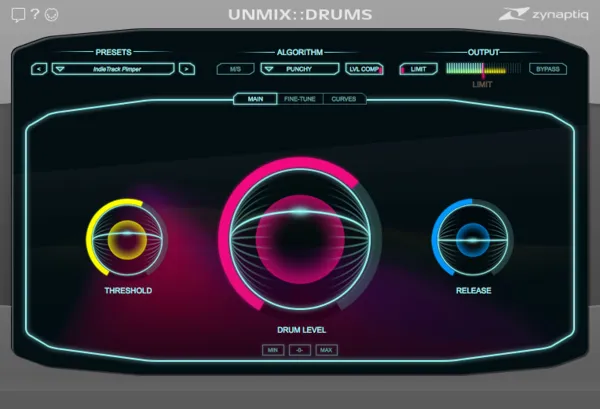
UNMIX::DRUMS Educational Version drum level plugin interface by Zynaptiq

UNMIX::DRUMS Educational Version: Drum Level Plugin by Zynaptiq Free Download

UNMIX::DRUMS Educational Version is a drum level control plugin from Zynaptiq that boosts or attenuates drums inside mixed music in real time, using source separation.

VST3VST2AUAAXWindowsmacOS64-bit
AVAILABLE ATPlugin Boutique
Free trial available from the developer
01Overview

UNMIX::DRUMS Educational Version is the Zynaptiq plugin that works on finished mixes as well as drum buses. Its source separation technology lets you change the level of the drums relative to everything else, with frequency-dependent control. The developer describes the plugin as the first of its kind for drum level control in mixed music. It is available for eligible full-time students and faculty at educational institutions.

Best for

  • Mix drum balancing
  • Drum bus impact shaping
  • Sub-bass enhancement
  • Sample-based music creation
  • Mashups and remixes
  • Mastering drum level
Developer
Zynaptiq
Category
Drum Tools
Store
Plugin Boutique
02Key features

What you get

  • Source separation-based control of drum level in mixed music
  • SMOOTH and PUNCHY boost modes with drum reverb boost
  • Sample-accurate sub-bass (re)synthesizer with BASS SYNTH slider
  • Frequency-dependent control of key parameters
  • Breakpoint editor in the CURVES view
  • Intuitive 3-way graphical user interface
  • M/S operation and hard-knee output limiter
  • Factory presets and a sample-accurate analyzer display
03In depth

Drum Level Control in Mixed Music

The plugin takes a mixed music input and lets you raise or lower the drums relative to the rest of the signal. Its DRUM LEVEL and THRESHOLD controls set the main balance. Zynaptiq says boost can reach up to +18 dB, and that the achievable amount depends on the input signal.

On a drum bus, the frequency-dependent DRUM LEVEL control can be drawn with a breakpoint editor in the CURVES view. This lets you shape drum impact without a compressor or transient processor.

Two boost modes are included. SMOOTH targets natural, dry medium boosts and pre-processing for drum extraction. PUNCHY gives a snappier, tighter result. Both modes can also boost the drum reverb, focusing on early reflections in SMOOTH and long tails in PUNCHY.
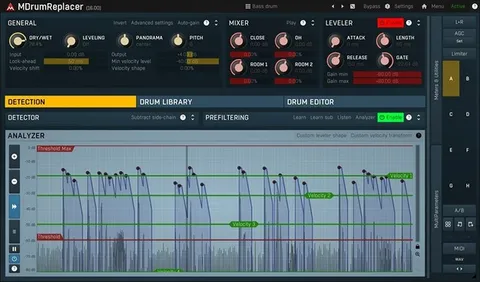
Sub-Bass Synthesis and Workflow

A sample-accurate sub-bass resynthesizer adds low-frequency energy through the BASS SYNTH slider. The developer states it avoids level instabilities, false triggers and phase cancellation.

The three-level interface keeps only the parameters you need visible. Other tools include M/S processing, a hard-knee output limiter and drum level macro buttons. A set of factory presets is also included.

04Specs

Will it run?

Formats, systems and requirements as listed by Plugin Boutique. Missing details are left out, not guessed.

DeveloperZynaptiq
TypePlugin
CategoryDrum Tools
FormatsVST3, VST2, AU, AAX
Operating systemsWindows, macOS
Architecture64-bit
Free trialYes
05FAQ

Questions, answered

What formats and operating systems does UNMIX::DRUMS Educational Version support?

It is available in VST3, VST2, AU and AAX formats, as 64-bit. It runs on Windows and macOS.

What do I need to use UNMIX::DRUMS Educational Version?

You need a compatible host that supports VST 2.4, VST 3, AU or AAX, processing audio as 32-bit float. Windows 10 or newer or macOS 10.15 or newer is required, plus an iLok account and an internet connection for activation.

Does it need a dongle?

An iLok account is required. An iLok 2 or 3 device is optional if your machine has internet access. The older first-generation iLok is not supported.

How much CPU does it use?

Zynaptiq says its plugins use a lot of CPU. The developer recommends a playback buffer size of at least 512 samples, ideally 1024, and suggests testing with the free trial first.

07Developer

More from Zynaptiq

All Zynaptiq products →