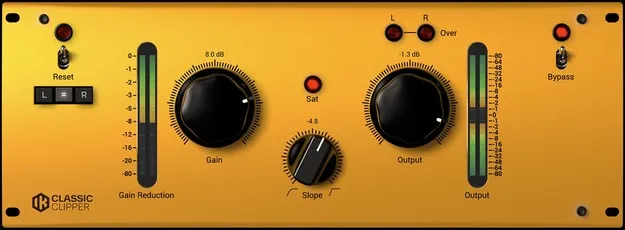
Classic T-RackS Clipper by IK Multimedia distortion plugin interface

Classic T-RackS Clipper: Peak Clipping and Saturation Plugin by IK Multimedia

Rated 4.2/5 on Plugin Boutique (19 ratings)

Classic T-RackS Clipper is a distortion plugin from IK Multimedia that uses peak clipping instead of peak limiting. It offers Gain, Slope and Output controls for dynamics control and harmonic saturation.

VST3VST2AUAAXWindowsmacOS64-bit
AVAILABLE ATPlugin Boutique
Opens the store in a new tab
01Overview

Classic T-RackS Clipper is an effects plugin from IK Multimedia in the distortion category. Its main job is peak clipping, a dynamics process that tames unruly peaks as an alternative to standard peak limiting. IK Multimedia says clipping is often more transparent than limiting, which is why mastering engineers use it. The plugin is also used for harmonic saturation, adding anything from mild harmonics to pronounced distortion depending on settings.

Best for

  • Last-stage dynamics control
  • Snare saturation
  • Bass presence
  • Creative distortion effects
  • Mastering peak control
  • Adding warmth to sterile tracks
Developer
IK Multimedia
Category
Distortion
Store
Plugin Boutique
02Key features

What you get

  • Peak clipping as an alternative to standard peak limiting
  • Harmonic saturation from mild harmonics to pronounced distortion
  • Simple control set: Gain, Slope and Output
  • Prevents digital overs while clipping
  • Suited to last-stage dynamic control
  • Can add presence to weak snare and bass tracks
  • Available in VST3, VST2, AU and AAX formats
  • Runs on Windows and macOS, 64-bit
03In depth

Peak Clipping and Harmonic Saturation

The Classic T-RackS Clipper uses peak clipping to control peaks, giving you a dynamics option beyond the usual limiter. IK Multimedia describes clipping as a more transparent process than standard peak limiting, and positions it as a last-stage dynamic control.

The same processor can generate harmonic saturation. With high gain and lower output, the signal picks up a range of saturation that can run from mild harmonics to strong distortion. Clipping at these settings also prevents digital overs.

Used in this way, the plugin can add presence and character to a cold or sterile track, or create a distinct creative distortion effect.
Controls and Practical Use on Snares and Bass

The plugin keeps its interface simple, with three controls: Gain, Slope and Output. Raising the level on a weak or dynamically inconsistent snare or bass track saturates it, making it more present and bold in the mix.

IK Multimedia cautions against overusing the effect. Heavy distortion can be hard to blend into a mix, so moderate settings are usually the better starting point.

04Specs

Will it run?

Formats, systems and requirements as listed by Plugin Boutique. Missing details are left out, not guessed.

DeveloperIK Multimedia
TypePlugin
CategoryDistortion
FormatsVST3, VST2, AU, AAX
Operating systemsWindows, macOS
Architecture64-bit
05FAQ

Questions, answered

What is the Classic T-RackS Clipper used for?

It uses peak clipping to control peaks and can also add harmonic saturation. Depending on gain and output settings, it can add mild harmonics or strong distortion.

Which formats and operating systems does it support?

It is available in VST3, VST2, AU and AAX formats. It runs on Windows and macOS in 64-bit versions. Windows requires an ASIO-compatible sound card.

What do I need to run the Classic T-RackS Clipper?

On Mac, you need an Intel Core 2 Duo or newer, 4 GB of RAM (8 GB suggested) and macOS 10.15 or newer. On Windows, you need Windows 10 or newer, 4 GB of RAM (8 GB suggested) and an ASIO-compatible sound card. An internet connection is required for Custom Shop operations.

07Developer

More from IK Multimedia

All IK Multimedia products →