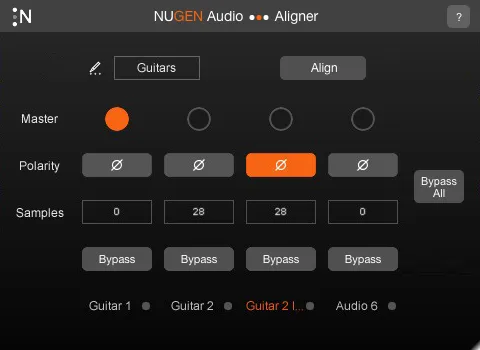
Aligner automatic phase and polarity alignment plugin by NUGEN Audio interface

Aligner: Automatic Phase and Polarity Alignment Plugin by NUGEN Audio

Rated 4.1/5 on Plugin Boutique (15 ratings)

Aligner is an automatic phase and polarity alignment plugin from NUGEN Audio, designed to speed up the workflow of audio engineers working with multiple tracks of the same source.

VST3AUAAXWindowsmacOS64-bit
AVAILABLE ATPlugin Boutique
Opens the store in a new tab
01Overview

Recording one sound source with more than one microphone often leads to phase or polarity problems between tracks. Mic distance, or any other factor that makes the audio reach one track before another, can cause the recording to sound thin or weak. NUGEN Audio describes Aligner as a tool that handles this alignment automatically, so engineers can correct these timing and polarity differences without manually hunting for them on every track.

Best for

  • Multi-mic drum recording
  • Fixing thin vocal recordings
  • Stereo mic phase correction
  • Studio session prep
  • Post-production alignment
Developer
NUGEN Audio
Store
Plugin Boutique
02Key features

What you get

  • Automatic phase alignment between multiple tracks
  • Automatic polarity alignment for multi-mic recordings
  • Corrects timing differences caused by mic distance
  • Designed to speed up daily audio engineering workflow
  • Available in VST3, AU and AAX formats
  • 64-bit plugin for Windows and macOS
03In depth

Automatic Phase and Polarity Alignment

Multi-mic recordings are prone to phase and polarity mismatches that are often hard to hear at first. NUGEN Audio says these problems are frequently almost imperceptible, yet they can still make a recording sound thin or weak.

Aligner is built to detect and correct these differences automatically across tracks, which removes much of the manual work of lining up recordings by ear.
Built for Daily Engineering Workflow

NUGEN Audio positions Aligner as a tool designed to speed up the daily workflow of audio engineers. Its focus is practical: solving a common recording problem quickly so sessions keep moving.

It is classed as a studio tool in the Sound Editor category, and it runs as a plugin inside compatible host applications.

04Specs

Will it run?

Formats, systems and requirements as listed by Plugin Boutique. Missing details are left out, not guessed.

DeveloperNUGEN Audio
TypePlugin
CategorySound Editor
FormatsVST3, AU, AAX
Operating systemsWindows, macOS
Architecture64-bit
05FAQ

Questions, answered

What is Aligner used for?

Aligner is used to correct phase and polarity issues that occur when one sound source is recorded with more than one microphone. It aligns the tracks automatically.

Which formats and operating systems does Aligner support?

Aligner is available in VST3, AU and AAX formats as a 64-bit plugin for Windows and macOS.

What do I need to use Aligner?

Aligner needs a 64-bit AAX, VST3, AU or AudioSuite-compatible host application. The listed requirements are 512 MB RAM on Windows XP or later, and Mac OS X 10.9.x with 512 MB RAM.

07Developer

More from NUGEN Audio

All NUGEN Audio products →