Tape Stop by Vengeance Sound pitch effect plugin interface

Tape Stop: Tape-Style Pitch Effect Plugin by Vengeance Sound

Rated 4.5/5 on Plugin Boutique (521 ratings)

Tape Stop is a pitch effect plugin from Vengeance Sound that simulates tape-stop pitch-down and pitch-up, with added filter, volume and sequencer control. It is available in VST3, VST2, AU and AAX formats.

VST3VST2AUAAXWindowsmacOS64-bit
AVAILABLE ATPlugin Boutique
Opens the store in a new tab
01Overview

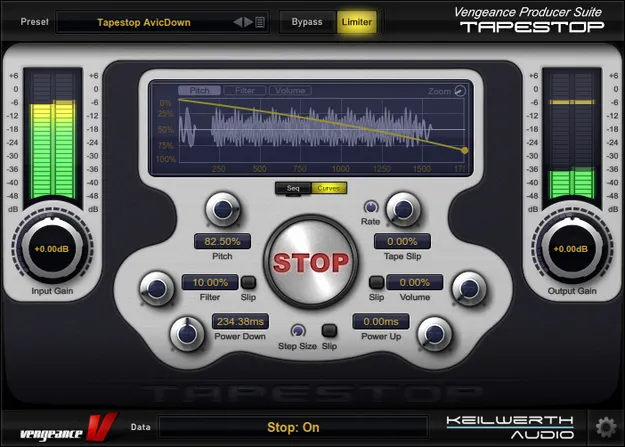
Tape Stop is an effects plugin built around the classic tape-stop effect, where playback slows and drops in pitch as if a tape machine were being halted. Vengeance Sound extends the idea with an internal sequencer, three independent envelopes for pitch, filter and volume, and a tape slip mode that imitates a worn tape or vinyl record. The effect duration can be set in note values, so transitions stay locked to the tempo of your project.

Best for

  • Tape stop transitions
  • Track breakdowns
  • Drop fills
  • Vinyl slip effects
  • Pitch wobble effects
  • Tempo-synced FX
Store
Plugin Boutique
02Key features

What you get

  • Simulates pitch-down and pitch-up tape-stop effects
  • Optional low-pass filter alongside the pitch change
  • Volume fades that can be added to the effect
  • Tape slip mode simulating worn tape or vinyl
  • Stepped or smooth pitch movement options
  • Internal sequencer for repeating effect patterns
  • Three independent envelopes for pitch, filter and volume
  • Realtime scope to view the effect shape
  • 80 included presets for pitch, wobble and special FX
  • Effect duration set in note values for tempo sync
03In depth

Pitch Control, Filter and Volume Envelopes

Tape Stop handles more than the standard pitch-down. Pitch can move down or up, and the pitch effect can be set to stepped or smooth movement. An optional low-pass filter and volume fades can be added alongside the pitch change, and each of the three parameters has its own independent envelope.

A built-in sequencer lets you program repeating patterns, and a realtime scope shows the shape of the effect as you adjust it. The developer states that the plugin produces no clicks and stays 100% in sync with your song.
Presets and Practical Use in Your Session

The plugin ships with 80 presets covering pitch, wobble and special effect styles, which gives you a starting point before you build your own shapes. Because the effect duration follows note values, you can place tape stops and slips on specific beats or bars.

Tape Stop is a good fit for transitions, breakdowns and fills, and for adding worn-media character to a track. It is an effect, so you insert it on the audio or channel you want to process rather than playing it as an instrument.

04Specs

Will it run?

Formats, systems and requirements as listed by Plugin Boutique. Missing details are left out, not guessed.

DeveloperVengeance Sound
TypePlugin
CategoryPitch Shifter
FormatsVST3, VST2, AU, AAX
Operating systemsWindows, macOS
Architecture64-bit
05FAQ

Questions, answered

What formats does Tape Stop support?

Tape Stop is available in VST3, VST2, AU and AAX formats.

Which operating systems does Tape Stop run on?

Tape Stop supports Windows and macOS. The macOS version requires macOS 10.9 or later and supports Intel and Apple Silicon processors. The Windows version requires Windows Vista or later and an OpenGL 3.2 capable GPU.

What do I need to use Tape Stop?

Tape Stop needs a compatible 64-bit host that supports VST2, VST3, AU or AAX, depending on the format you install. The licence must be refreshed every 90 days, either in the Vengeance Sound V-Manager or with an offline key file from your user account.

Does Tape Stop stay in sync with my project tempo?

Yes. The tape stop effect duration can be set in note values, and the developer states the effect stays 100% in sync with your song.
07Developer

More from Vengeance Sound

All Vengeance Sound products →