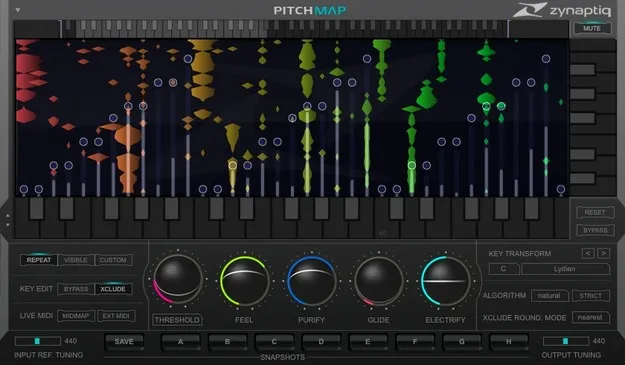
PITCHMAP pitch processing plugin interface by Zynaptiq

PITCHMAP: Real-Time Mixed-Signal Pitch Processor by Zynaptiq Free Download

Rated 4.4/5 on Plugin Boutique (908 ratings)

PITCHMAP is a pitch shifter plugin by Zynaptiq that changes the pitch of individual sounds within mixed audio in real time. It can be played from a MIDI keyboard or driven by a pitch map, and it supports VST3, VST2, AU and AAX on Windows and macOS.

VST3VST2AUAAXWindowsmacOS64-bit
AVAILABLE ATPlugin Boutique
Free trial available from the developer
01Overview

PITCHMAP works on finished mixes and loops, not only on isolated tracks. It separates the input into individual sounds, including their harmonics and transients, and lets you retune or remap each one. Developer Zynaptiq describes the plugin as able to correct tuning, re-harmonize material and suppress or isolate elements of a mix. Its Natural Mode adds separate handling for voice, and Purify, Electrify and Glide shape the sound further. The plugin runs as a 64-bit effect in common DAW formats.

Best for

  • Tuning correction in mixes
  • Sample pitch reshaping
  • DJ key matching
  • Mashups and remixes
  • Harmony testing
  • Synth sounds from live input
  • Film and game sound design
Developer
Zynaptiq
Store
Plugin Boutique
02Key features

What you get

  • Pitch processing of individual sounds inside mixed signals in real time
  • MIDI keyboard control of pitch mapping
  • Pitch map editor with draggable sliders
  • Macro controls for key and scale changes
  • Natural Mode with separate voice processing
  • Purify and Electrify parameters for synthetic character
  • Polyphonic Glide portamento option
  • Eight Snapshot slots for settings and automation
03In depth

Sound Control and Pitch Mapping

PITCHMAP lets you assign source pitches to target pitches by playing notes on a MIDI keyboard or by dragging sliders in its pitch map editor. Macro controls can shift material from one key or scale to another in a few clicks.

Snapshot functionality provides eight slots for comparing settings, applying different settings to different parts of a recording, and creating parameter automation. Zynaptiq says the plugin is designed for near-instant results while still exposing fine detail.

Zynaptiq recommends a playback buffer of at least 512 samples, or ideally 1024, for best performance.
Who PITCHMAP Is For

Zynaptiq lists uses including correcting tuning in mixed recordings, testing harmonies for compositions, reshaping pitch in sampled material, adapting songs to a key for DJ sets, and building mashups and remixes faster.

Sound designers can use the plugin with live MIDI input to create synthesizer-like sounds from an existing signal.

Zynaptiq also notes that PITCHMAP is not a replacement for other pitch tools. For monophonic vocals it points to Antares Auto Tune, and for single polyphonic instruments to Celemony Melodyne. For some polyphonic audio, the developer says offline processing may give better results.

04Specs

Will it run?

Formats, systems and requirements as listed by Plugin Boutique. Missing details are left out, not guessed.

DeveloperZynaptiq
TypePlugin
CategoryPitch Shifter
FormatsVST3, VST2, AU, AAX
Operating systemsWindows, macOS
Architecture64-bit
Free trialYes
05FAQ

Questions, answered

What formats and operating systems does PITCHMAP support?

PITCHMAP is available in VST3, VST2, AU and AAX formats. It runs on Windows and macOS as a 64-bit plugin.

What do I need to run PITCHMAP?

You need a host that supports VST 2.4, VST 3, AU or AAX, and a free iLok.com account for activation. An internet connection is required for software activation, and an iLok 2 is needed for activation on a machine without internet access. The first-generation iLok is not supported.

Does PITCHMAP use a lot of CPU?

Zynaptiq says its plugins use significant CPU due to their complex processing. The developer recommends using the free trial to check your system and setting the playback buffer to at least 512, ideally 1024, samples.

07Developer

More from Zynaptiq

All Zynaptiq products →