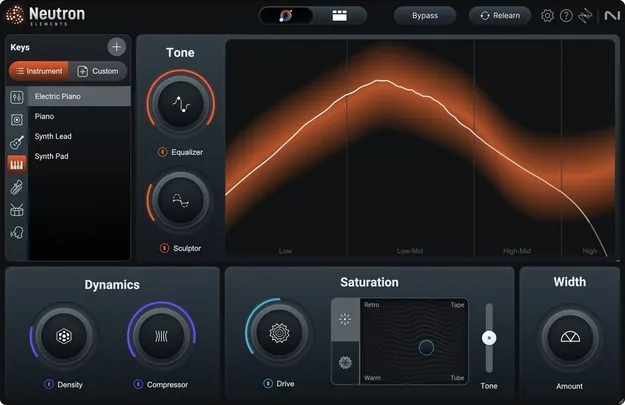
Neutron 5 Elements by iZotope channel strip mixing plugin interface

Neutron 5 Elements: Channel Strip Mixing Plugin by iZotope

Rated 4.5/5 on Plugin Boutique (27 ratings)

Neutron 5 Elements is a channel strip mixing plugin from iZotope that uses an updated Assistant View, Mix Assistant processing and Tonal Balance metering to help producers mix tracks faster. It is available in VST3 and AU formats for Windows and macOS.

VST3VST2AUAAXWindowsmacOS64-bit
AVAILABLE ATPlugin Boutique
Opens the store in a new tab
01Overview

Neutron 5 Elements is the entry-point edition of iZotope's Neutron 5 mixing suite, built around the updated Assistant View. The developer positions it as a way to bring out the balance in a mix without a lengthy setup. It integrates with Audiolens, and its metering includes a Tonal Balance curve that shows how your mix's frequency content sits against a reference. The plugin runs as a 64-bit effect and is a good fit for producers who want guided mixing decisions inside a single channel strip.

Best for

  • Mixing full tracks
  • Channel strip processing
  • Tonal balance checks
  • Guided mix starting points
  • Pro Tools mixing
Developer
iZotope
Store
Plugin Boutique
02Key features

What you get

  • Updated Assistant View for guided channel strip processing
  • Improved Mix Assistant processing
  • Integrates with Audiolens
  • Metering with Tonal Balance curve for frequency comparison
  • Available in VST3, AU and AAX formats
  • Supports Windows 10-11 and macOS Ventura or higher
  • 64-bit only on all supported formats
03In depth

Assistant View and Mix Assistant Processing

The core of Neutron 5 Elements is its Assistant View, which has been improved in this version. The Assistant analyzes the track it sits on and suggests processing settings, so you start from a reasoned mix move rather than a blank channel strip. Mix Assistant processing has also been updated, which iZotope presents as a more accurate basis for these suggestions.

Because the Assistant works on the track itself, it suits producers who want to shape individual elements quickly and then refine the results by hand. You keep full control of the settings the Assistant proposes, so the plugin works as a starting point as much as a finished处理 chain.
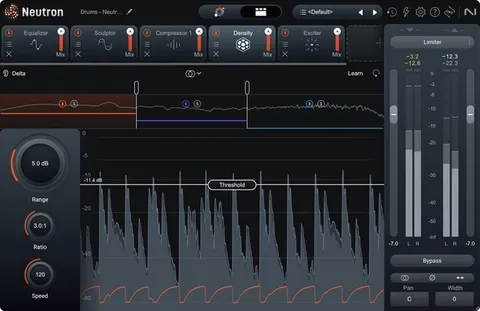
Metering and Tonal Balance Analysis

Neutron 5 Elements includes metering with a Tonal Balance curve. This display compares the frequency distribution of your mix against a target curve, making it easier to see where low, mid and high energy sit relative to a reference. Use it during mixing to check whether a track is heavy in one region, and again during mastering prep to confirm the overall balance.

The Tonal Balance view is most useful alongside your ears. Treat the curve as a visual cross-check on the decisions you are already making in the mix.

Who It Is For and What You Need

Neutron 5 Elements suits producers and engineers who want a guided, all-in-one channel strip for mixing. It runs in VST3 and AU formats, plus AAX for Pro Tools workflows, on Windows 10 to 11 (64-bit) and macOS Ventura 13.6.9 or later, with Apple silicon Macs supported natively. VST2 is no longer supported in this version, so check your host before installing.

04Specs

Will it run?

Formats, systems and requirements as listed by Plugin Boutique. Missing details are left out, not guessed.

DeveloperiZotope
TypePlugin
CategoryChannel Strip
FormatsVST3, VST2, AU, AAX
Operating systemsWindows, macOS
Architecture64-bit
05FAQ

Questions, answered

What formats does Neutron 5 Elements support?

Neutron 5 Elements is available in VST3, AU and AAX formats. VST2 is no longer supported in this version.

Which operating systems can run Neutron 5 Elements?

It runs on Windows 10-11 (64-bit only) and macOS Ventura (13.6.9) or higher, with Apple silicon Macs supported natively.

Does Neutron 5 Elements work with VST2 hosts?

No. The system requirements state that VST2 is no longer supported, so use the VST3, AU or AAX format instead.

What is the Tonal Balance curve used for?

The Tonal Balance curve is part of the plugin's metering. It shows how the frequency content of your mix compares to a reference curve, helping you judge overall balance.

07Developer

More from iZotope

All iZotope products →