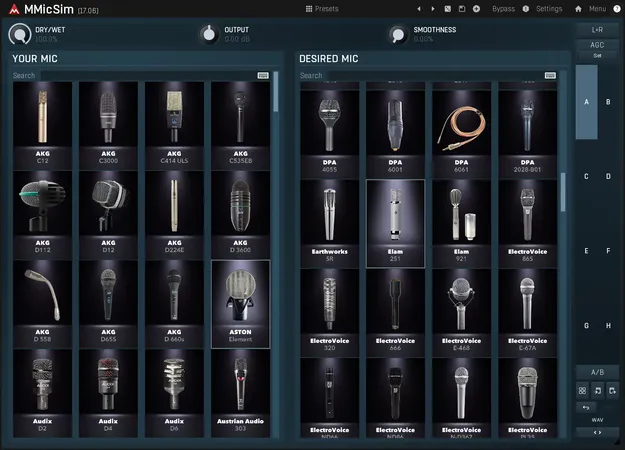
MMicSim microphone simulator plugin interface by MeldaProduction

MMicSim: Microphone Simulator Plugin by MeldaProduction

Rated 4.6/5 on Plugin Boutique (80 ratings)

MMicSim is a microphone simulator plugin by MeldaProduction that converts the sound of your existing microphone into the sonic character of a chosen target mic from its library of over 100 microphones.

VST3VST2AUAAXWindowsmacOS64-bit
AVAILABLE ATPlugin Boutique
Opens the store in a new tab
01Overview

MMicSim is a Studio Tools utility plugin from MeldaProduction. You pick the microphone you already own from a source list, then choose a target microphone from the desired list. The plugin reshapes the signal so it takes on the character of the target. The library covers everyday workhorses as well as vintage models such as the Telefunken ELA M251 and Neumann M49b. It runs as a 64-bit plugin on Windows and macOS.

Best for

  • Vocal mic transformation
  • Snare and kick re-miking
  • Guitar cabinet mic auditioning
  • Fixing recording mistakes
  • Creative texture exploration
Category
Utilities
Store
Plugin Boutique
02Key features

What you get

  • Converts your existing microphone into a chosen target microphone
  • Library of over 100 microphones, including vintage models
  • Simple source and target selection for fast results
  • Smoothness control to reduce spectral inaccuracies and resonances
  • Dry/Wet knob to set the intensity of the algorithm
  • Microphone responses measured in an anechoic chamber
  • Available in VST3, VST2, AU and AAX formats
03In depth

Sound Shaping and Controls

The plugin keeps its interface simple: choose a source, choose a target, and start processing. For finer adjustment, the Smoothness control reduces spectral inaccuracies and acoustic resonances, and the developer recommends setting it around 20 percent as a starting point.

The Dry/Wet knob sets how strongly the core algorithm affects the signal, so you can decide how much of the target character you add.
Where MMicSim Fits in a Session

MMicSim is aimed at vocals and instruments. On a dynamic microphone recording, it can move the result toward the airier detail associated with a premium tube condenser.

On instruments, it can be used to simulate different microphone choices after tracking. The developer suggests re-miccing drum sessions to change the character of a snare or kick, and auditioning different ribbon and dynamic microphones on a guitar cabinet. It can also help correct a recording problem or serve as a creative tool.

04Specs

Will it run?

Formats, systems and requirements as listed by Plugin Boutique. Missing details are left out, not guessed.

DeveloperMeldaProduction
TypePlugin
CategoryUtility
FormatsVST3, VST2, AU, AAX
Operating systemsWindows, macOS
Architecture64-bit
05FAQ

Questions, answered

What formats does MMicSim support?

MMicSim is available in VST3, VST2, AU and AAX formats.

Which operating systems can run MMicSim?

MMicSim runs on Windows 10 and 11 (64-bit) and on macOS 10.14 Mojave and newer (64-bit), including Apple Silicon Macs.

What do I need to use MMicSim?

You need a 64-bit VST, VST3, AU or AAX compatible host. On Windows, an Intel or AMD processor with SSE2 support is required. On macOS, Intel, AMD or Apple Silicon CPUs are supported.

How many microphones are included?

The developer describes a library of over 100 microphones, ranging from common studio workhorses to rare vintage models such as the Telefunken ELA M251 and Neumann M49b.

07Developer

More from MeldaProduction

All MeldaProduction products →