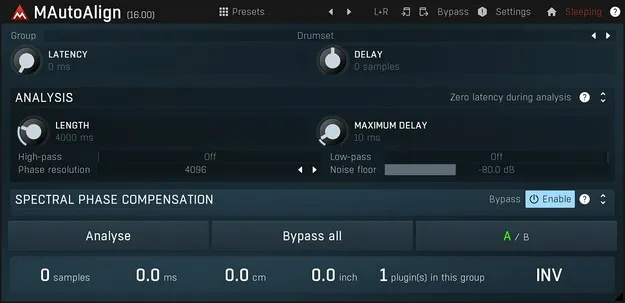
MAutoAlign by MeldaProduction multitrack phase alignment plugin interface

MAutoAlign: Automatic Multitrack Phase Alignment Plugin by MeldaProduction Free Download

Rated 4.7/5 on Plugin Boutique (1,687 ratings)

MAutoAlign is a multitrack phase alignment plugin from MeldaProduction that automatically finds delays and polarity inversions across tracks recorded with multiple microphones.

VST3VST2AUAAXWindowsmacOS64-bit
AVAILABLE ATPlugin Boutique
Free trial available from the developer
01Overview

MAutoAlign targets phase cancellation, the problem that appears when a source is recorded with more than one microphone. Place one instance on each track and it analyzes the others on its own, without sidechain or manual routing. The plugin only delays tracks and may invert their polarity, with no filtering or other signal-altering processing. It runs as a Melda effect in the Phaser subcategory, with VST3, VST2, AU and AAX versions available.

Best for

  • Multi-mic recording alignment
  • Phase cancellation fixes
  • Drum multi-mic mixing
  • Film and game surround audio
  • Pre-EQ track alignment
Category
Phasers
Store
Plugin Boutique
02Key features

What you get

  • Automatic delay and polarity alignment across multiple tracks
  • One instance per track, with instances finding each other automatically
  • No sidechain or complex routing required
  • Transparent processing with no filtering of the signal
  • Advanced metering that shows frequency cancellations
  • Up to 8 channels of surround processing
  • MIDI learn for any parameter
  • Resizable and stylable GUI, fully automatable
03In depth

How Automatic Multitrack Alignment Works

Each track gets its own instance of MAutoAlign. The instances find one another and run the analysis between them, so you do not need to set up sidechains or routing. The developer describes the plugin as unique in this multitrack design.

The plugin's processing is limited to delay and polarity. Because it does not filter or otherwise alter the signal, the audio is left unchanged apart from the alignment itself.

The advanced metering shows frequency cancellations, which helps you judge how much of the signal is lost when the tracks are mixed together.
Interface, Channel Support and Automation

MAutoAlign handles mono and stereo signals, as well as surround audio up to 8 channels, which suits film and game audio work. MIDI learn lets you map any parameter to a MIDI controller or keyboard for real-time control, recording or automation.

The interface uses a standardized GUI with textual editing and zooming, and the developer states that it supports resizable and stylable GUIs. The plugin is fully automatable and built for SSE and SSE2 processors.

04Specs

Will it run?

Formats, systems and requirements as listed by Plugin Boutique. Missing details are left out, not guessed.

DeveloperMeldaProduction
TypePlugin
CategoryPhaser
FormatsVST3, VST2, AU, AAX
Operating systemsWindows, macOS
Architecture64-bit
Free trialYes
05FAQ

Questions, answered

What formats does MAutoAlign support?

MAutoAlign is available in VST3, VST2, AU and AAX formats.

Which operating systems does MAutoAlign run on?

MAutoAlign runs on Windows and macOS. Windows 8, 10 and 11 (64-bit) are listed, along with macOS 10.14 and newer (64-bit), which includes native Apple Silicon support.

What do I need to run MAutoAlign?

You need a 64-bit VST, VST3, AU or AAX compatible host and an Intel, AMD or (on macOS) Apple Silicon processor with SSE2 support. Check the product PDF documentation for installation instructions.

Does MAutoAlign change the tone of my tracks?

By default it only delays tracks and may invert their polarity. It performs no filtering or other processing that alters the signal.

07Developer

More from MeldaProduction

All MeldaProduction products →