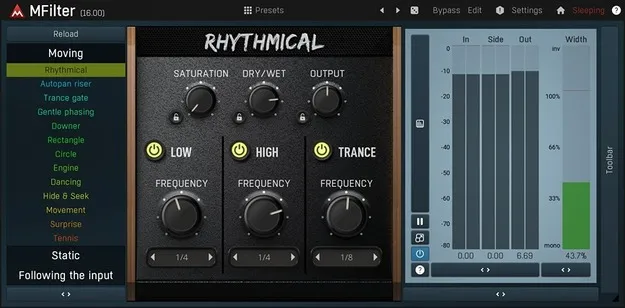
MFilter by MeldaProduction filter effect plugin interface

MFilter: Modulated Multiband Filter Plugin by MeldaProduction Free Download

Rated 4.8/5 on Plugin Boutique (120 ratings)

MFilter is a filter effect plugin by MeldaProduction, based on its MEqualizer, with four global modulators for creating wah-wah, sweeps and other moving filter sounds.

VST3VST2AUAAXWindowsmacOS64-bit
AVAILABLE ATPlugin Boutique
Free trial available from the developer
01Overview

MFilter is an effect plugin from MeldaProduction that reworks the company's MEqualizer into a modulated filter. Its four global modulators can move the filter over time, and each band can be set to one of seven filter types. The plugin has a simple default interface for quick results and an advanced mode for detailed control. It is available in VST3, VST2, AU and AAX formats for Windows and macOS.

Best for

  • Wah-wah effects
  • Filter sweeps
  • Moving synth textures
  • Surround mixing
  • Film and game audio
Category
Filters
Store
Plugin Boutique
02Key features

What you get

  • Four global modulators with LFO, follower, ADSR and pitch detection modes
  • Seven filter types per band: peak, shelves, low/high-pass, band-pass, notch
  • Dual interface with a simple default mode and an advanced mode
  • Integrated tube saturation for a vintage analogue character
  • Up to 8 channels of surround processing
  • Adjustable up-sampling from 1x to 16x
  • Tempo sync for oscillators and modulators
  • MIDI learn and full automation support
03In depth

Modulation and Filter Control

MFilter includes four global modulators. Each one can work as an LFO, an envelope follower, a MIDI or audio triggered ADSR envelope, or a pitch detector, and each can modulate any set of parameters, including other modulators. This makes it possible to keep a filter sound moving instead of static.

Each band offers seven filter types: peak, low-shelf, high-shelf, low-pass, high-pass, band-pass and notch. All parameters can be adjusted directly on the frequency response graph, where clicking a band gives access to its filter type, gain and advanced settings such as harmonics control.
Workflow, Processing and Surround Support

The default interface uses a few knobs and predefined modes, while the advanced mode exposes the full feature set. A full randomization button generates new settings, and holding Ctrl limits the change to slight modifications of the current settings.

MFilter supports up to 8 channels of surround audio, and its up-sampling is adjustable from 1x to 16x to reduce aliasing. Oscillators and modulators can sync to the host tempo, and any parameter can be mapped to a MIDI controller with MIDI learn.

04Specs

Will it run?

Formats, systems and requirements as listed by Plugin Boutique. Missing details are left out, not guessed.

DeveloperMeldaProduction
TypePlugin
CategoryFilter
FormatsVST3, VST2, AU, AAX
Operating systemsWindows, macOS
Architecture64-bit
Free trialYes
05FAQ

Questions, answered

What is MFilter used for?

MFilter is used for filter effects such as wah-wah and sweeps. Its four global modulators can also animate the filter so the sound changes over time.

What formats and operating systems does MFilter support?

MFilter is available in VST3, VST2, AU and AAX formats. It runs on Windows and macOS, in 64-bit versions.

What do I need to run MFilter?

You need a VST, VST3, AU or AAX compatible 64-bit host. On Windows, Windows 8, 10 or 11 is required; on macOS, macOS 10.14 or newer is required, with native Apple Silicon support.

Does MFilter have a trial version?

Yes, a trial version is available.

07Developer

More from MeldaProduction

All MeldaProduction products →