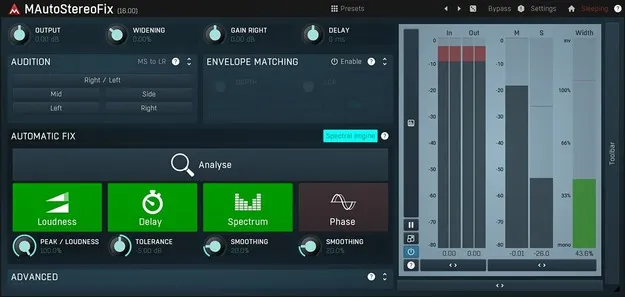
MAutoStereoFix by MeldaProduction stereo utility plugin interface

MAutoStereoFix: Automatic Stereo Fixing Plugin by MeldaProduction Free Download

Rated 4.4/5 on Plugin Boutique (39 ratings)

MAutoStereoFix is a studio utility plugin by MeldaProduction that analyzes stereo audio and automatically matches the volume, timing, spectrum and phase of the right channel to the left.

VST3VST2AUAAXWindowsmacOS64-bit
AVAILABLE ATPlugin Boutique
Free trial available from the developer
01Overview

MAutoStereoFix is a utility plugin from MeldaProduction for correcting stereo imbalances. The developer designed it for stereo microphone recordings such as overhead and room mics, and says it can also be used on master tracks. The plugin analyzes the audio and adjusts the right channel to match the left in several ways. It also includes tools for checking the stereo field, such as swapping channels and listening to the mid signal.

Best for

  • Overhead mic correction
  • Room mic alignment
  • Stereo drum recordings
  • Master bus stereo checking
  • Mid-side monitoring
Category
Utilities
Store
Plugin Boutique
02Key features

What you get

  • Automatic matching of right channel to left in volume, time, spectrum and phase
  • Optional volume envelope matching
  • Designed for stereo mic pairs such as overheads and rooms
  • Can be used on master tracks
  • Individual channel listening and left-right swap
  • Mid signal checking
  • Stylable, resizable, GPU-accelerated interface
  • MIDI learn support for controllers
  • 64-bit processing with unlimited sampling rate
  • Global preset management and online preset exchange
03In depth

How the automatic channel matching works

MAutoStereoFix compares the two channels of a stereo signal and matches the right channel to the left in volume, time, spectrum and phase. The developer says it can also match the volume envelope, so changes in level over time follow the left channel as well.

Because the plugin works automatically, you insert it on the track and let it analyze the material. Problems that are easy to miss during mixing, such as small timing or phase differences between mics, are the kind of issues it is built to address.
Stereo field checking tools

Beyond automatic correction, MAutoStereoFix gives you manual ways to inspect the stereo image. You can listen to individual channels, swap left and right, and check the mid signal. Monitoring on good headphones helps you judge the balance by ear.

The developer positions these tools as a way to build a centered stereo field, with the final decision left to your ears rather than the algorithm.

04Specs

Will it run?

Formats, systems and requirements as listed by Plugin Boutique. Missing details are left out, not guessed.

DeveloperMeldaProduction
TypePlugin
CategoryUtility
FormatsVST3, VST2, AU, AAX
Operating systemsWindows, macOS
Architecture64-bit
Free trialYes
05FAQ

Questions, answered

What formats does MAutoStereoFix support?

MAutoStereoFix is available in VST3, VST2, AU and AAX formats. It runs on Windows and macOS.

What do I need to run MAutoStereoFix?

On Windows, you need Windows 8, 10 or 11 (64-bit) with a VST, VST3 or AAX compatible 64-bit host and an Intel or AMD processor with SSE2 support. On macOS, you need macOS 10.14 or newer (64-bit), a VST, VST3, AU or AAX compatible host, and an Intel, AMD or M1 processor with SSE2 support, with native Apple Silicon ARM support.

Does MAutoStereoFix require an internet connection or dongle?

No. The developer states that no dongle or internet access is required for activation.

Is there a trial version?

Yes, MAutoStereoFix has a trial version available.

07Developer

More from MeldaProduction

All MeldaProduction products →