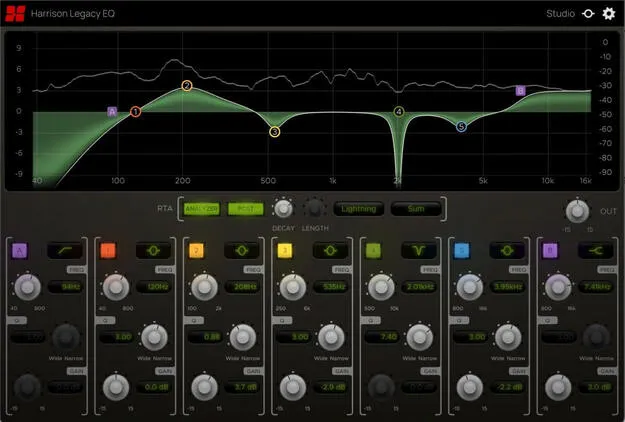
Legacy EQ by Harrison Consoles parametric EQ plugin interface

Legacy EQ: Analog-Style Parametric EQ Plugin by Harrison Consoles

Rated 4.7/5 on Plugin Boutique (58 ratings)

Legacy EQ is a parametric equalizer plugin from Harrison Consoles that recreates the sound and feel of the developer's classic MPC digital equalizer. It offers five EQ bands, two filters and RTA analyzers.

VST3VST2AUAAXWindowsmacOSLinux
AVAILABLE ATPlugin Boutique
Opens the store in a new tab
01Overview

Legacy EQ is a parametric EQ plugin modeled on the MPC digital equalizer from Harrison Consoles. The developer describes the original as an analog circuit with digital control that later became a staple in post-production and film studios. The plugin is built around a main display where you set each band's frequency, gain and Q directly on the graph. Five parametric bands and two dedicated filters cover tonal shaping, corrective cuts and sweep effects, while the RTA analyzers help you monitor the low end before and after processing.

Best for

  • Mix corrective EQ
  • Low-end balancing
  • Resonance notching
  • Filter sweep effects
  • Post-production tonal shaping
Category
EQ
Store
Plugin Boutique
02Key features

What you get

  • Five parametric EQ bands with independent controls
  • Six selectable shapes per EQ band
  • Gain range of -15 to +15 dB per band
  • Two filter bands with four selectable shapes and slopes
  • Wide notch shape for easier frequency targeting
  • Switchable pre- and post-EQ RTA analyzer
  • Adjustable analyzer speed and trim
  • Graphical editing with mouse-wheel and two-finger Q control
03In depth

Main Display and Band Controls

The main display graph is the center of the plugin. Drag a band's icon to set its frequency and gain, and use the mouse wheel or a two-finger drag to change its Q. Each of the five parametric bands can be activated and customized independently.

Each band offers six shape options, including bell, low and high shelf, low and high cut, notch and band-pass. Gain adjusts within a range of -15 to +15 dB, and the Q control runs from wide to narrow, so you can decide how far a change spreads into neighboring frequencies.
Filters and RTA Analysis

Two filter bands add steeper slopes to the EQ. Each filter can be set to one of four shapes and slopes. The wide notch shape covers a broader range than a typical notch, which makes it easier to find a resonance by ear, while the band-pass and notch shapes isolate or remove specific frequencies with adjustable Q width.

The RTA analyzer on the main display can be switched between pre- and post-EQ. Its speed and trim can be adjusted to suit your signal. The developer says the analyzers show the full resolution of the bass and sub-bass spectrum, which helps when balancing the low end of a mix.

04Specs

Will it run?

Formats, systems and requirements as listed by Plugin Boutique. Missing details are left out, not guessed.

DeveloperHarrison Consoles
TypePlugin
CategoryEQ
FormatsVST3, VST2, AU, AAX
Operating systemsWindows, macOS, Linux
05FAQ

Questions, answered

What formats does Legacy EQ support?

Legacy EQ is available in VST3, VST2, AU and AAX formats.

Which operating systems does Legacy EQ run on?

The plugin is listed for Windows, macOS and Linux. Windows 7 or newer and macOS 10.9 or newer are required, and the developer suggests trying the demo on Linux.

What do I need to use Legacy EQ in my DAW?

Legacy EQ runs as a plugin inside a host DAW. For Pro Tools, AAX must be enabled during installation, with version 10.3.5 or newer on Windows and 11 or higher on Mac. Logic requires the AU format, Cubase requires VST or VST3, and most other workstations use the VST format.

07Developer

More from Harrison Consoles

All Harrison Consoles products →