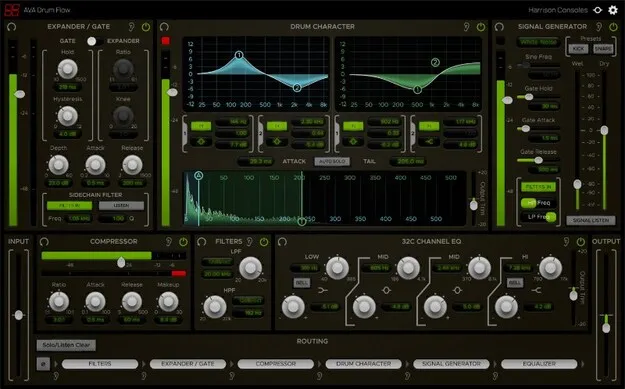
Drum Flow drum processing plugin interface by Harrison Consoles

Drum Flow: All-in-One Drum Processing Suite by Harrison Consoles

Rated 4.5/5 on Plugin Boutique (123 ratings)

Drum Flow is an all-in-one drum processing plugin from Harrison Consoles, with six routable processing elements for shaping drum tones. It includes a transient-aware EQ, an expander/gate, a signal generator, a console compressor, a 32C channel EQ and filters.

VST3VST2AUAAXWindowsmacOSLinux
AVAILABLE ATPlugin Boutique
Opens the store in a new tab
01Overview

Drum Flow is aimed at producers who record or edit real drums and want more punch without losing the natural character of the kit. Harrison Consoles built it as a single processing suite focused on drum tones, with a master section for input, output and routing. The developer says the goal is to pull out maximum punch while keeping the nuance of each drum, drummer and room. Its elements can be combined in the signal chain to suit each sound, whether you are working on a single kick mic or a full kit.

Best for

  • Drum tone shaping
  • Removing mic bleed
  • Adding kick thump
  • Snare snap enhancement
  • Drum bus processing
  • Recorded drum cleanup
Store
Plugin Boutique
02Key features

What you get

  • Six routable processing elements in one plugin
  • Drum Character EQ with separate attack and tail bands
  • Transient detection with adjustable threshold
  • Expander/Gate for removing mic bleed
  • Signal Generator for adding snap or thump
  • Console-style compressor with makeup gain
  • Emulation of Harrison 32C channel strip EQ
  • Selectable-shape high- and low-pass filters
03In depth

Transient-Based EQ and Gating for Drum Tones

The Drum Character element is an EQ that detects drum hit transients and lets you EQ the attack and tail of each hit separately. A threshold sets the level that triggers detection, and a waveform display lets you set the attack and tail widths in milliseconds. Each range has its own two-band EQ with shapes including low shelf, high shelf, bell and notch.

The Expander/Gate can work as either an expander or a gate. It attenuates signals below a set threshold, which the developer notes is useful for removing bleed from nearby drum mics. Together with the Drum Character EQ, these tools let you treat the hit and the decay of each drum on its own terms.
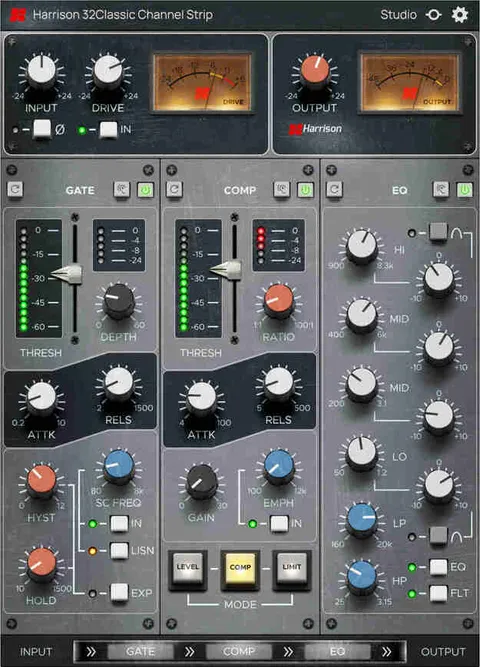
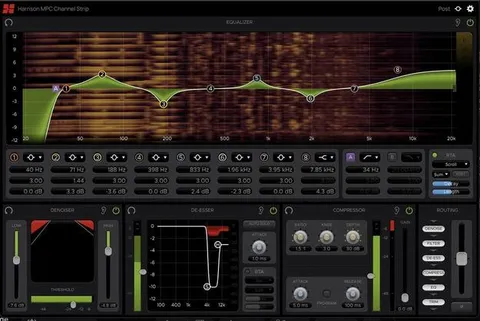
Signal Generator, Compressor and Console EQ

The Signal Generator adds extra snap or thump by blending in a gated noise or a low-frequency tone. The compressor is a full-featured console compressor with ratio, attack, release and makeup controls. The 32C Channel EQ emulates Harrison's 32C channel strip EQ, and the high- and low-pass filters offer selectable shapes.

Because all six elements are routable, you can arrange them to match your workflow, for example placing the gate before the compressor to clean up bleed first.

04Specs

Will it run?

Formats, systems and requirements as listed by Plugin Boutique. Missing details are left out, not guessed.

DeveloperHarrison Consoles
TypePlugin
CategoryChannel Strip
FormatsVST3, VST2, AU, AAX
Operating systemsWindows, macOS, Linux
05FAQ

Questions, answered

What is Drum Flow?

Drum Flow is an all-in-one drum processing plugin from Harrison Consoles. It combines a transient-aware EQ, an expander/gate, a signal generator, a compressor, a 32C channel EQ and filters.

Which formats and operating systems does Drum Flow support?

Drum Flow is available in VST3, VST2, AU and AAX formats. It is listed for Windows, macOS and Linux.

What do I need to use Drum Flow?

macOS 10.9 or newer and Windows 7 or newer are required. For Pro Tools, version 10.3.5 or newer is needed on Windows and version 11 or higher on Mac, with the AAX format enabled during installation. Logic requires the AU format, Cubase requires VST and/or VST3, and most other workstations require the VST format. Linux users are advised to try the demo.

07Developer

More from Harrison Consoles

All Harrison Consoles products →