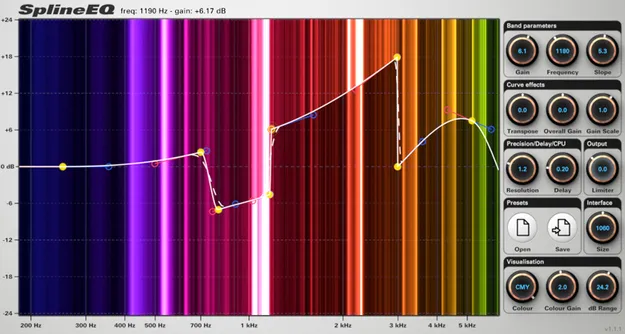
SplineEQ by Photosounder linear phase equalizer plugin interface

SplineEQ: Linear Phase Spline-Based Equalizer by Photosounder

Rated 4.4/5 on Plugin Boutique (418 ratings)

SplineEQ is a linear phase equalizer plugin from Photosounder that shapes filters by designing spline curves. It offers up to 60 bands and runs as VST3, AU and CLAP on Windows and macOS.

VST3AUCLAPWindowsmacOS64-bit
AVAILABLE ATPlugin Boutique
Opens the store in a new tab
01Overview

SplineEQ is an effects plugin in the EQ subcategory, developed by Photosounder. Instead of choosing from fixed filter types, you draw the response you want as a spline curve, and each point on the curve defines part of the filter's shape. The plugin processes audio in 64-bit floating point and supports all sampling rates, including 384 kHz, on Windows and macOS.

Best for

  • Mastering EQ
  • Surgical cuts
  • Mix bus shaping
  • Restoration filtering
  • Sound design EQ
Developer
Photosounder
Category
EQ
Store
Plugin Boutique
02Key features

What you get

  • Linear phase equalizer that changes intensity without shifting phase
  • Filters designed by editing a spline curve of any shape
  • Up to 60 bands, with 4 available in the free version
  • Curve transpose up to 10 octaves, plus overall gain and gain scale
  • Colour frequency analyser showing spectrum before and after filtering
  • Gain range from -60 dB to +60 dB with a built-in limiter
  • Adjustable resolution, latency and CPU usage trade-off
  • Presets saved as text-editable files, compatible across platforms and hosts
03In depth

Linear phase filtering and spline-based design

Linear phase equalizers change only the intensity of frequencies and leave their phase untouched. Photosounder notes that this can produce better sound quality than common minimum phase equalizers, and that linear phase processing avoids aliasing artefacts.

SplineEQ builds each filter from a spline curve that can take almost any shape. A dashed curve shows the actual filter response whenever it differs from the ideal spline, and the filter resolution can be adjusted.
Band control, analysis and curve editing

You can use between 1 and 60 bands, and the free version is limited to 4. Double-clicking the visualisation area creates or disables a band, and bands can be adjusted there, with the knobs, or with automatable parameter sliders in the host.

Curve tools include transposing the curve by up to 10 octaves, shifting all gains together, and scaling gains by a ratio to flatten, exaggerate or reverse a curve. The frequency analyser shows spectrum intensity before and after filtering in colour, at a resolution of about 10 Hz. The gain range runs from -60 dB to +60 dB, with a built-in limiter for boosts.

04Specs

Will it run?

Formats, systems and requirements as listed by Plugin Boutique. Missing details are left out, not guessed.

DeveloperPhotosounder
TypePlugin
CategoryEQ
FormatsVST3, AU, CLAP
Operating systemsWindows, macOS
Architecture64-bit
05FAQ

Questions, answered

What formats does SplineEQ support?

SplineEQ is available in VST3, AU and CLAP formats. The Audio Unit version is an Audio Unit v2 plugin.

Which operating systems does SplineEQ run on?

SplineEQ runs on 64-bit Windows and macOS. On macOS it is a universal plugin for Intel (macOS 10.12 or later) and Apple Silicon (macOS 11.0 or later).

Does SplineEQ support high sample rates?

Yes. SplineEQ supports all sampling rates, including 384 kHz, on Windows and macOS.

What is the difference between the free and full versions?

The free version is limited to 4 bands and cannot save or open presets. The full version supports up to 60 bands and preset saving and loading.

07Developer

More from Photosounder

All Photosounder products →