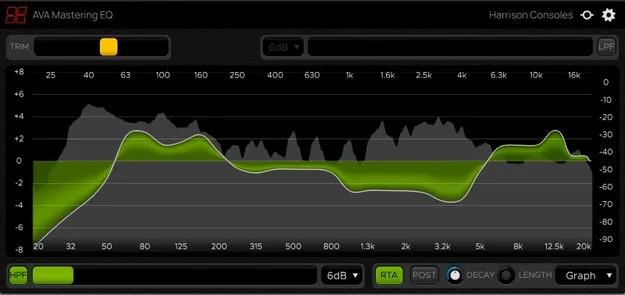
Mastering EQ by Harrison Consoles EQ plugin interface

Mastering EQ: Full-Range Mastering Equalizer by Harrison Consoles

Rated 4.3/5 on Plugin Boutique (2,251 ratings)

Mastering EQ is a 31-band equalizer plugin from Harrison Consoles, designed for mastering mixes. Adjacent bands form smooth, flat-edged curves rather than separate humps and valleys.

VST3VST2AUAAXWindowsmacOSLinux
AVAILABLE ATPlugin Boutique
Opens the store in a new tab
01Overview

Mastering EQ is an effects plugin in the EQ category from Harrison Consoles. Its 31 bands span 20 Hz to 20 kHz at one-third octave spacing, giving broad control over the full frequency range. Harrison says the plugin is built for the broad tonal moves needed at the final stage, while keeping the balance between the elements of a mix. It also includes adjustable high-pass and low-pass filters and a momentary bypass for comparing against the unprocessed signal.

Best for

  • Final mix tone control
  • Mastering EQ
  • Broad tonal adjustments
  • Bus and master processing
  • Full-range mix balancing
Category
EQ
Store
Plugin Boutique
02Key features

What you get

  • 31 bands from 20 Hz to 20 kHz at one-third octave spacing
  • Adjacent bands form flat-edged curves rather than discrete humps
  • Auto-expanding display from plus or minus 4 dB to plus or minus 14 dB
  • Manual scale adjustment with a lock icon to restore auto scaling
  • Adjustable high-pass and low-pass filters with 6 or 12 dB/Oct slopes
  • Momentary bypass for auditioning the unprocessed signal
  • Fine adjustment mode via Control or Command
  • Optional Vintage theme based on Harrison console software
03In depth

Sound and Curve Behavior

Harrison describes the curve as the key difference. When two adjacent bands are adjusted, the resulting curve stays flat across the band edges instead of forming discrete humps and valleys. The developer says this suits the wide, musical changes used in final tone shaping.

The default display shows plus or minus 4 dB. Boosting or cutting a band beyond that range expands the scale automatically to plus or minus 14 dB, and you can also set the scale manually.
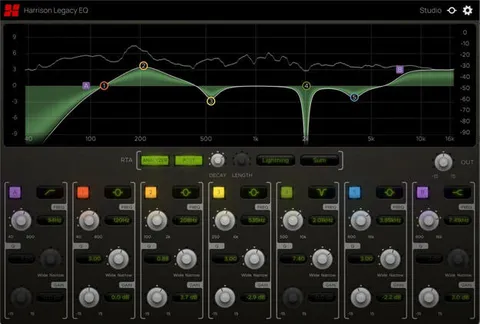
Controls and Workflow

Clicking and dragging across the frequency display is the main way to shape the curve. Dragging a control band or the output trim up or down changes gain, and the scroll wheel or touchpad works as well. Right-click and drag resets bands to zero, and holding Shift smooths unwanted bumps between adjacent curves.

Holding Control or Command enables a fine adjustment mode. The output Trim control sets the output level, and double-clicking it returns it to 0 dB. The Ear icon provides momentary bypass for auditioning the unaffected signal, and the Gear icon opens options for resizing, theme selection and the version number. A Vintage theme uses the color scheme of Harrison's large-format console software.

04Specs

Will it run?

Formats, systems and requirements as listed by Plugin Boutique. Missing details are left out, not guessed.

DeveloperHarrison Consoles
TypePlugin
CategoryEQ
FormatsVST3, VST2, AU, AAX
Operating systemsWindows, macOS, Linux
05FAQ

Questions, answered

What formats does Mastering EQ support?

Mastering EQ is available in VST3, VST2, AU and AAX formats.

Which operating systems can run Mastering EQ?

The plugin is listed for Windows, macOS and Linux. The developer's system requirements state macOS 10.9 or newer and Windows 7 or newer, and note that Linux users should try the demo.

What do I need to use Mastering EQ in my DAW?

Mastering EQ runs inside a host DAW. Pro Tools requires version 10.3.5 or newer on Windows and version 11 or higher on Mac, with the AAX format enabled during installation. Logic needs the AU format enabled, Cubase needs VST and/or VST3 enabled, and most other workstations need the VST format enabled.

07Developer

More from Harrison Consoles

All Harrison Consoles products →