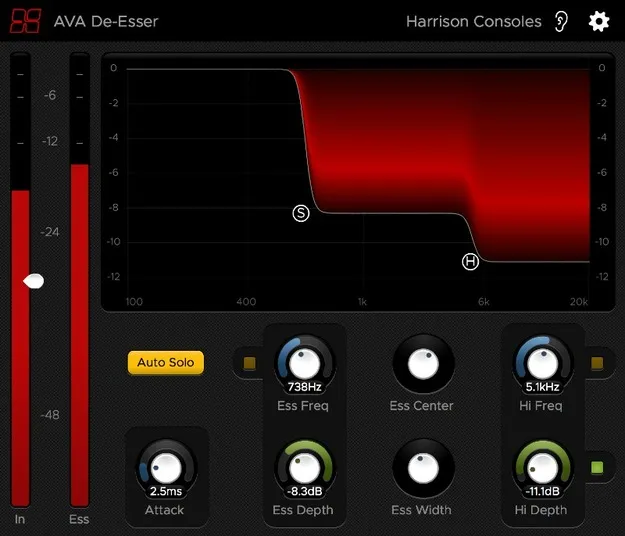
De-Esser by Harrison Consoles de-essing plugin interface

De-Esser: Sibilance Reduction Plugin by Harrison Consoles

Rated 4.5/5 on Plugin Boutique (167 ratings)

De-Esser is a de-essing plugin from Harrison Consoles that uses a fourth-generation algorithm to detect and reduce harsh sibilance while leaving other fricatives untouched.

VST3VST2AUAAXWindowsmacOSLinux
AVAILABLE ATPlugin Boutique
Opens the store in a new tab
01Overview

De-Esser is the Harrison Consoles plugin built around the company's fourth-generation de-essing algorithm. It targets sibilant frequencies, the harsh "s" and "sh" sounds in vocals and other sources, and attenuates them with adjustable threshold and depth. The developer describes the result as smooth and transparent. The plugin offers Band Solo and Auto-Solo tools to help you find the exact sibilant range before you cut it.

Best for

  • Vocal sibilance control
  • Live vocal processing
  • Mix cleanup
  • Dialogue and post work
  • Harsh high-frequency taming
Category
De Essers
Store
Plugin Boutique
02Key features

What you get

  • Algorithm targets harsh sibilance and ignores other fricatives
  • Band Solo and Auto-Solo for dialing in the sibilant range
  • Up to 12dB of sibilance reduction
  • Adjustable threshold and depth for onset and strength
  • Six control dimensions accessible from the main graph
  • Zero-latency processing suitable for live use
  • Gain-reduction meter on Pro Tools and Studio One mixer strips
  • Momentary bypass and optional Vintage console theme
03In depth

Sibilance Control and Sound Character

The processor is designed to act only on harsh sibilance, so other fricatives are left alone. Harrison Consoles says the algorithm is tuned to detect and eliminate sibilance while keeping the signal natural.

Reduction reaches up to 12dB. The Attack control sets how quickly the processor moves from zero to full attenuation, ranging from 200 microseconds to 20 milliseconds. A Hi band shelf handles some higher-frequency content after the main sibilant band is treated.

Because processing is zero-latency, the plugin is suitable for live use as well as studio tracking and mixing.
Workflow and Key Controls

The main graph is the fastest way to work. Click anywhere in it to move the band depths and center frequency together, and scroll to change bandwidth. The Ess Freq control sets the low-frequency cutoff from 200 Hz to 8 kHz, and the Hi Freq control covers 2 kHz to 12 kHz.

The Ear icon engages momentary bypass so you can audition the unprocessed signal while holding the mouse button. The Gear icon opens options for resizing, theme selection and the plugin version number. A Vintage theme uses the colour scheme of Harrison's large-format console software.

In Pro Tools (AAX) and Studio One (VST3), a gain-reduction meter appears on the mixer strip.

04Specs

Will it run?

Formats, systems and requirements as listed by Plugin Boutique. Missing details are left out, not guessed.

DeveloperHarrison Consoles
TypePlugin
CategoryDe Esser
FormatsVST3, VST2, AU, AAX
Operating systemsWindows, macOS, Linux
05FAQ

Questions, answered

What formats does De-Esser support?

De-Esser is available in VST3, VST2, AU and AAX formats. It runs on Windows, macOS and Linux.

What do I need to run De-Esser in my DAW?

Pro Tools requires version 10.3.5 or newer on Windows and version 11 or higher on Mac, with the AAX format enabled during installation. Logic needs the AU format enabled, Cubase needs VST and/or VST3, and most other workstations need the VST format enabled.

Does De-Esser add latency?

No. The plugin uses zero-latency processing, so it can be used on live input as well as in the studio.

How much can De-Esser reduce sibilance?

The plugin is capable of up to 12dB of reduction in sibilance, with adjustable threshold and depth controls.

07Developer

More from Harrison Consoles

All Harrison Consoles products →