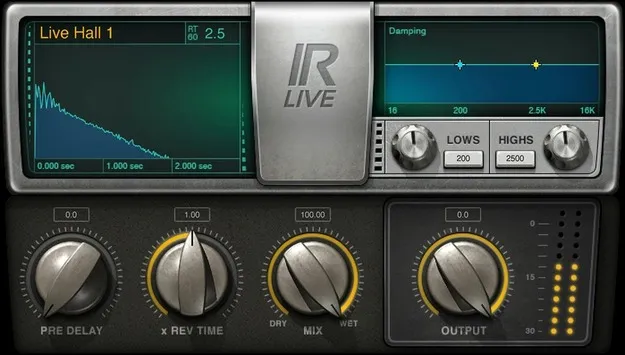
IR-Live Convolution Reverb by Waves reverb plugin interface

IR-Live Convolution Reverb: Live Sound Convolution Reverb by Waves

IR-Live Convolution Reverb is a Waves reverb plugin that applies recorded acoustic spaces, called impulse responses, to your audio. It ships with a 4.8 GB library and works in VST2, AU and AAX formats.

VST2AUAAXWindowsmacOS
AVAILABLE ATPlugin Boutique
Opens the store in a new tab
01Overview

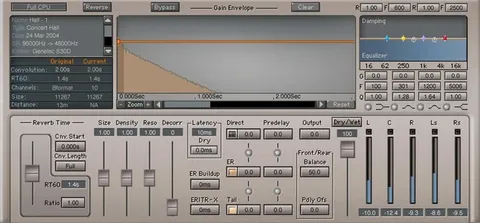
IR-Live Convolution Reverb is built around convolution, a method that recreates a real acoustic space by applying a recorded impulse response to the signal. The library is 4.8 GB of impulses, and you can import WAV files or other custom impulse responses if you want spaces of your own. Shaping controls let you adjust damping with high and low shelving EQ, set pre-delay from 0 to 500 milliseconds, and scale reverb time from 0.25% to 400%. The plugin runs on macOS and Windows.

Best for

  • Realistic studio reverb
  • Live sound venue processing
  • Ambient and cinematic tails
  • Custom space recreation
  • Digital console effects
Developer
Waves
Category
Reverbs
Store
Plugin Boutique
02Key features

What you get

  • 4.8 GB library of recorded impulse responses
  • High and low shelving EQ for controlling reverb damping
  • Pre-delay adjustable from 0 to 500 milliseconds
  • Reverb time multiplier from 0.25% to 400%
  • Import WAV or other custom impulse responses
  • Compatible with MultiRack Native and leading digital consoles
  • Works with SoundGrid DSP servers
  • Available in VST2, AU and AAX formats
03In depth

Sound Shaping and Reverb Controls

The main controls focus on the tail of the reverb. High and low shelving EQ let you control damping, so you can darken or brighten the decay without leaving the plugin. Pre-delay is variable from 0 to 500 milliseconds, which sets the gap between the dry signal and the first reflections. The reverb time multiplier runs from 0.25% to 400%, letting you shorten a large space for tighter results or stretch it for long, ambient tails.

Because the impulses come from recorded spaces, the character of each reverb is tied to the room it was captured in. Adjusting the time and damping controls lets you move that character toward the sound you need in the mix.
Custom Impulses and Workflow Options

IR-Live lets you import WAV files or other custom impulse responses. This is useful if you already have recordings of spaces you want to reuse across projects. The plugin is also described by Waves as a time-saving convolution reverb for the studio, which points to its use as a quick way to get a realistic space into a session.

For live and console work, Waves notes compatibility with MultiRack Native and leading digital consoles, and says it can be used with SoundGrid DSP servers.

04Specs

Will it run?

Formats, systems and requirements as listed by Plugin Boutique. Missing details are left out, not guessed.

DeveloperWaves
TypePlugin
CategoryReverb
FormatsVST2, AU, AAX
Operating systemsWindows, macOS
05FAQ

Questions, answered

What formats does IR-Live Convolution Reverb support?

IR-Live Convolution Reverb is available in VST2, AU and AAX formats.

Which operating systems does IR-Live run on?

The plugin runs on Windows and macOS. The listed system requirements cover macOS Monterey 12 through Sequoia 15 and Windows 10 and later.

Can I use my own impulse responses?

Yes. You can import WAV files or other custom impulse responses into IR-Live Convolution Reverb.

What do I need to use IR-Live Convolution Reverb?

You need a compatible host for the plugin's format, such as a VST2, AU or AAX host on macOS or Windows. For live use, the plugin is also compatible with MultiRack Native, leading digital consoles and SoundGrid DSP servers.

07Developer

More from Waves

All Waves products →