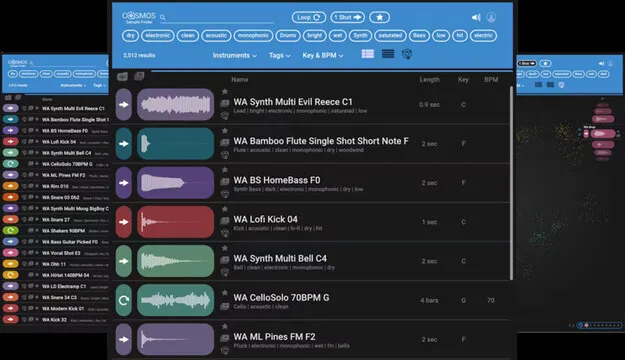
COSMOS Sample Finder by Waves sample browser plugin interface

COSMOS Sample Finder: AI Sample Browser by Waves

Rated 4.3/5 on Plugin Boutique (16 ratings)

COSMOS Sample Finder is a Waves utility plugin that uses AI neural networks to analyze, auto-tag and sort the audio samples on your hard drive by instrument, key, BPM and sonic characteristics.

VST2AUAAXWindowsmacOS
AVAILABLE ATPlugin Boutique
Opens the store in a new tab
01Overview

COSMOS Sample Finder is built for producers whose sample folders have grown beyond what filenames can handle. Instead of relying on names you typed years ago, it scans your drive and tags each file by instrument, timbre, style, key, tempo and characteristics such as loop or one-shot. Search by tags to pull up everything that matches, whatever the file is called. The package also includes more than 2500 royalty-free samples to start with, and it can run as a standalone app or open directly from the Waves CR8 sampler.

Best for

  • Sample library organization
  • Finding drum loops by tempo
  • Locating kicks by character
  • Rediscovering forgotten samples
  • Beat production workflow
  • Sound design sample search
Developer
Waves
Category
Utilities
Store
Plugin Boutique
02Key features

What you get

  • AI analysis and auto-tagging of all samples on your hard drive
  • Search by instrument, key, BPM and sonic characteristics
  • Over 2500 royalty-free samples included
  • Waveform, list and cluster views for browsing results
  • Favorites list and custom collections for frequently used files
  • Supports WAV, AIF, OGG and FLAC audio files
  • Standalone app or opens from the Waves CR8 sampler
  • Powered by Waves Neural Networks technology
03In depth

How AI Tagging Makes Sample Libraries Searchable

COSMOS uses Waves Neural Networks technology to analyze every sample it finds and assign descriptive tags. Once a library is indexed, you can combine tags to narrow a search, for example a saturated kick, or a bright drum loop at a specific tempo.

Three views help you work with results. The waveform view shows the audio shape, the list view gives a compact overview, and the COSMOS cluster view groups similar sounds together, which can help you find samples you forgot you had. You can also mark frequently used files as favorites or organize them into collections.
Formats, Requirements and Who It Suits

COSMOS Sample Finder is available in VST2, AU and AAX formats. It runs on Windows and macOS. The developer lists support for WAV, AIF, OGG and FLAC files, so most common sample types are covered. The macOS requirements are macOS Monterey 12, Ventura 13, Sonoma 14 and Sequoia 15. On Windows, the listed requirement is Windows 10 or later, with VST and AAX formats.

It suits producers, beatmakers and sound designers who work with large sample collections and want faster access to them during a session. Because it can also be used standalone, it is useful outside a DAW as well.

04Specs

Will it run?

Formats, systems and requirements as listed by Plugin Boutique. Missing details are left out, not guessed.

DeveloperWaves
TypePlugin
CategoryUtility
FormatsVST2, AU, AAX
Operating systemsWindows, macOS
05FAQ

Questions, answered

What does COSMOS Sample Finder do?

It uses AI to analyze the samples on your hard drive and tags them by instrument, timbre, style, key, BPM and characteristics such as loop or one-shot. You can then search by tags instead of filenames.

Which file formats does it support?

The developer lists compatibility with WAV, AIF, OGG and FLAC files.

What do I need to run COSMOS Sample Finder?

It is available in VST2, AU and AAX formats for macOS and VST2 and AAX for Windows. Mac requires macOS Monterey 12 or later, and PC requires Windows 10 or later. It can also run as a standalone app or be opened from the Waves CR8 sampler.

Does it come with any samples?

Yes. The package includes over 2500 royalty-free samples.

07Developer

More from Waves

All Waves products →