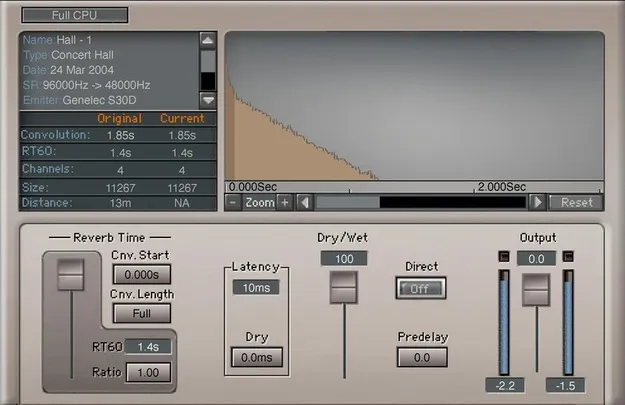
IR-L Convolution Reverb by Waves reverb plugin interface

IR-L Convolution Reverb: Acoustic Space Reverb Plugin by Waves

IR-L Convolution Reverb is a reverb plugin from Waves that uses impulse responses recorded in real acoustic spaces to add realistic room and hall ambience. It is available as VST2, AU and AAX for Windows and macOS.

VST2AUAAXWindowsmacOS
AVAILABLE ATPlugin Boutique
Opens the store in a new tab
01Overview

Convolution reverb reproduces a space by applying a recorded impulse response to your audio, which gives a more lifelike result than algorithmic models. IR-L is built for producers who want that realism without a complicated signal path. Waves says it draws on the sound quality of the IR1 audio engine and describes the library as covering a wide range of spaces, from small stairwells to large cathedrals. Standard reverb parameters keep the editing approachable.

Best for

  • Realistic room ambience
  • Hall and cathedral reverb
  • Vocal and drum space
  • Custom impulse processing
  • Mix ambience
Developer
Waves
Category
Reverbs
Store
Plugin Boutique
02Key features

What you get

  • 4.8 GB library of curated acoustic space impulses
  • Standard reverb parameters for straightforward editing
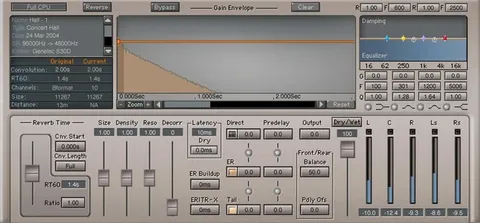
  • Trim the beginning and end of any reverb impulse
  • Variable pre-delay from 0 up to 500 milliseconds
  • Import WAV and third-party impulse files
  • Two selectable levels of CPU usage
  • Mono, mono-to-stereo, full stereo and efficient stereo modes
03In depth

Sound and Editing Controls for Convolution Reverb

The IR-L library includes a 4.8 GB collection of impulses that Waves describes as carefully curated and recorded with field-recording equipment. Each impulse can be shaped with standard reverb parameters, so you can adjust the reverb without working through a dense set of convolution settings.

You can trim the beginning and end of an impulse to remove unwanted sections and tighten the tail. Variable pre-delay runs from 0 to 500 milliseconds, letting you separate the dry signal from the start of the reverb.
Import Options and CPU Modes

Beyond the built-in library, you can import your own WAV files and third-party impulse files, which extends the plugin to spaces you have recorded or sourced elsewhere.

The plugin offers two CPU usage levels, and you can choose mono, mono-to-stereo, full stereo or efficient stereo processing. These options let you balance sound and processing load depending on how many reverb instances your session needs.

04Specs

Will it run?

Formats, systems and requirements as listed by Plugin Boutique. Missing details are left out, not guessed.

DeveloperWaves
TypePlugin
CategoryReverb
FormatsVST2, AU, AAX
Operating systemsWindows, macOS
05FAQ

Questions, answered

What formats and operating systems does IR-L Convolution Reverb support?

IR-L Convolution Reverb is available in VST2, AU and AAX formats. It runs on Windows and macOS.

What do I need to run IR-L Convolution Reverb?

The listed requirements are macOS Monterey 12, Ventura 13, Sonoma 14 or Sequoia 15 for VST, AU and AAX on Mac, and Windows 10 or later for VST and AAX on PC.

Can I use my own impulse responses with IR-L?

Yes. You can import WAV files and third-party impulse files in addition to the included library.

07Developer

More from Waves

All Waves products →