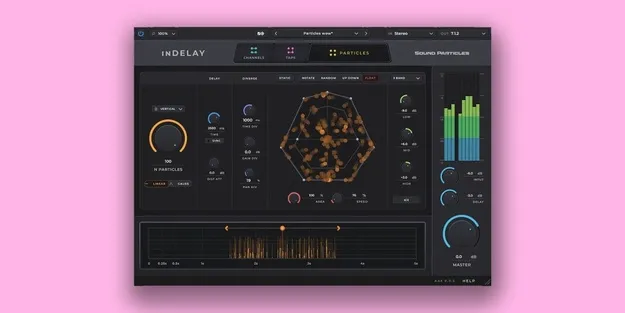
inDelay Educational Version delay plugin by Sound Particles interface

inDelay Educational Version: Particle-Based Delay Plugin by Sound Particles

inDelay Educational Version is a delay plugin from Sound Particles that runs its 3D particle engine inside a multi-tap delay. It offers up to 100 simultaneous delays, air absorption simulation and a visual time editor, and is sold for students and academic professionals.

VST3VST2AUAAXWindowsmacOS64-bit
AVAILABLE ATPlugin Boutique
Opens the store in a new tab
01Overview

inDelay Educational Version is built around Sound Particles' particle-based approach to delay. Instead of a single repeat pattern, each delay is treated as a particle that can be positioned, moved and shaped in a 3D space. The developer notes that its 3D engine is used in film and music production. Along with the core delay engine, the plugin includes air absorption, a visual time editor and a craziness control that pushes delays toward lush, reverb-like textures. It is offered as an educational version for students and academic professionals, and Sound Particles confirms educational status after purchase.

Best for

  • Ambient soundscapes
  • Film and game sound design
  • Spatial mixing
  • Dense echo textures
  • Surround and Atmos mixing
  • Creative sound experimentation
Category
Delays
Store
Plugin Boutique
02Key features

What you get

  • Dynamic Particles System based on Sound Particles' 3D engine
  • Up to 100 simultaneous delays
  • Delay Movements for animated repeats
  • Visual Time Editor for multi-parameter adjustments
  • Air absorption simulation for distance-based high-frequency loss
  • Soundscape Mode for immersive delay textures
  • Per-delay channel positioning
  • Craziness knob for reverb-like delay tails
  • Random Presets for unexpected starting points
  • More than 30 output formats, including Dolby Atmos and Ambisonics
03In depth

Sound Character and Delay Movement

The core idea of inDelay is that each repeat behaves like a particle. Up to 100 delays can run at the same time, which lets you build dense, layered echoes rather than a simple repeat pattern.

Air Simulation adds air absorption to each delay, so repeats farther away in the virtual space lose high-frequency content, as they would in a real room. Delay Movements add motion to the repeats, and the Craziness knob moves the result from discrete echoes toward rich, reverb-like tails.
Workflow, Channel Routing and Output Formats

The Intuitive Time Editor is a visual tool where you click and drag to adjust several delay parameters at once, including delays that have already passed. Channel Customization lets you place each delay at a chosen position in the stereo or surround field.

The plugin supports more than 30 output formats, from mono and stereo to 5.1, High Order Ambisonics, Sony 360 and Dolby Atmos. Random Presets provide starting points for unexpected results.

04Specs

Will it run?

Formats, systems and requirements as listed by Plugin Boutique. Missing details are left out, not guessed.

DeveloperSound Particles
TypePlugin
CategoryDelay
FormatsVST3, VST2, AU, AAX
Operating systemsWindows, macOS
Architecture64-bit
05FAQ

Questions, answered

What is inDelay Educational Version?

It is a delay plugin from Sound Particles that applies its particle-based 3D engine to delay effects. It is sold as an educational version for students and academic professionals.

Who is the educational version for?

It is intended for students and academic professionals. Sound Particles confirms your educational status after purchase.

Which formats and operating systems does it support?

It is listed in VST3, VST2, AU and AAX formats on Windows and macOS, and is a 64-bit plugin. AAX requires Pro Tools 11 or above.

What do I need to run inDelay?

The listed minimum is a 2-core or higher CPU, 4 GB of RAM and 600 MB of disk space. On macOS, 10.15 or higher is required, with Intel and native Apple Silicon Macs supported. On Windows, Windows 10 or higher is required.

07Developer

More from Sound Particles

All Sound Particles products →