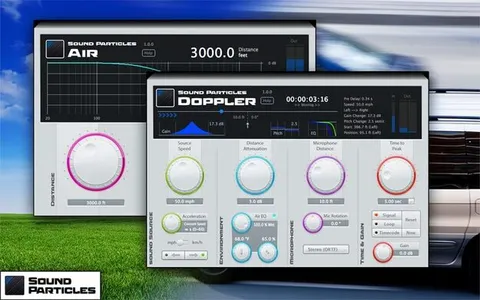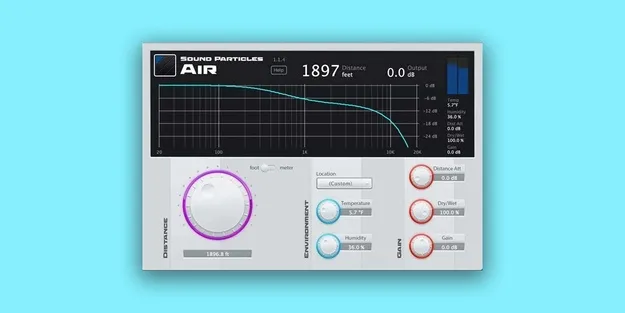
Air by Sound Particles audio effect plugin interface

Air: Distance and Air-Absorption Effect Plugin by Sound Particles Free Download

Rated 4.5/5 on Plugin Boutique (82 ratings)

Air is a multi-effect audio plugin from Sound Particles that simulates distance by applying high-frequency attenuation, similar to how air dampens sound over a distance. It is available for Windows and macOS.

WindowsmacOS
AVAILABLE ATPlugin Boutique
Free trial available from the developer
01Overview

Air models how sound changes as it travels through the atmosphere. Instead of a generic low-pass filter, it applies frequency response values based on scientifically measured air dampening. Presets cover a range of temperature and humidity settings from locations around the world, and you can enter your own custom values. Distance Attenuation controls volume over distance, and a live display shows the frequency response applied to the sound.

Best for

  • Sound effect depth
  • Dialogue replacement distance
  • Mixing for distance
  • Simulating faraway sources
  • Film and game audio
Store
Plugin Boutique
02Key features

What you get

  • Preset temperature and humidity settings from locations worldwide
  • Custom environment settings for your own temperature and humidity
  • Air-absorption model based on scientifically measured frequency response
  • Distance Attenuation parameter for volume over distance
  • Visual display of the frequency response applied to the sound
  • Imperial and Metric unit support, including meters, feet, mph and km/h
  • Parameter editing from control surfaces such as AVID S6
03In depth

Realistic Distance and Air Absorption

Air uses measured frequency response values for air dampening, so the high-frequency roll-off is more accurate than a simple low-pass filter. Sound Particles includes temperature and humidity settings from places ranging from Antarctica to Death Valley, and you can also enter a custom environment.

The Distance Attenuation parameter controls how volume drops with distance. Because you can see the actual frequency response being applied, you can judge the result visually as well as by ear.
Workflow, Units and Control Surfaces

Air supports both Imperial and Metric units, so you can set distances in meters or feet and speeds in mph or km/h. Parameters can also be edited from control surfaces such as the AVID S6.

The developer describes Air for sound effects, dialogue replacement and mixing, where the goal is to make a recording sound like it was captured at a specific distance.

04Specs

Will it run?

Formats, systems and requirements as listed by Plugin Boutique. Missing details are left out, not guessed.

DeveloperSound Particles
TypePlugin
CategoryMulti Effect
Operating systemsWindows, macOS
Free trialYes
05FAQ

Questions, answered

What is Air used for?

Air simulates distance by applying high-frequency attenuation and volume loss over distance. It is used for adding depth to sound effects, matching dialogue replacement to the original set, and placing sources at a distance in a mix.

Which operating systems does Air support?

Air runs on Windows and macOS. On Mac it requires OS X 10.9 or higher and supports both Intel and native Apple Silicon Macs.

What do I need to run Air?

On Windows, 7, 8 or 10 is required. Minimum specs are a 2-core CPU, 4 GB of RAM and 600 MB of disk space; the recommended setup is a 4-core CPU, 8 GB of RAM and 600 MB of disk space.

Does Air have a trial version?

Yes, a trial version is available.

07Developer

More from Sound Particles

All Sound Particles products →