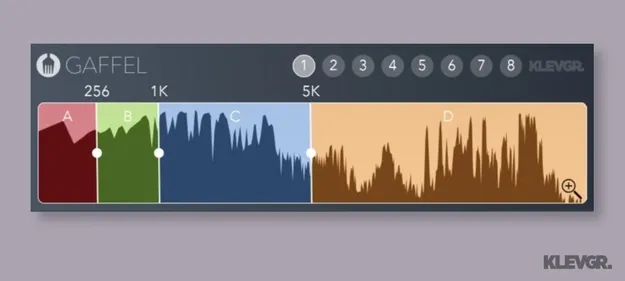
Gaffel by Klevgrand synced band splitter plugin interface

Gaffel: Synced Band Splitter Plugin by Klevgrand Free Download

Rated 4.7/5 on Plugin Boutique (26 ratings)

Gaffel is a band splitter plugin by Klevgrand that divides audio into frequency bands, letting you build multiband effects out of other plugins across multiple channels.

VST2AUAAXWindowsmacOS
AVAILABLE ATPlugin Boutique
Free trial available from the developer
01Overview

Gaffel is a utility plugin from Klevgrand that splits audio into separate frequency bands. The developer describes it as a way to create multiband effects with any plugin installed on your system. Its crossovers use a Linkwitz-Riley filter algorithm, and frequency settings can be synchronized between instances that share the same group, which keeps split points consistent across tracks in your DAW.

Best for

  • Multiband effects
  • Multiband compression setups
  • Cross-track band splitting
  • Synced frequency control
Developer
Klevgrand
Category
Utilities
Store
Plugin Boutique
02Key features

What you get

  • Splits audio into four frequency bands
  • Three adjustable crossover frequencies
  • Linkwitz-Riley crossover filter algorithm
  • Frequency parameters synced across instances in a group
  • Supports up to eight independent groups
  • Per-band on/off toggle
  • Option-key fine tuning for crossover frequencies
03In depth

How the Crossovers and Bands Work

Gaffel offers three crossover frequencies that divide the signal into four bands. You can toggle each band on or off with a click, so you can isolate or bypass specific ranges while you work.

The crossovers use a Linkwitz-Riley filter algorithm. Klevgrand says this design is used for the band splitting, and it gives you a defined split point between each band.
Syncing Frequencies Across Instances

Gaffel supports up to eight groups. Instances assigned to the same group share their frequency parameters, so changing a crossover on one track updates every other instance in that group. Instances in a different group stay independent.

For fine adjustment, hold the Option key while dragging a crossover frequency. This makes precise tuning of the split points easier when you need to match bands across channels.

04Specs

Will it run?

Formats, systems and requirements as listed by Plugin Boutique. Missing details are left out, not guessed.

DeveloperKlevgrand
TypePlugin
CategoryUtility
FormatsVST2, AU, AAX
Operating systemsWindows, macOS
Free trialYes
05FAQ

Questions, answered

What formats does Gaffel support?

Gaffel is available in VST2, AU and AAX formats. The system requirements also list VST-3 compatibility.

Which operating systems can run Gaffel?

Gaffel runs on Windows 7 SP1 or later and on macOS 10.10 or later. The macOS build is optimized for the M1 processor.

What does Gaffel do?

Gaffel splits audio into frequency bands. Running it on multiple channels lets you apply other plugins to each band and build multiband effects.

Is there a trial version?

Yes, Gaffel offers a trial version.

07Developer

More from Klevgrand

All Klevgrand products →