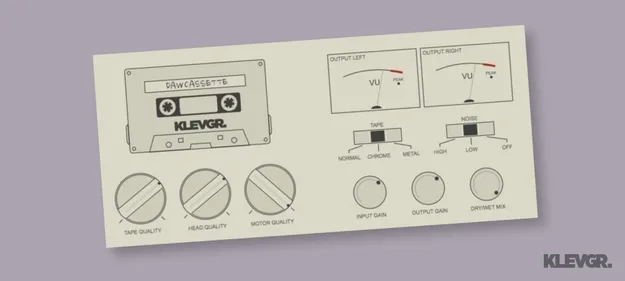
DAW Cassette by Klevgrand tape deck emulation plugin interface

DAW Cassette: Tape Deck Emulation Plugin by Klevgrand Free Download

Rated 4.7/5 on Plugin Boutique (77 ratings)

DAW Cassette is a tape deck emulation effect plugin from Klevgrand. It adds tape saturation, noise and wobble to your audio, with three tape types, Dolby-style noise options and quality controls for tape, head and motor.

VST2AUAAXWindowsmacOS
AVAILABLE ATPlugin Boutique
Free trial available from the developer
01Overview

DAW Cassette by Klevgrand models the sound of a cassette deck inside your digital audio workstation. The plugin is built around tape saturation and noise, with controls that let you shape how warm, dirty or stable the result sounds. Its gain and mix controls make it easy to blend the effect in gradually, from a subtle coloration to an obviously lo-fi character. Klevgrand's tape-focused approach makes it a fit for producers who want analog-style texture on drums, synths, vocals or full mixes.

Best for

  • Lo-fi drum processing
  • Tape saturation on vocals
  • Analog warmth for synths
  • Bus coloration
  • Retro mix texture
Developer
Klevgrand
Store
Plugin Boutique
02Key features

What you get

  • Three tape types: Normal, Chrome and Metal
  • Dolby emulation for noise character
  • Noise-free Dolby K option
  • Tape, head and motor quality knobs
  • Input gain, output gain and dry/wet mix
  • Channel crosstalk adjustment
  • Adjustable tape head angle for phase effects
  • Four-band graphic equalizer
03In depth

Tape Types, Noise and Tone Shaping

The plugin offers three tape types, Normal, Chrome and Metal, each giving a different starting point for the color of the signal. Dolby emulation sets the noise character, and a noise-free Dolby K option is included if you want the tape coloration without the hiss.

For finer control, the quality knobs for tape, head and motor adjust saturation, frequency response and speed consistency. A four-band graphic equalizer lets you tune the tonal balance after the tape stage, while crosstalk and head angle controls add channel bleed and phase effects.
Workflow Controls and Mixing

Input and output gain let you drive the tape stage and set the level going out, so you can match the plugin's effect to the loudness of your track. The dry/wet mix control keeps the original signal in the blend, which helps when you want the tape character to sit underneath the source rather than replace it.

Because the effect is adjustable from subtle to heavy, it can be used on individual tracks or on a bus. Adjust the mix first, then the tape type, and finish with the noise level to keep the result balanced.

04Specs

Will it run?

Formats, systems and requirements as listed by Plugin Boutique. Missing details are left out, not guessed.

DeveloperKlevgrand
TypePlugin
CategoryTape Emulation
FormatsVST2, AU, AAX
Operating systemsWindows, macOS
Free trialYes
05FAQ

Questions, answered

What formats and operating systems does DAW Cassette support?

DAW Cassette is available in VST2, AU and AAX formats. It runs on Windows and macOS. The developer lists macOS 10.10 or later, optimized for the M1 processor, and Windows 7 SP1 or later, and also lists VST-3 support.

Does DAW Cassette include a trial?

Yes, a trial version is available so you can test the plugin before deciding whether to use it.

What is the difference between the tape types?

DAW Cassette offers Normal, Chrome and Metal tape types. Each one gives a different tape character, so you can choose the one that fits your source.

07Developer

More from Klevgrand

All Klevgrand products →